• I’ve been using both Active Admin and Delayed::Job for years now and both have served me very well. It’s very common for me to want to display job records in the admin tool and have some extra tools around them such as:

    • the ability to mark them all for re-run
    • the ability to run one manually (not recommended for production)
    • the ability to run them all manually (also not recommended for production)
    • an easy way to delete them all
    • a good view of the data inside the job

    To achieve this, over the years, my admin/delayed_job.rb grew and I took it from project to project. Today I want to share it with you in case you are doing the same:

    ActiveAdmin.register Delayed::Job, as: "DelayedJob" do
      collection_action :run_all, method: :post do
        successes, failures = Delayed::Worker.new.work_off
        if failures > 0
          flash[:alert] = "#{failures} failed delayed jobs when running them."
        end
        if successes > 0
          flash[:notice] = "#{successes} delayed jobs run successfully"
        end
        if failures == 0 && successes == 0
          flash[:notice] = "Yawn... no delayed jobs run"
        end
        redirect_to admin_delayed_jobs_url
        I18n.locale = :en # Running delayed jobs can mess up the locale.
      end
    
      if Rails.env.development?
        collection_action :delete_all, method: :post do
          n = Delayed::Job.delete_all
          redirect_to admin_delayed_jobs_url, notice: "#{n} jobs deleted."
        end
      end
    
      collection_action :mark_all_for_re_run, method: :post do
        n = Delayed::Job.update_all("run_at = created_at")
        redirect_to admin_delayed_jobs_url, notice: "Marked all jobs (#{n}) for re-running."
      end
    
      member_action :run, method: :post do
        delayed_job = Delayed::Job.find(params[:id])
        begin
          delayed_job.invoke_job
          delayed_job.destroy
          redirect_to admin_delayed_jobs_url, notice: "1 delayed job run, apparently successfully, but who knows!"
        rescue => e
          redirect_to admin_delayed_jobs_url, alert: "Failed to run a delayed job: #{e.to_s}"
        end
        I18n.locale = :en # Running delayed jobs can mess up the locale.
      end
    
      action_item do
        links = link_to("Run All Delayed Jobs", run_all_admin_delayed_jobs_url, method: :post)
        links += (" " + link_to("Mark all for re-run", mark_all_for_re_run_admin_delayed_jobs_url, method: :post)).html_safe
        links += (" " + link_to("Delete All Delayed Jobs", delete_all_admin_delayed_jobs_url, method: :post)).html_safe if Rails.env.development?
        links
      end
    
      index do
        selectable_column
        id_column
        column "P", :priority
        column "A", :attempts
        column("Error", :last_error, sortable: :last_error) { |post| post.last_error.present? ? post.last_error.split("\n").first : "" }
        column(:created_at, sortable: :created_at) { |job| job.created_at.iso8601.gsub("T", " ") }
        column(:run_at, sortable: :run_at) { |post| post.run_at.present? ? post.run_at.iso8601.gsub("T", " ") : nil }
        column :queue
        column("Running", sortable: :locked_at) { |dj| dj.locked_at.present? ? "#{(Time.now - dj.locked_at).round(1)}s by #{dj.locked_by}" : "" }
        actions
      end
    
      show title: ->(dj) { "Delayed job #{dj.id}" } do |delayed_job|
        panel "Delayed job" do
          attributes_table_for delayed_job do
            row :id
            row :priority
            row :attempts
            row :queue
            row :run_at
            row :locked_at
            row :failed_at
            row :locked_by
            row :created_at
            row :updated_at
          end
        end
    
        panel "Handler" do
          begin
            pre delayed_job.handler
          rescue => e
            div "Couldn't render handler: #{e.message}"
          end
        end
    
        panel "Last error" do
          begin
            pre delayed_job.last_error
          rescue => e
            div "Couldn't render last error: #{e.message}"
          end
        end
    
        active_admin_comments
      end
    
      form do |f|
        f.inputs("Delayed job") do
          f.input :id, input_html: { readonly: true }
          f.input :priority
          f.input :attempts
          f.input :queue
          f.input :created_at, input_html: { readonly: true }, as: :string
          f.input :updated_at, input_html: { readonly: true }, as: :string
          f.input :run_at, input_html: { readonly: true }, as: :string
          f.input :locked_at, input_html: { readonly: true }, as: :string
          f.input :failed_at, input_html: { readonly: true }, as: :string
          f.input :locked_by, input_html: { readonly: true }
        end
    
        f.buttons
      end
    
      controller do
        def update
          @delayed_job = Delayed::Job.find(params[:id])
          @delayed_job.assign_attributes(params[:delayed_job], without_protection: true)
          if @delayed_job.save
            redirect_to admin_delayed_jobs_url, notice: "Delayed job #{@delayed_job} saved successfully"
          else
            render :edit
          end
          I18n.locale = :en # Running delayed jobs can mess up the locale.
        end
      end
    end
  • Ruby on Rails has a very convenient way of presenting a dialog for potentially dangerous tasks that require some confirmation before proceeding. All you have to do is add

    [code language=”ruby”]
    data: {confirm: "Are you sure?"}
    [/code]

    A problem with those, though, is that most (all?) browsers make the dialogs quite ugly:

    Call to Buzz - ugly dialog

    For Call to Buzz, I wanted to finally have something better. Thankfully, there’s a very simple solution, as long as you are using Bootstrap: Twitter::Bootstrap::Rails::Confirm. You just add it to your project and the dialog now looks like this:

    Call to Buzz - bootstrap dialog

    That looks much better, but it’d be nice if it had a nice title, better matching buttons, etc. It’s easy to do by adding some data attributes to the link and the documentation for this gem recommends creating a new method to use instead of link_to when deleting something. I wasn’t very happy with this approach so I resolved it with pure JavaScript so my links remain oblivious to the fact that I’m using this gem:

    [code language=”javascript”]
    $(document).ready(function () {
    $("a[data-confirm]").data({
    "confirm-fade": true,
    "confirm-title": "Call to Buzz"
    });
    $("a[data-method=delete]").data({
    "confirm-title": "Warning",
    "confirm-cancel": "Cancel",
    "confirm-cancel-class": "btn-cancel",
    "confirm-proceed": "Delete",
    "confirm-proceed-class": "btn-danger"
    });
    });
    [/code]

    And with that, the dialog now looks like this:

    Call to Buzz - much better bootstrap dialog

    Update: Later on I wanted to be able to define some extra parameters on a link, such as:

    [code language=”ruby”]
    data: {confirm: "Are you sure you want to disconnect?", confirm_proceed: "Disconnect"}
    [/code]

    To achieve that I re-wrote the code that dynamically adds the extra confirm parameters to look like this (this uses jQuery 3, on earlier version you’d have to do confirm-fade instead of confirmFade):

    [code language=”javascript”]
    $("a[data-confirm]").each(function (_, link) {
    var $link = $(link);
    var data = $link.data();
    data = $.extend({}, {
    "confirmFade": true,
    "confirmTitle": "Call to Buzz"
    }, data);
    if ($link.data("method") == "delete") {
    data = $.extend({}, {
    "confirmTitle": "Warning",
    "confirmCancel": "Cancel",
    "confirmCancelClass": "btn-cancel",
    "confirmProceed": "Delete",
    "confirmProceedClass": "btn-danger"
    }, data);

    }
    $link.data(data);
    });
    [/code]

  • If you are using Simple Form and Bootstrap 3, you probably initialized your app with something similar to:

    [code language=”bash”]
    rails generate simple_form:install –bootstrap
    [/code]

    which adds a file called simple_form_bootstrap.rb to your application with many customizations that make Simple Form output nicely formatted Bootstrap 3 forms.

    For Call to Buzz, an app I’m building, I had several booleans to display, like this:

    Call to Buzz booleans

    My problem was that I wanted a label to explain what those booleans are, something like this:

    Call to Buzz booleans with label

    I achieved that by creating a wrapper that’s a mix between :horizontal_boolean and horizontal_radio_and_checkboxes which I called horizontal_boolean_with_label and looks like this:

    [code language=”ruby”]
    config.wrappers :horizontal_boolean_with_label, tag: "div", class: "form-group", error_class: "has-error" do |b|
    b.use :html5
    b.optional :readonly

    b.use :label, class: "col-sm-3 control-label"

    b.wrapper tag: "div", class: "col-sm-9" do |wr|
    wr.wrapper tag: "div", class: "checkbox" do |ba|
    ba.use :label_input
    end

    wr.use :error, wrap_with: {tag: "span", class: "help-block"}
    wr.use :hint, wrap_with: {tag: "p", class: "help-block"}
    end
    end[/code]

  • You build a product, a web or a mobile app and then you need to build a web site to promote it, a.k.a.: the web site. There are several ways of building and maintaining this web site and I have tried most of them and today I have strong opinions about how to do it.

    One alternative is to build a custom website as a bunch of HTML and CSS produced by a graphics designer and a coder. Maybe with some server side functionality. If you are building a web app, you might be tempted to mix the web presence with the web app. A lot of tech startups go this route because they have the talent and because it’s the only way to achieve the pristine look that everybody wants and that the industry giants, such as Apple, have.

    This is a mistake. The mistake is not considering the process of the evolution of this web site. We only think of the initial task of building it and that tends to be easily achievable, but after that is when the problems really start. Marketing and sales will want constant modifications to that web site both in terms of content and look and feel. They’ll want new landing pages, different kind of analytics. Sometimes they’ll want to scrap the whole thing and start over. This is part of their job and you should just let them do it.

    The problem of having the developers of the startup also develop the website is that they need to maintain it and if your marketing/sales people are active enough, they can easily generate enough modifications for a full time person. But your developer needs to be working on the product, not the website. Most changes requested by marketing are going to be relatively small and not as important as improving the product, which means your web presence will be neglected and your marketing person will get annoyed.

    The answer is to have CMS and give write access to market and sales. Whether the CMS is WordPress or SquareSpace or something else, it doesn’t matter. I would even recommend to not host it yourself so that the marketing/sales department have a support department that can help them with issues that is not your development team.

    This approach will not look as clean, it might feel a bit clunky and people inside and outside the organization are going to constantly fight it. If this is your choice, you’ll have a tough time defending it. I found myself repeating the contents of this blog post to many people over and over again and this is why I’m writing it.

  • Rails 4.1 introduced the concept of secrets.yml, a file in which you store all the credentials for your app, separated by environment, so for example, development can talk to Test Stripe and production to Live Stripe. Furthermore, this file is capable of picking up environment variables which allows you to divorce credentials from code. Not properly separating credentials from code recently cost Uber the leakage of 50,000 driver names and license numbers.

    At Qredo we are very strict about handling credentials, including the ones for SMTP, which in Rails projects are normally stored in config/environments/development.rbconfig/environments/production.rb, etc. Trying to read Rails.application.secrets from those files doesn’t work, because they are loaded before the secrets, so, we came up with this alternative solution.

    The environment files that need to use SMTP for delivering email have this common configuration:

    config.action_mailer.delivery_method = :smtp
    config.action_mailer.smtp_settings = {
      address: "smtp.example.com",
      port: 587,
      authentication: "plain",
      enable_starttls_auto: true
    }

    and then, on config/initializers/email.rb we finish configuring our SMTP credentials by reading it from secrets.yml:

    if ActionMailer::Base.delivery_method == :smtp
      ActionMailer::Base.smtp_settings[:domain]    = Rails.application.secrets.smtp_domain
      ActionMailer::Base.smtp_settings[:user_name] = Rails.application.secrets.smtp_user_name
      ActionMailer::Base.smtp_settings[:password]  = Rails.application.secrets.smtp_password
    end
    

    In config/secrets.yml you need set those credentials:

    development:
      secret_key_base: 123...
      smtp_domain: example.org
      smtp_user_name: [email protected]
      smtp_password: <%= ENV["SMTP_PASSWORD"] %>
    
    test:
      secret_key_base: c7f3f62597b14c7287d75c239168fd3a89d3a6cb51beb909679c2609e912aaa3ca0a0aa5df2e191648baed6fe49698527a75dd265d222697576405971f478c98
    
    staging:
      secret_key_base: <%= ENV["SECRET_KEY_BASE"] %>
      smtp_domain: example.net
      smtp_user_name: [email protected]
      password: <%= ENV["SMTP_PASSWORD"] %>
    
    production:
      secret_key_base: <%= ENV["SECRET_KEY_BASE"] %>
      smtp_domain: example.com
      smtp_user_name: [email protected]
      smtp_password: <%= ENV["SMTP_PASSWORD"] %>

    And that’s it! Enjoy bringing SMTP credentials into Rails >4.0 secrets management.

  • This is an update of an old post of similar name but for a newer version of Devise and with better design decisions. The old post was for Devise 1.0.8, this one covers 4.0.0

    I was trying to have a single page with both sign in and sign up forms with Devise 4.0.0 but this applies to whenever you want to show log in or registering individually or together anywhere on your site other than the views and controllers Devise creates for you.

    For my task, I created a custom controller for it with a single new action as the create actions would be in the respective already existing Devise controllers. Something like this:

    class Users::SessionsOrRegistrationsController < ApplicationController
      def new
      end
    end

    And then I created a new.html.erb (actually, new.html.haml, but I digress) that contained both log in and sign up one after the other. Something like this:

    <h2>Sign up</h2>
    
    <%= form_for(resource, as: resource_name, url: registration_path(resource_name)) do |f| %>
      <%= devise_error_messages! %>
    
      <div class="field">
        <%= f.label :email %>
        <%= f.email_field :email, autofocus: true %>
      </div>
    
      <div class="field">
        <%= f.label :password %>
        <% if @minimum_password_length %>
          <em>(<%= @minimum_password_length %> characters minimum)</em>
        <% end %>
        <%= f.password_field :password, autocomplete: "off" %>
      </div>
    
      <div class="field">
        <%= f.label :password_confirmation %>
        <%= f.password_field :password_confirmation, autocomplete: "off" %>
      </div>
    
      <div class="actions">
        <%= f.submit "Sign up" %>
      </div>
    <% end %>
    
    <hr/>
    
    <h2>Log in</h2>
    
    <%= form_for(resource, as: resource_name, url: session_path(resource_name)) do |f| %>
      <div class="field">
        <%= f.label :email %>
        <%= f.email_field :email, autofocus: true %>
      </div>
    
      <div class="field">
        <%= f.label :password %>
        <%= f.password_field :password, autocomplete: "off" %>
      </div>
    
      <% if devise_mapping.rememberable? %>
        <div class="field">
          <%= f.check_box :remember_me %>
          <%= f.label :remember_me %>
        </div>
      <% end %>
    
      <div class="actions">
        <%= f.submit "Log in" %>
      </div>
    <% end %>

    I actually ended up creating two _form partials and including them. In either case, when you try to render those views, you’ll get errors about some missing methods. You need to provide those as helper methods so my controller actually looks like this:

    class Users::SessionsOrRegistrationsController < ApplicationController
      def new
      end
    
      private
    
      def resource_name
        :user
      end
      helper_method :resource_name
    
      def resource
        @resource ||= User.new
      end
      helper_method :resource
    
      def devise_mapping
        @devise_mapping ||= Devise.mappings[:user]
      end
      helper_method :devise_mapping
    
      def resource_class
        User
      end
      helper_method :resource_class
    end

    And now it works.

  • I’m just getting started reading the Non-Violent Communication book. I was in the middle of chapter 2 when I put it to work, with amazing results, in a business setting. Needless to say I’m sold on the idea and I’ll continue reading the book, perfecting it and recommending it to other people. This is what happened.

    I was doing market-fit research for a new product called Glycast, which is like AdSense for Podcasts. Some years ago I built the core tech for it, but the timing was wrong and it sat on the shelf until now. Now I want to put this tech to good use, so I recorded some videos explaining how it works for podcasters and advertisers and started reaching out to talk to them, get their feedback, refine the product, validate the idea.

    Shortly after setting up the landing page I got a message from Dave Jackson of School of Podcasting. In his email he asked a few questions about the service and linked to a YouTube video. I clicked the link to find a video recorded by him, with the title “Clueless Podcasts Advertisers”.  I though maybe this was about things to avoid, to watch out for. Nope, that video is about me. He never mentions me by name but he describes my operation and quotes me verbatim.

    My blood started to boil. I’m not trying to harm anybody. I’m just searching for feedback to build a product podcasters and advertisers are happy with and the first message I get is attacking it. In my 6 years or so of running startups I been constantly attacked, so this wasn’t new to me. I don’t understand the mentality of people that when they don’t have a use for your product, they attack you, insult you, spread false information, etc. I normally just move on.

    My first reply to the Clueless Podcast Advertisers video was, well, clueless. It went something like this:

    I really don’t appreciate you posting a video, calling us clueless. We are not trying to harm anyone blah blah blah and you are attacking us. You are saying this and that and your are wrong, WRONG, WRONG.

    Thankfully, I decided to stop and apply the principles of Non-Violent Communication I just learned. The first thing we have to do is observe without evaluation. We often mix the two. The books gives a few examples, such as:

    You are too generous.

    which is a mixing of observation and evaluation. On the other hand

    When I see you give all your lunch money to others, I think you are being too generous.

    is separating the two. Me, feeling attacked, was an evaluation of the situation. It was time to ignore that painful evaluation and observe. I re-read his email, I re-watched the video, observing, like an impartial third party and what I found surprised me.

    David is helping people get into podcasting. These people are in a vulnerable position because they don’t yet understand the industry they are getting into so they can be subject to scams and abuse by unscrupulous third parties. I bet David is constantly exposed to people that signed up for the wrong service, bought the wrong microphone and now they are coming to him for help. And all he can do is break the bad news: you wasted money, you wasted time, you lost your audience, you are re-starting from scratch. I constantly see entrepreneurs making similar mistakes and I have to break the news and every time I wish I was there earlier, to warn them.

    From David’s point of view, I was an potentially unscrupulous third party that was trying to pull off a vendor lock in. Podcasters needed to be warned about me! At this point, I felt I was on David’s side. How weird! It was a fast onset of high level empathy. I re-wrote my answer to be:

    About the video. I’m not here to harm anyone. I’m here to make a product to help podcasters and advertisers connect, be more efficient. I’m building whatever podcasters will need to be happy. I understand your worry and your desire to warn your audience that might not understand RSS distribution and make a bad decision now that will cost them a chunk of their audience later on. That’s not something I want to do and I wouldn’t be happy with any company holding an audience hostage like that. I do want to work with you, and other podcasters, to make sure I meet your needs of an excellent platform that will help monetize your podcast, whatever your size is, whatever your topic is, and focus on your craft, on what you love, on podcasting.

    I sent the email and I felt immediately better about it. Much better than if I sent the previous version. I consider it a success for Non-Violent Communication and I moved on. Shortly after he asked me for permission to publish this email and I said yes. What I wasn’t expected is that he was going to record a podcast episode reading the whole email and commenting about it: http://schoolofpodcasting.com/7141-2/

    Among other things he says, referring to us:

    I’m completely blown away by their response

    About our solution, he says:

    interesting, creative and I like it

    He particularly refers to the paragraph I re-wrote as “the coolest part on the email”.

    What a phenomenal result! I’m completely sold already on the principles of Non-Violent Communication and I can’t wait to finish reading the book and possibly reading other books too, to learn how to apply them.

  • Like the question of what came first, the chicken or the egg, I feel this question is repeated over and over like it’s some grandiose enigma with no solution.

    About the poultry question, at some point a non-chicken animal laid a non-chicken egg containing a chicken. Done! The egg was first. Back to the meaning of life.

    Meaning

    To answer the question properly, I need to know, very precisely, what’s the meaning of meaning. The answer is sort-of contained in the question, but let’s take a look at the Oxford Dictionary:

    mean·ing /ˈmiːnɪŋ/

    1 What is meant by a word, text, concept, or action: the meaning of the Hindu word is ‘breakthrough, release’
    1.1 Implied or explicit significance: he gave me a look full of meaning
    1.2 Important or worthwhile quality; purpose: ‘this can lead to new meaning in the life of older people’

    Meaning is an action performed by a living creature that is intelligent. It’s a connection between a symbol, word, text, concept or action and something else. It’s not inherent to the symbol. The tree is inherently green, the word “rose” is not inherently connected to Rosa rubiginosa. We can talk about the meaning of the word “rose” because we created it with that meaning (even if the creation was accidental, like most languages).

    We didn’t create life, it was here long before we were assigning meaning to things, thus, it has no meaning. You can give a rose to someone else to signify your love for them and that’s the meaning of that rose, for you, and hopefully for the recipient. But the rose growing in the wild, like life on planet Earth, has no meaning.

    A meaningful life

    That doesn’t mean you can’t live a meaningful life. The same we you can assign meaning to a rose you can assign meaning to your life. And that’s the gist of the issue. You have to do the task of assigning meaning. Assigning meaning is very different than finding meaning. It’s a harder task, a task with more chances of failing, a task that doesn’t have a clear path to follow, because in essence, it’s building the path, it’s creating the path.

    Another clear distinction is that whatever meaning you assign it’s for you and you cannot expect it to be shared. The meaning is not inherent to the thing it’s connected to, it’s connected in your mind, so you can’t expect other minds to make the same connection. For example, you might create a meaningful life for yourself by feeding hungry children. It doesn’t mean everybody else will also agree on it being meaningful. We can’t even agree on the meanings of words and we have dictionaries!

    But God!

    Now someone might talk about God. What if God created us with a purpose, with a meaning. Well, there’s no such a thing as a god, but let’s assume there is. Let’s assume a super powerful external entity created us with some purpose. Maybe we are an experiment, maybe God and the Devil are trying to figure out if good or evil will succeed. Maybe God had a crush on a Goddess and we are a present, like a poem but made out of living creatures (like bacteria in the ink on a page). Is that our meaning then? Nope.

    We have minds and free will and can creating our own meaning. Even if we started off as something as low as a galactic rose, the fact that we can chose our path allows us to go wherever we want.

    Summary

    There’s no meaning except the one you create, so, stop searching, and start creating.

    Picture by Chris Sorge.

  • In Tim Ferris’ interview of Derek Sivers, in which he says that if your answer to a question is not “Hell yeah”, it should be “no”. This got the “Hell yeah” from many listeners and some custom artwork created. But I’m not sure I agree.

    Let me elaborate a bit on the concept. Derek Sivers’ argument is that if you say yes to too many things you are going to be oversubscribed and when something truly awesome comes your way, you won’t be able to say yes because you’ll be too busy, too tired or won’t even notice. He said that if it wasn’t for him constantly saying “no” to everything, he wouldn’t have started the Nownownow project.

    What’s missing from this equation is the opposite. If you are too picky, if you often have better things to do, if you are not constantly bombarded by projects and opportunities, like Sivers is now, then you might become isolated. You might miss the great opportunities because you weren’t there to see them.

    I think a better approach should be something along the line of “You should be taking N new opportunities per year” where N is of course, hard or impossible to define. It’s up to you but the frequency of saying yes and no should vary to have a constant N. If you are bombarded for opportunities, then yes, you need a strong filter, such as “Hell yeah or no” but if you are not, then you need to go out and find them and that means saying yes to things that are not “Hell yeah”.

    For example, for the past 4 years I been hyper-focus on my company, Carousel Apps, and my productivity has been high. But also, I missed the enjoyment of helping others with startup and the opportunities of collaboration, making connections, etc. That’s why in 2016 I want to have one evening a week sitting down and having a long conversation with someone about whatever it is they are doing and trying to help them in any way I can.


  • If I say to you “let’s meet in a month” you probably won’t know exactly when we are meeting again. It’s an approximation at best. Do I mean 30 days? do I mean the exact same day number but on the next month? What if that month doesn’t have that day, like February 30th? What if we are in a business setting and 30-days-later or same-number-of-the-month falls on a Saturday? As you see, months, as a measure of time, can be pretty useless. Specially when talking about small numbers, like 1 or 2.

    There’s a better unit. The week. How long is the week? 7 days. All weeks are 7 days, no exceptions. If I say “‘let’s meet in a week” you know what I mean. Add seven days to today and that’s when we are meeting. If it’s a Monday, in a week, it’s also a Monday. Also, weeks are smaller, more granular, which is useful for little projects. If I ask “When is X is going to be done?” I’d rather hear it expressed in weeks rather than months.

    We normally use months because they allow us to set up a time in the year. We can say “July” and know when it’s that. Weeks can do that too actually.

    Did you know that the weeks of the year are numbered? It is call “ISO week date” where ISO stands for International Organization for Standardization. Since a year doesn’t start on the same day of the week every year and also has variable numbers of days, years may have 52 or 53 weeks. This allows to say week 5 or week 30 and refer to a specific week of the year. There’s even a format: 2015-W5-1. That referees to Monday of week 5 of 2015.

    If you are using Google calendar, you can add the week numbers to it following this procedure:

    1. Click on “Other calendars”
    2. Click on “Browse Interesting Calendars”
      Using Week Numbers in Google Calendar - Browse Interesting Calendars
    3. Click on “More”
      Using Week Numbers in Google Calendar - More
    4. Next to “Week Numbers” click on “Subscribe”

    From now on, in your week view, you’ll see a small rectangle with the week number, in this case, week 6:

    Using Week Numbers in Google Calendar - Week 6

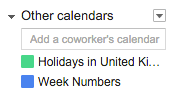
    It also appears on your list of other calendars, so you can change the color and enable or disable it:

    Using Week Numbers in Google Calendar - Other calendars

    The most organized businesses I came in contact with, made extensive use of calendar numbers and I intend on doing the same and recommend it to other people. I think the first obstacle to overcome is making the number ubiquitous so that when you use it, saying “week 6” for example, people know intuitively what you are talking about.

    Let’s do it.

    Picture by Yandle.