• We just released to-jdbc-uri 0.5.0 with support for URL parameters. Courtesy of Joe Kutner.

    I’d like to note, sometimes I hear that the Clojure community doesn’t care about testing, but to-jdbc-uri has a very complete testing suite and so far, this and other contributions came fully tested.

  • Yesterday, the web celebrated its 25th birthday and to join in, I have a little story. A couple of years ago I found a NeXTcube. I’m not going to say where it is to avoid vandalism (the computer is publicly accessible under some circumstances without much oversight), but this is the story. Sir Tim Berners-Lee coded the earliest version of the web in his NeXTcube workstation when he was working at CERN, so, I was always interested in this machines, from a historical/playful point of view.

    The cube that was in front of me was more or less abandoned and I asked the owner if I could play with it. He was very reticent but I was more relentless and I got to play with it. He told me that Next computer belonged, at one point, to CERN and that it has not been used since then. I decided to explore it.

    The first interesting thing I found was a file containing a lot of email addresses from people that seemed to work at CERN or be related to CERN in some form or fashion. The owner of the computer decided to be overly professional and deleted the file.

    The second interesting thing I found completely blew my mind. There was a folder called WorldWideWeb and inside it several files called WorldWideWeb_0.1.0.tar, 0.1.1.tar, 0.2.0.tar and so on. Could this be? I opened one by one and indeed they were apps. I started with the oldest and executed them one by one.

    The first one raised an error as it tried to contact cernvax.cern.ch (this Next cube was disconnected) and then it crashed:

    WorldWideWeb_0.1.0

    I kept on going and eventually one started. It was very plain but I knew what it was. I quickly went back to my terminal, open vi, and wrote a small HTML file, which then I passed as a parameter to the little WorldWideWeb_0.2. It worked… it displayed an h1 as a title!

    I was jumping out of my skin. I don’t want to publish the whole picture to avoid releasing private information, but I’m standing, next to the cube, pointing and what could possible be the earliest version of the web browser that still works today, displaying a web site I just coded (it says Hello World):

    WorldWideWeb_0.2

    Then I discovered the browser allowed me to edit the page, directly there, without having to do anything special, and I remembered that Sir Tim Berners-Lee originally designed the web to be read-write, not read-only.

    That was one of the most exciting moments of my life. When I got home I wrote an email to Sir Tim Berners-Lee, telling him of my finding and where he could find that computer, just in case he wanted to get ahold of those binaries (I couldn’t find any source code anywhere on that machine). He never replied, I don’t know if he ever got my email. I bet he gets a lot of it and that he’s a very busy man.

    Update: explained a bit why I don’t want to reveal where this happened.

  • Disclaimer: this article is now obsolete as the rules have changed, please don’t waste your time reading it.

    Disclaimer: I am not a lawyer, this is not legal advice. 


    There’s a lot of conflicting information out there about whether you need an ERN or not to publish an app in the App Store. I spoke to Apple representatives as well as various employees of a couple of US agencies. As painful as it is, if your app is capable of the simplest, most standard, of encryptions such as SSL/HTTPS then you need to answer your export compliance questions like this:

    The conclusion from selecting the above answers:

    To make your app available on the App Store, you must submit a copy of your U.S. Encryption Registration (ERN) approval from the U.S. Bureau of Industry (BIS).

    In some places, you’ll see CCATS instead of ERN. I’m not 100% sure, but it seems CCATS was a previous more bureaucratic version of the ERN. Right now, what you need is an ERN and this is our journey to get it. We are publishing as much detail as possible so that you can replicate it for your own application. There are some other blog posts that explain how to do it, but we found that over the years, some of the steps changed and we had to find a new path. Since this is going to happen again, we are adding as much information as possible so that should your path be slightly different, you won’t have much trouble finding your way through it.

    Starting at the beginning

    After being utterly confused by both Apple’s as well as BIS’ FAQ and how to pages, I decided to go the homepage for the Bureau of Industry and Security and see where it took me:

    At this point I new SNAP-R was relevant to my needs. I was almost under the impression of needing one, even though I didn’t know what it was. Going through that page I found this:

    Yes! I’d like to submit an application (SNAP-R) – fourth item in the list. That takes you to this page: http://www.bis.doc.gov/index.php/licensing/simplified-network-application-process-redesign-snap-r, which defines what a SNAP-R is. It stands for Simplified Network Application Process – Redesign. I think a SNAP-R is sort of an account with the BIS. There’s no mention of ERN in that page, but it says:

    You must have a Company Identification Number (CIN) and an active user account to access SNAP-R. The procedures and requirements for obtaining a CIN and user account are set forth below.

    You need to obtain a CIN before you can proceed. If you scroll all the way to the bottom of the page, you’ll see:

    And that link, ladies and gentlemen, is the most promising I’ve seen so far. It takes you to https://snapr.bis.doc.gov/registration/Register.do which looks like this:

    The SNAP-R Company Registration process

    After completing and submitting that form you’ll get an email to confirm your email address. I recommend limiting yourself to ASCII characters here, as the é and á in my name got mangled. That email took only a few minutes to arrive but the confirmation page claims the next step might take up to five days:

    Some people claim to have been finished in 30 minutes or even less. I suppose it depends where you or your company is located. In my case, the five days elapsed so I sent them an email and two days later I got a reply telling me to call their support number: +1-202-482-2227 (later on I learned that another phone number that might help is +1-202-482-0707). When I talked to a representative, he said that I should have received the activation email already and just re-triggered it. Maybe calling them after a couple of days would have been a good approach to speed things up. Shortly after my call I got this email:

    That link takes you to a page to set up your log in and password:

    After entering those details, voila! you have an account:

    You may now log in:

    After logging in, you are now in your SNAP-R Home page:

    Creating a new work item within your SNAP-R account

    The next step is to create a new work item, which you can do from the sidebar. That takes you to a page that looks like this:
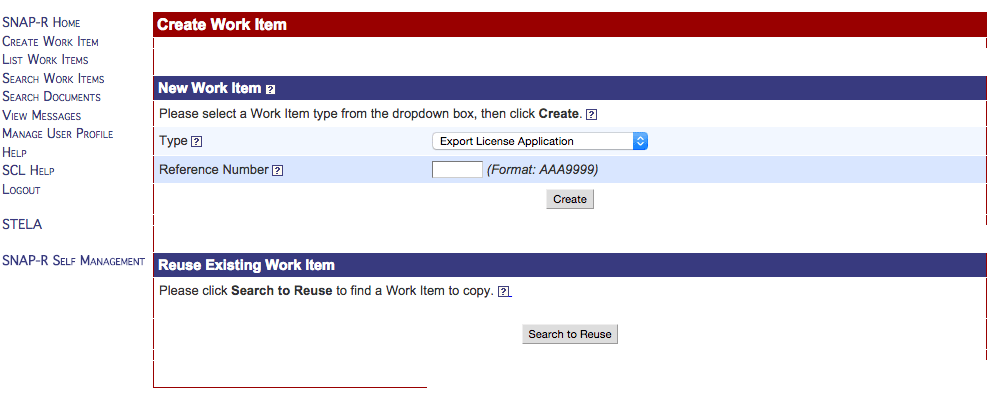
    The type of work item that you want, to be able to distribute apps with encryption, is an Encryption Registration:

    Now, about the Reference Number, the question mark next to it sends you to https://snapr.bis.doc.gov/snapr/docs/fieldHelp.html#NewWrkItem1 where it says:

    Enter a valid reference number for the Work Item. Reference numbers must be in the format “AAA1111”.

    which didn’t really answer what a reference number is. I decided to call them again and when I asked the question they put me on hold for 25 minutes. I hung up, called them again and I was speaking with someone else in less than 3 minutes and she answered. The reference number is just something you make up, for yourself. It’s not something you obtain and it seems as long as you follow their convention, it’s fine:

    After creating the work item, you are invited to edit it. It starts partially populated and it’s straight forward:
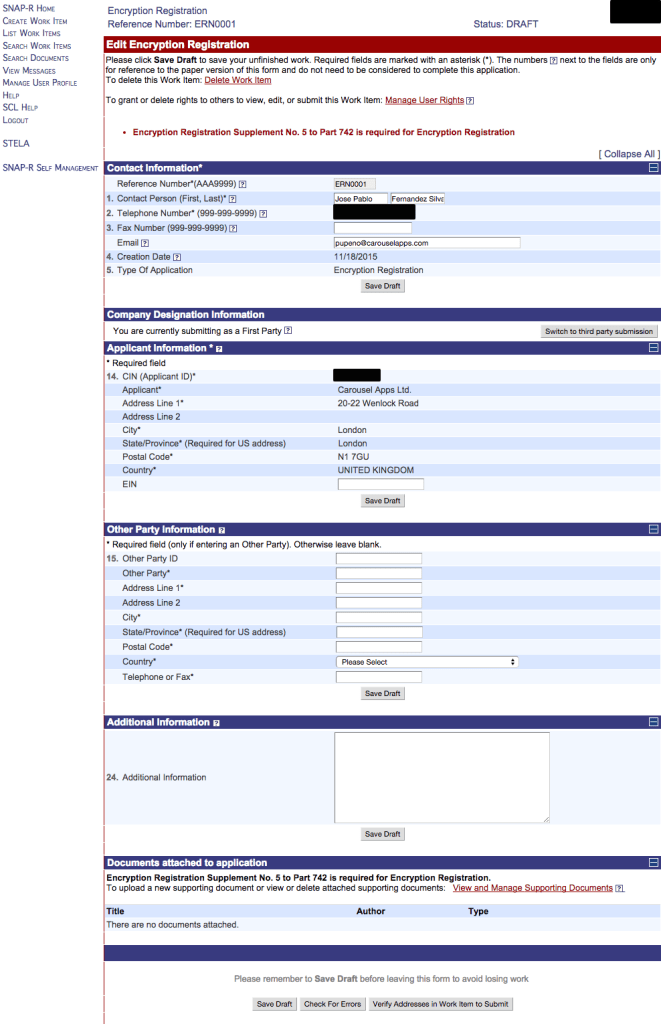
    Well, it’s straightforward until the last part: Documents. You need to attach the Encryption Registration Supplement No. 5 to Part 742.

    Creating the Encryption Registration Supplement

    Creating the supplement, thankfully, is easier than it looks; that is, when you know what you have to do. There’s a document number 742 that you can download from https://www.bis.doc.gov/index.php/forms-documents/doc_download/1208-742 and  on page 60 it has the Supplement No. 5: Encryption Registration. These are the contents of that page:

    SUPPLEMENT NO. 5 TO PART 742 - ENCRYPTION REGISTRATION
    
    Certain classification requests and self-classification reports for encryption items must be supported by an encryption registration, i.e., the information as described in this Supplement, submitted as a support documentation attachment to an application in accordance with the procedures described in §§ 740.17(b), 740.17(d), 742.15(b), 748.1, 748.3 and Supplement No. 2 to part 748 of the EAR.
    
    (1) Point of Contact Information
      (a) Contact Person
      (b) Telephone Number
      (c) Fax Number
      (d) E-mail address
      (e) Mailing Address
    (2) Company Overview (approximately 100 words).
    (3) Identify which of the following categories apply to your companys technology/families of products:
      (a) Wireless
        (i) 3G cellular
        (ii) 4G cellular/WiMax/LTE
        (iii) Short-range wireless / WLAN
        (iv) Satellite
        (v) Radios
        (vi) Mobile communications, n.e.s.
      (b) Mobile applications
      (c) Computing platforms
      (d) Multimedia over IP
      (e) Trusted computing
      (f) Network infrastructure
      (g) Link layer encryption
      (h) Smartcards or other identity management
      (i) Computer or network forensics
      (j) Software
       (i) Operating systems
       (ii) Applications
      (k) Toolkits / ASICs / components
      (l) Information security including secure storage
      (m) Gaming
      (n) Cryptanalytic tools
      (o) “Open cryptographic interface” (or other support for user-supplied or non-standard cryptography)
      (p) Other (identify any not listed above)
      (q) Not Applicable (Not a producer of encryption or information technology items)
    (4) Describe whether the products incorporate or use proprietary, unpublished or non-standard cryptographic functionality, including encryption algorithms or protocols that have not been adopted or approved by a duly recognized international standards body. (If unsure, please explain)
    (5) Will your company be exporting “encryption source code”?
    (6) Do the products incorporate encryption components produced or furnished by non-U.S. sources or vendors? (If unsure, please explain)
    (7) With respect to your companys encryption products, are any of them manufactured outside the United States? If yes, provide manufacturing locations. (Insert “not applicable”, if you are not the principal producer of encryption products) 

    All you have to do is create a PDF file answering these questions for your application and upload it. I couldn’t find this information anywhere so I called them once again and that’s how I learned that all matters related to encryption were handled by the department… never mind the name, the phone number is +1-202-482-0707. Next time I’m calling them directly – there was no wait, no menu, just a person picking up the phone.

    I created a document for my case saying:

    Screensaver Ninja Encryption Registration Supplement No. 5 to Part 742
    (1) Point of Contact Information
      (a) José Pablo Fernández Silva
      (b) +44XXXXXXXX
      (c)
      (d) [email protected]
      (e) 20-22 Wenlock Road, London, N1 7GU, United Kingdom
    (2) Carousel Apps is a small London based company producing software apps such as Screensaver Ninja. Our main use of encryption (and so far all of it) is the standard SSL (https), OpenSSH, etc. You can learn more about us at https://CarouselApps.com
    (3) We produce
      (j) Software
        (ii) Applications
    (4) Our products use standard off the shelf encryption libraries and tools, such as https (SSL). We don’t develop or intend to develop any proprietary encryption mechanisms
    (5) We don’t plan on exporting “encryption source code”.
    (6) Screensaver Ninja uses Apple’s Safari component that allows https encrypted communication. This is provided by Apple. I understand that Apple uses OpenSSL which is an open source project and thus may have contributions from all around the world.
    (7) We produce software, so, no manufacturing process are involved. All our software is produced outside the United States. The reason for this application is to distributed an app through Apple’s App store. 

    I cannot vouch for this content, I’m not sure this is the appropriate file to submit, this is only what I did. The next step is to click on “View and Manage Supporting Documents” which will take you to a page that looks like this:

    There, click “Upload Supporting Document” and you’ll be greeted by this form:

    I just came up with a title and keywords, entered the current date and my name as author. I think the only really important field is the document type:

    Submitting the ERN

    With that document in place and attached, we seem to have passed some sort of automatic verification procedure.

    I clicked on “Preview Work Item to Submit” and I was given a last chance to look at the application and verify its correctness:
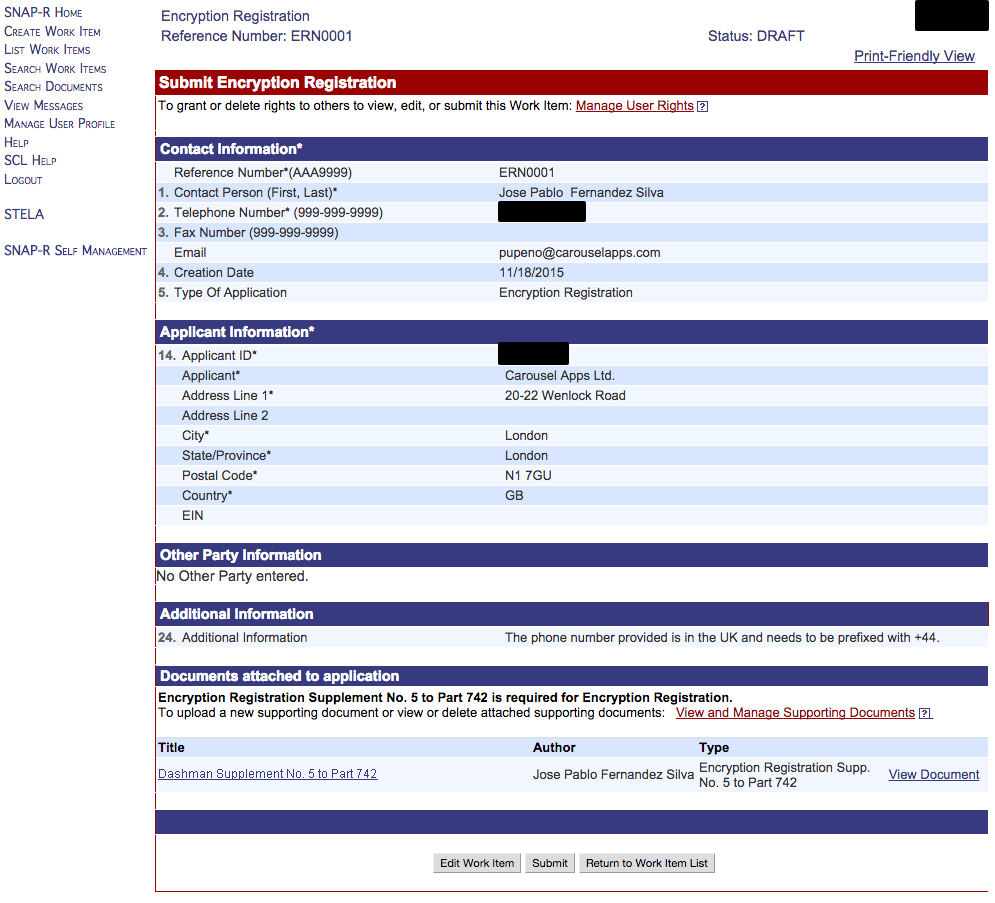
    The submission process, triggered by the “Submit” button of course, asks you for your name, in a special format, one more time:

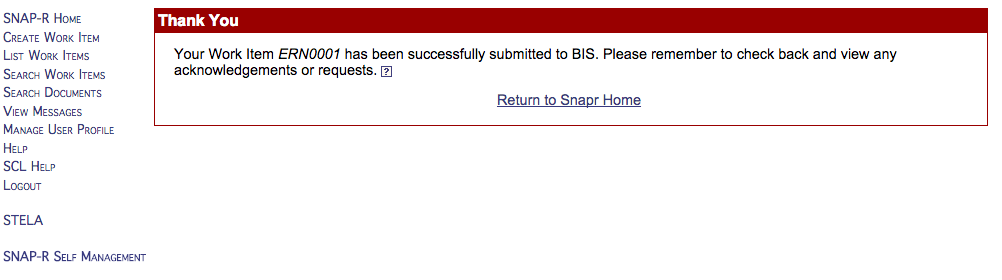
    And we you click “Submit Work Item” you are done:
    Uploading Encryption Registration to Apple

    I almost immediately got a message in the SNAP-R website:

    And the message was the acceptance of the application including the ERN code (blacked out):

    That is the document you need to upload to Apple. Take a screenshot of that page and save it for your records. Back at Apple’s iTunes connect, when you answer the questions stating that you use encryption, you get an upload box for the document:

    If the upload button doesn’t appear, this is what an Apple representative suggested: “If you do not see the prompt, there could be a glitch in the website. One possible workaround is to change the answer to question 4 to “Yes”. By doing this the upload field should appear.”

    Once you upload it, the “Submit” button will become enabled and you are ready to rock. Click it and your app will be on its way to fame and fortune. Well… that is… after they review your export compliance. For now, your app will be “Waiting for Export Compliance”:

    From Apple’s version statuses, that means: “Your app is reviewed and ready for sale, but your CCATS file is in review with Export Compliance.” CCATS seems to be an older or bigger version of the ERN and in some places we can still find CCATS instead of ERN. Don’t worry, an ERN is all you need if your situation is similar to mine. When the status reaches to “Waiting for Review”:

    Congratulations! Your ERN was accepted.  You are done with this bit of bureaucracy.

    If this blog post was useful or you find differences in the process, please, let us know in the comment section.

    Picture by Yuri Samoilov

  • We are very happy to announce version 0.2.0 of our form building library Free-form. This version includes:

    The Bootstrap 3 support means that you can have whole fields defined as succinctly as:

    [:free-form/field {:type        :email
                       :key         :email
                       :label       "Email"}]]

    Enjoy!


  • We are proud to announce the release of version 0.2.0 of our ClojureScript library Prerenderer, a library to do server side pre-rendering of single page applications. In this release, we include:

    The two first items in the changelog came hand in hand and they are the biggest changes to keep in mind if you are upgrading. We are very happy that we no longer need a fork of re-frame and we would like to extend our gratitude to Mike Thompson for working with us on having the appropriate API to make this happen.

    The change in API means that your Prerenderer module now would look something like this:

    (ns projectx.node
      (:require [prerenderer.core :as prerenderer]))
    
    (defn render-and-send [page-path send-to-browser]
      (send-to-browser (render page-path)))
    
    (set! *main-cli-fn* (prerenderer/create render-and-send "ProjectX"))

    instead of:

    (ns projectx.node
      (:require [cljs.nodejs :as nodejs]
                [prerenderer.core :as prerenderer]))
    
    (defn render [req res]
      (let [page-path (.-path (.parse url (.-url (.-query req))))]
        (.send res (render page-path))))
    
    (set! *main-cli-fn* (prerenderer/create render "ProjectX"))

    Enjoy!

  • This blog post was originally published in Screensaver Ninja‘s blog.

    We were recently challenged by someone who asked what was so special about adding websites into a screensaver. Perhaps, at first, this doesn’t seem like a tough task but after months of challenging work, I can confirm it is. I realized I never shared exactly why yet, so here it is. Putting a browser into your screensaver is like putting a square peg in a round hole.

    Chromium on Mac

    Screensaver Ninja for Mac is already out there. It’s working and it’s robust, but getting there wasn’t without its pains. Initially, we wanted the Mac and Windows versions to have the exact same rendering engine and thus, we went for Chrome’s WebKit, packaged as Chromium Embedded Framework, or CEF for short.

    open-package-contentsChromium, the open source version of Chrome, follows the same structure as Chrome to handle page isolation: by running it in different processes. On Mac, applications are distributed as bundles which you may know as .app files. They are actually directories and you can inspect the contents by right‐clicking or control‐clicking on it and then choosing Show Package Contents. (Warning: if you change anything the app will likely not work anymore.) When you use CEF, you end up with a secondary bundle application inside your application. This is sort‐of supported, but weird and not without issues.

    In Mac OS X, screensavers are dynamic libraries that are loaded by a special screensaver program. When you make a screensaver, you are not in control of the running program, you just have a few entry points to start doing your animation. The Mac OS X screensaver framework doesn’t like it at all when you have a secondary app bundle that you trigger from your library.

    During this research, we found a bunch of issues, many of which were not clear‐cut as solving it for us might break it for other people. We still needed those issues solved so we wrote scripts that would pre-process CEF and solve them for us. Ultimately we ended up dropping CEF; more on that later.

    Swift

    We decided to use Swift for our project. It’s the new way and we prefer higher level languages whenever possible. Swift saves us a bit of pain with memory management, syntax and other things. But we inadvertently caused ourselves quite a bit of pain. The Mac screensaver framework is still an Objective-C application and since we are not building an app, but a library, we need to write and compile Swift with Objective-C binary compatibility. This is not commonly done so it took us quite a bit of bumping our head against a brick wall to figure it out. Furthermore, not being in control of the program loading our library made getting error messages tricky at best.

    Apple’s WebKit

    When we dropped CEF, our alternative was Apple’s WebKit, which was so much easier to integrate and have running, despite the fact that there are two of them; one that works out of the box, but it’s deprecated, called WebView, and a new one that’s not so well supported, called KWWebView. We played a lot with both and both had the same problem: cookies shared with Safari.

    Apple decided that all users of a web view must share cookies with Safari. This was not acceptable for us because we want to have separate independent sessions and in the future we are even planning on having separate cookie jars per site so that you can, for example, be logged in into two different Twitter accounts at the same time. We contacted Apple about it, paying our tech support fee, and the answer was a resounding “can’t be done, we’ll add it to the list of things that we’ll consider in the future”.

    Challenge accepted Mr Apple! We embarked on a quest to achieve this anyway that took us into the dark innards of the Cookie Jar, debugging it at the assembly level to understand its interface and workings:

    debugging-the-cookie-jar

    I have to admit it, that was fun. After understanding Apple’s cookie jar’s implementation, we wrote a test suite that was exercising it all, as far as we know, including bits that we believe are abandoned. After that we wrote our own implementation that stored the cookies separately and used the same test suite to make sure our implementation was equivalent to Apple’s. This code had to be done in a mix of C and Objective-C. Then we used method swizzling to replace Apple’s with our own and ta-da! Cookie separation.

    Windows events

    The Windows version of Screensaver Ninja is of course not done yet, but we’ve already started working on it and we are partly there. One interesting problem that we run into is that Windows doesn’t help you at all with the workflow of a screensaver. It is of paramount importance to us that while the screensaver is running, nobody should be able to interact with those websites. We don’t want any keystrokes, mouse moves, mouse clicks, etc to reach the pages, otherwise it would be a breach of our security approach to dashboards.

    Windows has a long history all the way back to Windows 1.0 that ran as a little program on top of MS DOS. Awww, good old days. Through the decades, ways to code Windows applications have changed radically and thus the way events travel through applications also did. That means that there’s a lot of different ways for an app to get keystrokes, mouse events, etc. Finding them all and plugging all those holes was not trivial and since we are talking about security this required a lot of testing.

    I’m sure that as we go along, we are going to find many more issues like those in the Windows environment, and we are going to solve them and we are going to strive for elegant, stable, robust code.


  • We just released a new version of jar-copier, 0.3.0, that includes:

    • Better reporting of misconfiguration.
    • Thoroughly testing misconfiguration reporting.
    • Added the possibility to manually specify the jars (not java-agents).

    The main change is the last item, which was planned but now it became clear that some people actually wanted it.

  • We just released a new version of to-jdbc-uri, 0.4.1. A very important change in this one is that we are consolidating all our libraries into the com.carouselapps group ID, so you need to switch from including it like this:

    [to-jdbc-uri "0.3.0"]

    to including it like this:

    [com.carouselapps/to-jdbc-uri "0.4.1"]

    Aside from that, this release supports RedHat OpenShift style of URL that use the schema postgresql:// instead of postgres://. Courtesy of Pradnyesh Sawant.

    Picture by Joe Hall

  • When a user logs out from our web site, we are used to clearing the session and that’s it. When you are developing a single page application, you are likely to keep a lot of state on the client side, and that should be cleared too.

    For Ninja Tools, that meant going from the traditional re-frame initialize-db:

    (re-frame/register-handler
      :initialize-db
      (fn [_ _]
        (re-frame/dispatch [:get-current-user])
        {:current-route        nil
         :alerts               (sorted-map)
         :current-user         nil
         :log-in-form          {}
         :registration-form    {}
         :reset-password-form  {}
         :change-password-form {}
         :tools                nil
         :used-tools           nil}))

    to having the initial-db in a re-usable value:

    (def initial-db {:current-route        nil
                     :alerts               (sorted-map)
                     :current-user         nil
                     :log-in-form          {}
                     :registration-form    {}
                     :reset-password-form  {}
                     :change-password-form {}
                     :tools                nil
                     :used-tools           nil})
    
    (re-frame/register-handler
      :initialize-db
      (fn [_ _]
        (re-frame/dispatch [:get-current-user])
        initial-db))

    and our logged-out handler to use it instead of modifying the current estate, which meant going from:

    (re-frame/register-handler
      :logged-out
      (fn [db [_]]
        (routing/redirect-to :home)
        (-> db
            (assoc :current-user nil)
            (alerts/add-alert :success "You are now logged out."))))

    to:

    (re-frame/register-handler
      :logged-out
      (fn [db [_]]
        (routing/redirect-to :home)
        (-> db/initial-db
            (alerts/add-alert :success "You are now logged out."))))

    Since we care so much about security, for us, it’s important to go back to initial-db, and if there’s some state that should survive, we’ll pass it on manually. That is, we’ll be doing whitelisting vs blacklisting.

    Something that we haven’t decided is whether we clear the state on log-out, when the user just clicked the log out link, or logged-out, when when the server has cleared the session.

    The advantage of the former is that we clear all the state as soon as possible, the advantage of the later is that should the log out procedure fail for some reason, the app still has the state and it should still be usable, which might be required for re-trying logging out.

    Recapping that, clearing state immediately behaves better when everything goes well, clearing state later behaves better when something goes wrong during the log out process. We can’t comment one being safer that the other, as clearing the session earlier and failing to log out might leave the user under the impression they successfully logged out when it’s not the case.

    Picture by Ken Hawkins.

  • SQL, at least PostgreSQL, likes using snake case for table names, such as user_name, while in Clojure, kebab case is preferred, such as user-name. When you use the library Yesql you are likely to end up with keywords in snake case unless you do some conversion. In our toy project, Ninja Tools, I wanted to perform these conversions automatically.

    To achieve this automatic conversion I wanted to wrap every single function generated by Yesql and do the conversion both ways. This sounded familiar. Dmitri Sotnikov and I came up with a neat trick to do that in Conman, a connection manager for Yesql, that wraps all the Yesql functions binding them to a connection.

    This code wraps around the result for Conman but if you just need to do something similar with plain Yesql I’d recommend looking at Conman’s code. Normally, this is how you would use Conman:

    (ns ninjatools.db.core
      ;...
      )
    
    (defonce ^:dynamic conn (atom nil))
    
    (conman/bind-connection ninjatools.db.core/conn "sql/queries.sql")]

    and this is the code to do the automatic wrapping to convert case style:

    (ns ninjatools.db.core
      ; ...
      )
    
    (defonce ^:dynamic conn (atom nil))
    
    
    (ns ninjatools.db.core.queries
      (:require [conman.core :as conman]
                [camel-snake-kebab.core :as csk]
                [camel-snake-kebab.extras :as csk-extras]))
    
    (doall
     (for [yesql-query (conman/bind-connection ninjatools.db.core/conn "sql/queries.sql")]
       (intern 'ninjatools.db.core
               (with-meta (:name (meta yesql-query)) (meta yesql-query))
               (fn [& args]
                 (let [args (if (< 1 (count args))
                              args
                              (cons (csk-extras/transform-keys csk/->snake_case (first args))
                                    (rest args)))]
                   (csk-extras/transform-keys csk/->kebab-case
                                              (apply yesql-query args)))))))
    
    (in-ns 'ninjatools.db.core)

    Let me explain what’s going on here. The namespace of the file is ninjatools.db.core. In this namespace we define an atom, conn, to store the connection and then the madness begins.

    Line 7 defines another namespace, one that is used to store the original functions created by Conman and which we are not likely to ever access directly. On line 11 we do exactly that, we invoke Conman, and thus Yesql, so the file with the queries is read and turn into a bunch of functions in the ninjatools.db.core.queries namespace. This functions are also returned as a sequence that we are going to iterate over.

    In line 12 we call intern to essentially define a function in a different namespace, in this case, the one that matches this file. The name of this new function will be the same as the one defined by Yesql thanks to Clojure’s ability to inspect the meta-data of a function, as we can see in line 13. While we are at it, let’s also make the meta-data be same, just in case.

    Since we don’t know how many arguments the function will take, we accept any amount and if there’s more than one, in line 17 we convert the first one from Clojure’s kebab-case to PostgreSQL’s snake_case. The result goest through the reverse process in line 18.

    Very important for the sake of the rest of the file, line 19 takes us back to the natural namespace for this file. Neat trick, isn’t it? Obviously it would be better if this wasn’t required a lot, which is the goal of issue 108, “Callback when defining queries”.

    Any questions?

    Picture by AAB_BAA