Tag: Java

  • Years ago I built an application called Dashman. Customers used it to show web dashboards on screens around an office, a factory, a classroom, or a public space: Google Analytics, internal Grafana, shop-floor counters, org announcements, whatever they cared about as long as it was on web pages. This post is a retrospective on how that system was put together: the architecture, the handling of rendering jobs, and the end-to-end encryption that applied least privilege to every machine in the system, so that a compromise of the server or the public computers would expose only the data that machine needed to do its job, and nothing else.

    The naive approach, and why it fails

    The naive version of the job is easy to state: log into the websites and display them. One machine with a browser could, in principle, do all of it.

    That machine would hold everything: URLs, cookies, and obviously the rendered pages. In many offices the display sat in a lobby where anyone could walk up to it. In plenty of deployments, all you needed to compromise that computer was a USB keyboard. Plug it in and you were inside a computer that still had the customer’s session cookies in memory or on disk. The attack was simple.

    So the first move is architectural, separating rendering from displaying. Rendering needs cookies and a real browser. Displaying only needs the pixels, the rendered image. The machine under the public screen should not be the machine that logged into Google Analytics.

    The second move is end-to-end encryption, making it mathematically impossible to read the cookies anywhere they weren’t needed. That meant excluding both the Displayer and me as the operator, so my customers didn’t have to trust me with their precious cookies. The encryption was the part that I had the most fun with.

    The architecture

    The hosted side had several components, and the customer side had three applications. Together, the whole stack was a heterogeneous distributed system that looked like this:

    Configurator, Renderer, and Displayer on the customer side; Server, PostgreSQL, S3, and PubNub on the hosted side. Screenshots flow directly between clients and S3; the Server hands out presigned URLs.

    • Configurator: a desktop app the customer ran on an administrator’s machine. They logged into dashboard sources here (cookies originated here), chose what to display and where, and approved Renderers and Displayers.
    • Renderer: ran on a customer-controlled machine inside their network. It loaded configured URLs in a built-in browser and snapshotted them. The customer chose where this ran, such as a machine in a data center.
    • Displayer: ran on machines in public places, connected to the screens. It asked for screenshots at its resolution and showed whatever it got back.
    • Server: a stateless REST API that all the client components talked to.
    • PostgreSQL: durable store for accounts, sites, screenshot metadata, and the render queue.
    • S3: encrypted screenshots at rest.
    • PubNub: push channel. The Server published; Renderers and Displayers subscribed.

    A small deployment could collapse Configurator, Renderer, and Displayer onto one physical machine. Larger ones spread many Displayers across screens, ran several Renderers for capacity and redundancy, and kept a few Configurators on the administrators’ laptops.

    Cookies and two keys

    Everything sensitive had to be end-to-end encrypted. Cookies were the most critical piece of information because with them you could just log into all the websites. So I needed one key, which we’ll call the master key, to encrypt them end-to-end. So far so good, not that hard. With that key in place, the cookies on my hosted database were encrypted blobs that meant nothing to me.

    The screenshots that the Renderers generated also needed to be encrypted so that I couldn’t see them. But I couldn’t use the master key for this task because the Displayers couldn’t ever have it. A compromised Displayer should not expose the key that could decrypt the cookies. That meant a second key, the displayer key.

    This table might help:

    ConfiguratorRendererDisplayerBackend
    master key✅ readable✅ readable🚫 absent🔒 encrypted
    cookies✅ readable✅ readable🚫 absent🔒 encrypted
    URLs✅ readable✅ readable🚫 absent🔒 encrypted
    displayer key✅ readable✅ readable✅ readable🔒 encrypted
    Screenshots✅ readable✅ readable✅ readable🔒 encrypted

    This is just the beginning, though. Keeping these two keys encrypted on the Backend but distributed to Renderers and Displayers is where things get really interesting. More on that after a tour of the render loop.

    The render loop

    Dashman’s day-to-day work was a loop. A Displayer on a wall asked the Server for the best screenshot at its resolution. The Server tried the cache first: it picked among recently successful renders for that tenant, scoring candidates by how closely area and aspect ratio matched the request, by their freshness, and with some randomness.

    The goal there was that if you had 10 sites to display and 10 Displayers, you didn’t want to run 100 jobs when most of those would be pixel identical. But also, you didn’t want the 10 Displayers to show exactly the same thing in sync; variety was valuable.

    If nothing in the freshness window qualified, the Server enqueued a render job, told the Displayer to wait, and woke up the Renderers to start working. PubNub handled the fast path: the Server published to the renderer channel when a job was enqueued and to the displayer channel when a screenshot was ready. Renderers also polled on a slower cadence as a fallback. The database was authoritative and PubNub was a hint about when to look.

    After being woken up by a PubNub notification, all Renderers would try to claim a job. Claiming was an atomic row lock, and only one Renderer won. The order of processing was LIFO, not FIFO, because for displaying screenshots, freshness mattered. That meant a render job could be missed and never processed (under heavy load), but that was acceptable. If a Renderer crashed mid-render, the claim aged out and the row became available again. The claiming Renderer loaded the page, snapshotted it, uploaded the PNG to S3, and reported back. To reduce latency, the Server could auto-claim the next job at that point and assign it when responding to the Renderer. That way rendering jobs were chained together.

    Each site had two knobs the Configurator set: how long to wait after load before snapshotting (charts and fonts need time to settle), and how long a Displayer showed that screenshot before rotating. Both were per-site because a quarterly KPI and a minute-by-minute load report required different amounts of freshness and possibly different amounts of time to render fully.

    After all that, the Server notified the Displayer; the Displayer pulled the file from S3 and showed it on screen.

    Sequence: at the top, the Configurator saves a configuration to the Server, which fans the change out through PubNub to Renderer and Displayer; below, the steady-state loop where the Displayer asks the Server, the Server enqueues and publishes, the Renderer claims and uploads to S3, and the Displayer fetches from S3.

    The sequence diagram above shows two flows: an admin saving a configuration at the top (initial setup and occasional changes), then one full pass of the steady-state render loop below.

    I had sketched an alternative push path using WebSockets and SQS. I shipped PubNub instead because it was less code and less operational complexity while finding product-market fit. At higher scale, migrating would have been worth the savings.

    The render loop assumed each component could decrypt what it received and encrypt what it sent. What follows is the cryptography, in the order a real deployment came up: register user and tenant together, log in, change passwords, approve Renderers and Displayers, render with keys, revoke a decommissioned or compromised machine.

    Cryptography overview

    The user’s password was the root of trust. It never left the Configurator in plaintext. For authentication the Configurator ran SCrypt locally and sent the result to the Server, which ran SCrypt again to store an over-hashed password (a hash of a hash). At login it was similar, first hashing on the Configurator and then over-hashing the password to compare against the database. That split is generally a better way to do authentication than just sending a plain text password, but for Dashman it was a must. You will see why below.

    ConfiguratorRendererDisplayerBackend
    password⏱️ briefly in memory🚫 absent🚫 absent➖ absent
    hashed password⏱️ briefly in memory🚫 absent🚫 absent⏱️ briefly in memory
    over-hashed password⏱️ briefly in memory🚫 absent🚫 absent✅ readable

    During registration the Configurator created the two symmetric keys named above: master and displayer key. They were never stored or sent in plaintext to any hosted server.

    ConfiguratorRendererDisplayerBackend
    master key✅ readable✅ readable🚫 absent🔒 encrypted
    displayer key✅ readable✅ readable✅ readable🔒 encrypted

    To pass those keys through the hosted stack, each user also generated a public/private key pair using elliptic-curve cryptography. The master and displayer keys were encrypted with that public key, and that encrypted payload was stored on the server. Only the matching private key could decrypt them.

    ConfiguratorRendererDisplayerBackend
    user’s private key✅ readable🚫 absent🚫 absent🔒 encrypted
    user’s public key✅ readable🚫 absent🚫 absent✅ readable

    But now we had the problem of storing the user’s private key. We needed to encrypt that key and for that, the Configurator used PBKDF2 to create the password-key, a key derived from the same password the user entered to register or log in. Only someone who knew the password could re-derive that key on a new machine and recover the private key.

    ConfiguratorRendererDisplayerBackend
    password-key⏱️ briefly in memory🚫 absent🚫 absent🚫 absent

    If you are following along, the master/displayer keys get encrypted with the public key of the user, and the private key gets encrypted with the password-key. If you feel there’s one step too many there, you’d be right, until you see how Displayers and Renderers are enrolled. Hold on tight.

    This meant that to successfully log in and start operating the system from the Configurator app all you needed was a single password. But at the API level the Configurator needed two pieces of information: the hashed password (SCrypt, for authentication) and the password-key (PBKDF2, for decryption). Both were derived from the same plaintext password, but only the hashed password ever reached the Server.

    Now picture an attacker with persistent access to the Server: they can dump the database and watch incoming login traffic. The dump only yields the over-hashed password, which can’t be replayed to log in. Watching logins over time, however, lets them collect hashed passwords as users sign in, and that is where most apps would be leaking the plain text password. In Dashman, the hashed password still couldn’t decrypt anything: that needed the password-key, which was derived from the plaintext password and never touched the Server. That is what kept a Server compromise from exposing cookies or URLs.

    Each Renderer and each Displayer also generated their own public/private key pair locally, same as the Configurator. Each also generated a random password, kept on that machine, for authenticating to the Server. Unlike with the Configurator, these private keys never left the machine; the Server received only the public key. The credential and the private key lived and died with the machine: unlike users who could log in from anywhere, identity for Renderers and Displayers was tied to a specific machine and not transferable.

    ConfiguratorRendererDisplayerBackend
    a renderer’s password🚫 absent✅ readable🚫 absent🚫 absent
    a renderer’s private key🚫 absent✅ readable🚫 absent🚫 absent
    a renderer’s public key✅ readable✅ readable🚫 absent✅ readable
    a displayer’s password🚫 absent🚫 absent✅ readable🚫 absent
    a displayer’s private key🚫 absent🚫 absent✅ readable🚫 absent
    a displayer’s public key✅ readable🚫 absent✅ readable✅ readable

    The mechanism by which the master key got to a Renderer was that during enrollment that key was encrypted with the Renderer’s public key and stored on the Server. The Renderer fetched that record and decrypted it with its own private key. That is the payoff: the user’s elliptic-curve key pair exists so the master and displayer keys can be re-wrapped for each new Renderer or Displayer using their public keys, without the user’s password ever touching another machine. The password-key alone couldn’t have done that, because it only exists on the Configurator.

    The master and displayer keys were each put in a key ring: the master key ring and the displayer key ring respectively. That was because whenever a Renderer or Displayer was removed, new keys were generated and then rotated. For some time after rotation, data encrypted with the previous keys still needed to be readable, so all parts of Dashman could decrypt both old and new information.

    With all of this in place, we achieved the goal of cookies and URLs only present in the Configurator and Renderer, and screenshots only readable by the customer but not me, completing the full table of all information:

    ConfiguratorRendererDisplayerBackend
    cookies and URLs✅ readable✅ readable🚫 absent✅ encrypted
    screenshots🚫 absent✅ readable✅ readable✅ encrypted
    password⏱️ briefly in memory🚫 absent🚫 absent🚫 absent
    hashed password⏱️ briefly in memory🚫 absent🚫 absent⏱️ briefly in memory
    over-hashed password⏱️ briefly in memory🚫 absent🚫 absent✅ readable
    master key✅ readable✅ readable🚫 absent🔒 encrypted
    displayer key✅ readable✅ readable✅ readable🔒 encrypted
    user’s private key✅ readable🚫 absent🚫 absent🔒 encrypted
    user’s public key✅ readable🚫 absent🚫 absent✅ readable
    password-key⏱️ briefly in memory🚫 absent🚫 absent🚫 absent
    a renderer’s password🚫 absent✅ readable🚫 absent🚫 absent
    a renderer’s private key🚫 absent✅ readable🚫 absent🚫 absent
    a renderer’s public key✅ readable✅ readable🚫 absent✅ readable
    a displayer’s password🚫 absent🚫 absent✅ readable🚫 absent
    a displayer’s private key🚫 absent🚫 absent✅ readable🚫 absent
    a displayer’s public key✅ readable🚫 absent✅ readable✅ readable

    Registration

    Registration is the first ceremony, the moment when everything the rest of Dashman depends on comes into existence: the authentication material the Server will compare against on every future login, the elliptic-curve key pair the user will carry across machines, the symmetric rings that protect cookies and screenshots, and a single root for all of it (the password). It is the longest of the ceremonies because it has to bootstrap every kind of material at once. After it, the Configurator can fetch and decrypt the user’s data from any machine that knows the password, and the Server is left holding only ciphertext.

    Registration: the user enters a password, the Configurator hashes it and posts it for authentication, the Server creates the account and over-hashes, then the Configurator generates the cryptographic estate locally and uploads only the encrypted artifacts.

    Hashing the password

    The user enters a name, an organization, an email, and a password. The password never leaves the Configurator in plaintext. Before it leaves the machine at all, the Configurator runs it through SCrypt configured with this spec:

    ParameterValue
    AlgorithmSCrypt
    Cost (N)2^14 (16,384)
    Block size (r)8
    Parallelization (p)1
    Output length256 bits
    Salt256-bit random, unique per user

    SCrypt is a memory-hard password hashing function: each guess costs not only CPU time but also a sizeable block of RAM, which makes GPU and ASIC acceleration uneconomical for a brute-force attacker. In 2018 it was the strongest password hashing function available in Bouncy Castle, the cryptography library Dashman shipped on, and the cost parameter is tunable: as hardware gets cheaper, the cost goes up, and because the Configurator stores the spec alongside the result, future generations of the same password are not stuck at today’s setting. The per-user 256-bit salt prevents precomputation across the user base.

    The hash and the spec that produced it travel together in the registration request. The plaintext password does not.

    Storing nothing the Server can replay

    The Server does not store what the Configurator just sent. It runs SCrypt one more time over the incoming hash, with a fresh server-side spec, and stores the result. Call that the over-hash: it is the SCrypt of an SCrypt.

    Hash-then-store on the Server is standard. The unusual half is client-side: by SCrypting before sending, the Configurator keeps the plaintext password off the wire entirely. An attacker watching login traffic only ever sees hashes, not the password itself, and in a system like Dashman, where the plaintext password is what unlocks the rest of the cryptographic material described below, that distinction is the whole game. The client’s spec is stored alongside the over-hash so any Configurator can reproduce the same inner hash from the password later.

    Once the Server has committed the over-hash and created the account and tenant rows, it returns enough about the new user for the Configurator to continue. The Configurator now has an account on the Server, but the Server is not yet holding anything sensitive: no cookies, no rings, not even a public key.

    Generating the cryptographic estate

    Everything that protects sensitive data is built next, and it all happens on the Configurator before anything is sent back.

    First, the Configurator generates an elliptic-curve key pair on secp521r1. The curve choice is deliberate. secp521r1 is the largest of the standard NIST curves, and at the volumes Dashman ever expected (small numbers of agents per tenant, low frequency of cryptographic operations) the runtime cost of the larger curve is invisible. The Server will hold the public key and use it later to wrap material for the user; the private key will be the only thing on the network capable of unwrapping that material, and the Server will never see it without a layer of encryption around it.

    Next, it derives a 256-bit symmetric key from the password using PBKDF2 with this spec:

    ParameterValue
    AlgorithmPBKDF2 with HMAC-SHA-256
    Iterations65,536
    Output length256 bits
    Salt256-bit random, per-derivation

    We called the output the password-key. Both SCrypt (used at registration and login) and PBKDF2 run once per login on the Configurator, and both serve the same underlying purpose: making each guess at the password expensive enough that brute force is impractical. They guard different ciphertexts. SCrypt-derived material is what the Server stores as the over-hash and what an attacker would have to crack to recover the password from a database dump. PBKDF2-derived material is what wraps the elliptic-curve private key, where an attacker who got hold of that wrapped blob would need to brute-force the password through AES-GCM to read it. Within the cross-platform Java stack Dashman ran on, SCrypt (via Bouncy Castle) was the strongest password hashing primitive available, and PBKDF2 with HMAC-SHA-256 (via the JCE’s SecretKeyFactory) was the standard option for deriving a symmetric key from a password.

    The Configurator then encrypts the elliptic-curve private key under the password-key with AES in GCM mode (AES/GCM/NoPadding). The IV, the PBKDF2 salt, and the iteration count travel alongside the ciphertext when it is stored on the Server. The password never does. AES-GCM gives authenticated encryption, so a wrong password produces a GCM tag failure rather than silently decrypting into garbage that might look like a private key.

    Two empty rings are created next, the master ring and the displayer ring, and one random 256-bit AES key is added to each. The keys are pulled directly from the platform CSPRNG: there is no derivation, no input, just bytes. A ring is an ordered list of AES keys where the last entry is the current key (used for fresh encryption) and earlier entries are retained so that older ciphertexts remain decryptable. At registration, each ring has exactly one key; rotations described later append more.

    Finally, each ring is wrapped with the user’s elliptic-curve public key using Bouncy Castle’s ECIESwithAES-CBC profile, with a 128-bit nonce and a 128-bit MAC. ECIES, as a family, glues an ECDH agreement to a symmetric cipher and a MAC; the BC profile chosen was the straightforward bundled option at the time, rather than assembling the construction from primitives by hand. Before encryption, each ring is placed inside a small verifier envelope identifying the user and account it belongs to; on decryption the verifier must match or the operation fails. The verifier is what makes a misrouted blob (say, one user’s ring pasted into another’s row) fail closed instead of silently decrypting into something the application would try to use.

    At this point the Configurator holds in memory: the password (still, very briefly), the password-key, the elliptic-curve key pair, both rings, and the SCrypt hash of the password.

    It sends to the Server, in one PUT request: the public key, the ciphertext of the private key, the ciphertext of each wrapped ring, and the parameters needed to rebuild the password-key on a future login. The Server persists all of that as JSON it cannot decrypt.

    By the time the request returns, the password is dropped from memory. From the Server’s vantage, it is holding pieces of mathematics whose meaning is gated on a password it has never seen and on a private key it cannot reconstruct. From the Configurator’s vantage, it now has everything it needs to manage cookies and sites for this account, and a path to recover those materials on any other machine that knows the password.

    Logging in

    Login does two things at once: it authenticates the user to the Server, and it rebuilds the same in-memory state that registration produced. Those are independent code paths that happen to share a single input (the password) and a single transport (the Configurator’s HTTPS connection). If the first one succeeds and the second one fails, the user is signed in but cannot read anything.

    Login: the Configurator fetches the user's SCrypt spec from the Server, hashes the entered password with it, authenticates with HTTP Basic, then receives the encrypted key pair, the two encrypted rings, and the encrypted cookies and decrypts them locally.

    Authenticating

    Each user has their own SCrypt salt, generated at registration. The Configurator does not yet know it on a fresh install, so it asks the Server: given this email, what spec should I use? The answer is not secret. Without the password, the spec is useless. With the spec, the Configurator can reproduce the same SCrypt hash registration computed, regardless of which machine it runs on.

    The Configurator runs SCrypt with the fetched spec and forms HTTP Basic credentials of the form email:base64(hash). The Server runs SCrypt once more over the incoming hash with the spec that sits next to the over-hash, compares byte for byte, and either accepts or rejects. There is no separate session token; subsequent requests reuse the same Basic credentials until the Configurator clears them.

    If the spec the Configurator received is older than current defaults (say, the cost parameter has been raised since the account was created), the Configurator re-hashes the password with the current spec and uploads the upgraded hash on the next save. Work factors rise over the lifetime of the system without forcing anyone to reset their password.

    Recovering the keys

    Authentication only proves the password matches the stored over-hash. The Configurator still has to decrypt everything that follows. The Server returns, in the response to the authenticated GET, the encrypted elliptic-curve key pair, both encrypted rings, and the tenant’s encrypted cookies. The Configurator then:

    1. Reads the PBKDF2 spec stored alongside the encrypted private key and re-derives the password-key from the entered password. PBKDF2 with the same inputs yields the same key it produced at registration.
    2. Decrypts the elliptic-curve private key under the password-key. AES-GCM verifies that the ciphertext has not been tampered with, and a wrong password produces a tag failure rather than a corrupt private key.
    3. Decrypts each ring with the elliptic-curve private key, using ECIES. The verifier inside each ring’s ciphertext must match the expected user and account, otherwise decryption is rejected even if the algebra would have succeeded.
    4. Decrypts cookies under the master ring. The ring is tried current-key first, then older keys, until one verifies; that is how cookies encrypted before the last rotation remain readable.

    By the time the Configurator’s log in process finishes, its memory looks identical to the state at the end of registration, except that the Configurator did not generate any of these materials, it derived and decrypted them. The password is dropped; the password-key has done its job and is discarded with it.

    A practical corner of this design: a wrong password and a tampered private-key blob both manifest as the same AES-GCM tag failure. In practice this rarely caused confusion because the authentication step ahead of decryption already filtered out the common case (a mistyped password).

    The reason the elliptic-curve private key is wrapped under the password rather than stored only in an OS keychain is that Dashman was designed to recover on a fresh install: type the password, get everything back, no preloaded secrets needed. A keychain-only design would have hurt that experience and would not have changed the security story, since whatever the keychain held would still need an unlock secret tied to the user.

    Changing the password

    A password change in Dashman is, deliberately, the cheapest cryptographic operation the system performs. The hard work is concentrated at registration; from that point on the password unwraps exactly one thing (the elliptic-curve private key) and nothing else.

    Password change: the Configurator hashes the current password to authenticate, hashes the new password with a fresh spec, derives a new password-key, re-wraps the elliptic-curve private key under it, and sends the bundle to the Server.

    The flow only runs while the user is already logged in, which means the Configurator already holds the decrypted elliptic-curve private key and both rings in memory. It does not hold the original password (login dropped it), so the user has to enter the current password again to prove identity to the Server, plus the new password to provide fresh derivation input.

    The Configurator does, in order:

    1. SCrypts the current password with the stored spec to construct authentication credentials, the same way login does. This proves to the Server that whoever is asking for the change still knows the password the account was created with.
    2. SCrypts the new password with a fresh spec (new salt, current defaults). This is the hash the Server will over-hash and store going forward.
    3. Re-derives a new password-key from the new password with PBKDF2 and a fresh spec. The old password-key was never persisted, so there is no need to invalidate it; it just stops being useful once the new one is in place.
    4. Encrypts the elliptic-curve private key, which is sitting in memory in plaintext, under the new password-key with AES-GCM. The public key does not change. The rings do not change.

    The Configurator sends, in a single request: the new hashed password and its spec, the new ciphertext of the elliptic-curve private key (with its new PBKDF2 salt embedded), and any other profile fields the user edited. The Server first verifies the request using the current password’s Basic credentials, then over-hashes the new hashed password, stores it in place of the old one, and replaces the encrypted key-pair blob.

    The master and displayer rings are untouched. Cookies, site configurations, and screenshots already in S3 do not need to be re-encrypted: their keys live in the rings, which are themselves wrapped under the unchanged elliptic-curve public key. Re-encrypting any of that on a password change would be a lot of work for no security benefit, since the password only ever protected one specific layer of the cryptographic onion.

    A password change does not retroactively invalidate any other Configurator that previously decrypted the private key. Cryptographic invalidation of in-flight or cached material is what ring rotation is for, and that runs in a different ceremony, described later.

    Approving a Renderer

    Setting up Dashman means enrolling at least one Renderer and at least one Displayer. The two ceremonies share almost the entire shape, both in the UI the customer touches and in the sequence of network calls underneath; what differs is what each agent ends up holding. The Renderer is the fuller case: it receives both rings (master to decrypt cookies and site URLs, displayer to encrypt screenshots). I’ll walk through it first.

    Renderer approval: the Renderer generates its own key pair and a random password and connects unapproved; the user approves it in the Configurator, which wraps both rings under the Renderer's public key; PubNub notifies the Renderer, which fetches and decrypts the rings and the cookies.

    Connecting without keys

    A Renderer is launched on a machine the customer controls. On first start it has no account, has nothing to render, and does not know anyone’s password. The only input it has is a target: a slug or email the user types in that identifies the tenant it wants to join.

    Locally, before contacting anyone, the Renderer generates two things. First, its own elliptic-curve key pair on secp521r1, the same curve the user picked at registration but generated independently and never derived from the user’s. Second, a random password drawn from the platform CSPRNG, which the user never sees. That password is purely a credential for talking to the Server later; it is not used to derive any encryption material. Unlike the Configurator, where a wrapped copy of the private key is uploaded so the user can log in from any machine, a Renderer’s private key never leaves: both the credential and the private key live and die with this specific machine, and onboarding another Renderer means generating fresh ones on the new machine with no way to transfer the original identity.

    It sends to the Server: the tenant identifier, a display name (typically the machine’s hostname, useful when the user is looking at a pending Renderer in the Configurator and has to recognize it), the public half of the key pair, and the random password.

    The Server hashes the password once with SCrypt and persists a Renderer record marked unapproved. A single hash, rather than the double SCrypt used for users, is appropriate here because the password was generated by a CSPRNG and is not a stretching target for an offline guesser; the hash exists only so the Server is not storing the credential in clear. The Renderer is now visible on the Server, but the only material attached to it is its public key, its name, and authentication state. The Server then publishes a PubNub notification on the tenant’s user channel, which is how the Configurator learns there is a pending Renderer.

    Approving

    In the Configurator, the user sees the pending Renderer appear in the list and clicks Approve. This is the cryptographic step: it is the moment the user, who has the only copy of the unwrapped rings, decides that a specific Renderer’s public key is allowed to decrypt them.

    The Configurator wraps both rings, master and displayer, under the Renderer’s public key with ECIES, using the same ECIESwithAES-CBC profile and the same verifier envelope as everywhere else. The verifier here ties the wrapped material to the Renderer’s identifier and the account identifier, so a copy of one Renderer’s ciphertext cannot be reused by a different Renderer even if both belonged to the same tenant. The Configurator then PUTs the wrapped rings, with the Renderer marked approved, to the Server.

    Setting approved without wrapping the rings would be inert: the Renderer can authenticate either way once it has a password, but it cannot decrypt anything until the encrypted rings exist. Approval and key wrapping are bundled in the same request to keep the two from drifting out of sync.

    A subtle point worth pulling out. The user’s rings were already wrapped, at registration, under the user’s elliptic-curve public key. Approval wraps them a second time, under the Renderer’s elliptic-curve public key. The Server ends up holding two ciphertexts that decrypt to the same plaintext: one for recovery on a fresh Configurator (login on a new laptop), one for use on the Renderer. The Configurator only ever sends material wrapped under public keys; the user’s password never reaches the Renderer machine, and the Renderer’s private key never reaches the Configurator.

    Coming online

    The Server publishes a second PubNub notification, this time on the Renderer’s channel, saying the Renderer is now approved. The Renderer fetches its own record (now with encrypted rings populated), decrypts the rings under its own private key, decrypts the tenant’s cookies under the master ring, and from that point on can render pages.

    Approving a Displayer

    The ceremony for adding a Displayer looks almost identical to the one for a Renderer. The Displayer generates an elliptic-curve key pair and a random password locally, sends a connection request with its public key, the Server hashes the password and creates an unapproved record, the Configurator gets a PubNub notification, the user clicks Approve, the Configurator wraps a ring under the Displayer’s public key, the Server stores it, PubNub tells the Displayer, the Displayer decrypts.

    Displayer approval: same shape as the Renderer ceremony, but only the displayer ring is wrapped and shipped.

    But did you notice the difference?

    The Configurator wraps a ring (singular), not the rings. The master ring is not part of the payload, and on the Displayer side, the accessor that would return the master ring deliberately returns nothing. The Displayer’s reality is: it receives only one ring, it only ever decrypts one kind of payload (screenshots), and there is no path in the codebase by which a master key could end up in its memory.

    That asymmetry is the entire reason the Displayer exists as a separate component. A Renderer is a trusted machine in the customer’s network (a data center, an admin’s desk) that needs cookies in order to do its job. A Displayer is the machine wired up to a screen in a lobby or a hallway. Even if a stranger walked up to the lobby machine with a USB keyboard and dumped everything in memory, all they would get is whatever screenshots had recently been displayed and the key that decrypts a few more from S3. The decryption authority that could log into Google Analytics never touches that machine, and the Configurator has no way to send it there.

    The flip side of that constraint is that the Displayer cannot do anything with a screenshot until it has been encrypted under its ring. Which is what the next section is about.

    Rendering a screenshot

    Up to this point every ceremony has been about provisioning. Once Renderers and Displayers are approved, Dashman spends the rest of its life in a loop where bytes flow through the system and end up on a screen. The architectural separation from earlier and the cryptographic plumbing from the last few sections finally pay off together in this loop.

    Screenshot rendering: a Displayer asks the Server for a screenshot, a render job goes through PubNub to a Renderer which fetches encrypted site config, renders the page, encrypts the screenshot for the displayer ring, uploads it to S3, and the Displayer downloads and decrypts it.

    A Displayer asks the Server for the best screenshot at its current resolution. The Server consults its cache. If the cache cannot satisfy the request, it queues a render job for a fresh screenshot and publishes a notification on the renderer channel. The earlier render-loop section covered the cache and the queue; here the focus is on what is encrypted at each step.

    A Renderer wakes up, claims the newest job (LIFO so that a Displayer waiting on the screen sees fresh pixels first), and gets back from the Server two things: the encrypted site configuration (URL, per-site delay, anything else specific to the site), and a pair of presigned S3 URLs (one for upload, one for download), both valid for a day. The site configuration is encrypted under the current master key; the Renderer decrypts it by trying every key in its master ring until one verifies, in practice the current one.

    With the URL in hand, the Renderer loads it in an embedded WebView with the tenant’s cookies attached. After the page has loaded, the Renderer waits the per-site delay (some sites take seconds for charts and fonts to settle), snapshots the WebView, and serializes the result as PNG bytes.

    It then encrypts those bytes with the current displayer key, using AES-GCM, and attaches a verifier identifying the screenshot and the site the bytes belong to. On the Displayer side, decryption will reject any blob whose verifier does not match the screenshot the Displayer asked for. The resulting ciphertext, along with its IV and the small envelope around it, is uploaded to S3 via the presigned PUT URL. The Server never sees the bytes; the upload goes directly from the Renderer to S3.

    The Renderer then PUTs a small marker back to the Server reporting the job done. The Server flips the screenshot to rendered, publishes a notification on the displayer channel, and, as an opportunistic latency improvement, returns the next claimable job in the same response so the Renderer can chain into it without round-tripping through PubNub.

    A Displayer subscribed to the displayer channel receives the notification, fetches the screenshot metadata (which includes the presigned GET URL), downloads the ciphertext from S3, and decrypts it with its own displayer ring. The verifier check rejects any blob whose screenshot or site identifiers do not match what the Displayer asked for: a misrouted file fails closed instead of decrypting into something unexpected. Decryption succeeds, the Displayer hands the PNG to the screen rendering code, and the public sees pixels.

    Three things land at once at this point. The Renderer briefly saw cookies and a fully rendered web page, but they existed only in memory while it painted. The Displayer never saw cookies or a URL; it received an opaque blob, verified it, decrypted it, and showed it. The Server stored a record of which screenshots existed and pointers to where in S3 they lived, but it stored no plaintext; an operator browsing the production database, or an attacker who dumped it, would find ciphertext indexed by tenant. S3 held the ciphertext but could not read it. The end-to-end story holds.

    Decommissioning a Renderer

    Renderers and Displayers come and go. A data center contract ends, a machine is replaced, a Displayer in a lobby is suspected of having been physically tampered with. From a cryptographic point of view, the question is whether the new state of the system can be reached without invalidating the user’s password. The answer is yes, by rotating rings rather than rotating roots.

    Renderer removal: the Server deletes the Renderer record and notifies it via PubNub; the Configurator generates new master and displayer keys, re-wraps both rings for every remaining agent, re-encrypts site data, and saves the whole thing in one transaction.

    When the user removes a Renderer in the Configurator, the Configurator first asks the Server to delete the Renderer row. The Server deletes it and publishes a notification on the Renderer’s channel. If the Renderer is online, it receives the notification, logs out, and stops; its credentials no longer exist on the Server, so even if it tried to keep polling, the Server would reject it.

    Deletion alone is not enough. The removed Renderer kept whatever plaintext it had already extracted, and it kept its copy of both rings on local disk. If it is offline at the moment of deletion (the machine was stolen, the operator only knows it is missing), it will never receive the notification at all. Anything encrypted with the current master or displayer key from this point onward (future cookies, future site configurations, future screenshots) must be unreadable to the Renderer that just left.

    So the Configurator, immediately after the delete completes, performs the rotation:

    1. Generates a new random 256-bit AES key and appends it to the master ring. The previous master key stays in the ring; it has to, because cookies and site configurations encrypted before this moment are still in the database and still need to decrypt.
    2. Generates another fresh 256-bit AES key and appends it to the displayer ring, for the same reason: screenshots already in S3 are encrypted under the old displayer key and still need to be readable by the Displayers that survived.
    3. Re-wraps both extended rings under the user’s elliptic-curve public key, since the user themselves needs to recover the new state on the next login.
    4. For each Renderer that remains approved, re-wraps both rings under that Renderer’s public key with ECIES, replacing the previous ciphertext on the Server.
    5. For each Displayer that remains approved, re-wraps the displayer ring under that Displayer’s public key, replacing the previous ciphertext.
    6. Re-encrypts every site’s configuration (URL and cookies) under the new master key. Because encryption always uses the last key in the ring, anything saved from now on is under the new key only; the old key stays in the ring solely to decrypt historical artifacts.

    All of that, plus the deletion that prompted it, is sent to the Server as one PUT and committed in one transaction. Either every agent is updated and every site is re-encrypted, or the rotation is aborted; there is no window in which some agents have the new ring and others do not.

    The removed Renderer is now in a peculiar but desirable position. It still has its old copy of both rings, so any old ciphertext it kept around (a screenshot that happened to be in transit, a site configuration it cached before deletion) would still decrypt locally. But it has no credentials to fetch anything new from the Server, and even if it had a backdoor channel, every new screenshot in S3 is encrypted under a key it never received, every site configuration the Server holds is encrypted under a key it never received, and any new cookie the Configurator saves is encrypted under a key it never received. The decryption capability the Renderer kept is bounded by what it already had, not by what the system will produce going forward.

    Removing a Displayer follows the same routine. The Displayer never held the master key, so the master rotation is, strictly speaking, more than the threat requires; the displayer rotation is what matters. The codebase rotates both anyway because it is cheap, the routine is shared with Renderer removal, and rotating both leaves no current key the removed agent ever held in either ring. Simpler to reason about, no real cost at the volumes Dashman handled.

    Verifiers and wire formats

    A note about a detail that has shown up in every ceremony so far without much explanation. Every encrypted payload, symmetric or asymmetric, is wrapped in a small typed envelope before it is encrypted. The envelope holds the payload itself plus a verifier: a small object identifying what the payload is supposed to be. For user blobs the verifier carries the user identifier and the account identifier; for renderer and displayer blobs, the agent and account identifiers; for screenshots, the screenshot identifier and the site identifier. The envelope is serialized to JSON, encrypted as one piece, and on decryption the verifier inside the plaintext must match the verifier the caller expected. If it does not, decryption raises a verification failure rather than returning the bytes.

    This is not a digital signature. It does not prove the payload came from a particular party. What it gives instead is type-level safety inside the ciphertext: a payload meant for one tenant cannot be misrouted to another and silently decrypt into something the application would try to use. Crossing tenants is the kind of bug a system like this should not tolerate as silent corruption; verifier mismatches make it loud.

    For asymmetric wrapping the system uses Bouncy Castle’s ECIESwithAES-CBC with a 128-bit nonce and a 128-bit MAC. The curve choice (secp521r1) was the largest NIST curve with a mature ECIES profile in Bouncy Castle. The bigger curve hedges against future cryptanalysis at a runtime cost invisible at Dashman’s volumes. Assembling ECIES from primitives by hand would have been more work for no real gain at the time.

    For symmetric encryption the system uses AES in GCM mode (AES/GCM/NoPadding) with a per-payload random IV. GCM gives authenticated encryption (a tag that fails closed on tampering), which composes cleanly with the verifier envelope: a wrong key produces a GCM tag failure, a right key over the wrong tenant’s payload produces a verifier mismatch, and both are surfaced as decryption failures with no plaintext returned.

    I would revisit the curve and the specific ECIES profile if I were starting again today; standards drift and library defaults have moved on. The compartmentalization story (which keys live where, who can wrap material for whom, and what each component is mathematically prevented from reading) would stay the same regardless.

    That was fun

    Building Dashman was a lot of fun. Thinking through how it could be attacked, from lobby USB keyboards to a malicious operator rifling through S3, was fun in the same way hard puzzles are. Putting it into production and watching real customers use it was satisfying: the design decisions held up under real configuration mistakes, flaky networks, and Renderers disappearing mid-job, not only under the load tests I ran myself.

    I do wish it had seen more sustained load in the wild. It did get real usage, just not the “millions of screens” scale that would have stress-tested every corner of the queue and cache behavior beyond what I could simulate. Still, for a retrospective on a system I built years ago, that is a good problem to have.

  • Disclaimer: I don’t know what I’m talking about, I’ve done little Win API (Win32) development and I only have a few years of Java development of which maybe 2 or 3 are developing desktop applications with JavaFX (Dashman being my first fully fledged out JavaFX app).

    Disclaimer 2: I have only tested this on my own computer, running Microsoft Windows 10. I hope to soon test it in many others and over time we’ll see whether my solution was correct or not. I’ll update this blog post accordingly (or link to a newer version if necessary).

    I started taking the quality of Dashman very seriously and one of the problems I found was that the running instances wouldn’t exit properly during uninstall or upgrades. And as I expected, this turned out into a head-bashing-into-brick-wall task. My solution was for a JavaFX app, but this should work for a Swing or any other kind of apps.

    It all started with learning about Windows Restart Manager, something I didn’t know it even existed until a week ago. This is what allows Windows to close applications on uninstall, on reboots, etc. In the Guidelines for Applications, the crucial bit is this:

    The Restart Manager queries GUI applications for shutdown by sending a WM_QUERYENDSESSION notification that has the lParam parameter set to ENDSESSION_CLOSEAPP (0x1). Applications should not shut down when they receive a WM_QUERYENDSESSION message because another application may not be ready to shut down. GUI applications should listen for the WM_QUERYENDSESSION message and return a value of TRUE if the application is prepared to shut down and restart. If no application returns a value of FALSE, the Restart Manager sends a WM_ENDSESSION message with the lParam parameter set to ENDSESSION_CLOSEAPP (0x1) and the wparam parameter set to TRUE. Applications should shut down only when they receive the WM_ENDSESSION message. The Restart Manager also sends a WM_CLOSE message for GUI applications that do not shut down on receiving WM_ENDSESSION. If any GUI application responds to a WM_QUERYENDSESSION message by returning a value of FALSE, the shutdown is canceled. However, if the shutdown is forced, the application is terminated regardless.

    Simplifying it: when Windows needs your app to close, it will send a message asking if you are ready to close. Your application might respond negatively and then no application will be closed. This could happen for example if there’s some unsaved work and the app needs the consent from the user to either save or discard. This is what happens when you try to shut down your computer and Microsoft Word stops it asking whether you want to save the file or not.

    After that your application can receive a message asking it to please close or telling it to close now. I’m not sure what the nuances are between these two. For Dashman I decided to just save the config and close in either of these instances.

    Receiving these messages requires interfacing with Windows DLLs, for which I’m using JNA. I don’t know how JNA works, I read the code, sort-of understood it, copied and pasted it. What I think is going on is that you open the user32.dll like this:

    User32 user32 = Native.loadLibrary("user32", User32.class, Collections.unmodifiableMap(options))

    User32 is an interface that contains all the methods with the proper signatures to be able to call them from Java. options just makes sure we are using the Unicode version of the Win32 API calls. You can see that and all the other missing pieces on the full example at the end of the blog post.

    I need a Win32 API callback that will receive the messages and actually implement the guidelines previously quoted:

    StdCallLibrary.StdCallCallback proc = new StdCallLibrary.StdCallCallback() {
        public WinDef.LRESULT callback(WinDef.HWND hwnd, int uMsg, WinDef.WPARAM wParam, WinDef.LPARAM lParam) {
            if (uMsg == WM_QUERYENDSESSION && lParam.intValue() == ENDSESSION_CLOSEAPP) {
                return new WinDef.LRESULT(WIN_TRUE);
            } else if ((uMsg == WM_ENDSESSION && lParam.intValue() == ENDSESSION_CLOSEAPP && wParam.intValue() == WIN_TRUE) || uMsg == WM_CLOSE) {
                Application.exit();
                return new WinDef.LRESULT(WIN_FALSE); 
            }
            return user32.DefWindowProc(hwnd, uMsg, wParam, lParam);
     
        }
    };

    Oh! Lot’s of constants! What are they? I define them in the full example at the bottom of this post. They should be mostly self-evident what they stand for, their actual values are not that important.

    Now things get tricky. Apparently Microsoft Windows send these messages to windows, not processes. Dashman can run in the tray bar, with no active window. And even if it had an active window, getting the HWND pointer for that window in JavaFX doesn’t seem trivial (I couldn’t get it to work). So, I create a size 0 invisible window to receive the message:

    WinDef.HWND window = user32.CreateWindowEx(0, "STATIC", "Dashman Win32 Restart Manager Window.", WS_MINIMIZE, 0, 0, 0, 0, null, null, null, null);

    Then I need to connect that window to the callback:

    try {
        user32.SetWindowLongPtr(window, GWL_WNDPROC, proc);
    } catch (UnsatisfiedLinkError e) {
        user32.SetWindowLong(window, GWL_WNDPROC, proc);
    }

    The callback is not magic though, and requires an event loop that will constantly check if there’s a message and trigger the processing when that happens:

    WinUser.MSG msg = new WinUser.MSG();
    while (user32.GetMessage(msg, null, 0, 0) > 0) {
        user32.TranslateMessage(msg);
        user32.DispatchMessage(msg);
    }

    Of course, that means you want this to run as its own daemon thread. The reason to make it a daemon thread is so that it won’t hang around preventing the JVM from exiting. 

    One of my most useful sources of understanding and inspiration was the source code for Briar. I want to give credit where credit is due. I do think I spotted an issue with their source code in which they are not following the guidelines though. Also, they have a much more complex situation to handle.

    And now, the full example with all my comments including links to more information explaining where all the values for constants and logic is coming from:

    import com.sun.jna.Native;
    import com.sun.jna.Pointer;
    import com.sun.jna.platform.win32.WinDef;
    import com.sun.jna.platform.win32.WinUser;
    import com.sun.jna.win32.StdCallLibrary;
    import com.sun.jna.win32.W32APIFunctionMapper;
    import com.sun.jna.win32.W32APITypeMapper;
    
    import java.util.Collections;
    import java.util.HashMap;
    import java.util.Map;
    
    import static com.sun.jna.Library.OPTION_FUNCTION_MAPPER;
    import static com.sun.jna.Library.OPTION_TYPE_MAPPER;
    
    // Inspiration can be found at https://code.briarproject.org/akwizgran/briar
    public class RestartManager {
        // https://autohotkey.com/docs/misc/SendMessageList.htm
        private static final int WM_CLOSE = 0x10; // https://msdn.microsoft.com/en-us/library/windows/desktop/ms632617
        private static final int WM_QUERYENDSESSION = 0x11; // https://msdn.microsoft.com/en-us/library/windows/desktop/aa376890
        private static final int WM_ENDSESSION = 0x16; // https://msdn.microsoft.com/en-us/library/windows/desktop/aa376889
    
        // https://msdn.microsoft.com/en-us/library/windows/desktop/aa376890
        // https://msdn.microsoft.com/en-us/library/windows/desktop/aa376889
        private static final int ENDSESSION_CLOSEAPP = 0x00000001;
        private static final int ENDSESSION_CRITICAL = 0x40000000;
        private static final int ENDSESSION_LOGOFF = 0x80000000;
    
        // https://stackoverflow.com/questions/50409858/how-do-i-return-a-boolean-as-a-windef-lresult
        private static final int WIN_FALSE = 0;
        private static final int WIN_TRUE = 1;
    
        // https://msdn.microsoft.com/en-us/library/windows/desktop/ms633591(v=vs.85).aspx
        private static final int GWL_WNDPROC = -4;
    
        // https://msdn.microsoft.com/en-us/library/windows/desktop/ms632600(v=vs.85).aspx
        private static final int WS_MINIMIZE = 0x20000000;
    
        public static void enable() {
            Runnable evenLoopProc = () -> {
                // Load user32.dll usi the Unicode versions of Win32 API calls
                Map<String, Object> options = new HashMap<>();
                options.put(OPTION_TYPE_MAPPER, W32APITypeMapper.UNICODE);
                options.put(OPTION_FUNCTION_MAPPER, W32APIFunctionMapper.UNICODE);
                User32 user32 = Native.loadLibrary("user32", User32.class, Collections.unmodifiableMap(options));
    
                // Function that handles the messages according to the Restart Manager Guidelines for Applications.
                // https://msdn.microsoft.com/en-us/library/windows/desktop/aa373651
                StdCallLibrary.StdCallCallback proc = new StdCallLibrary.StdCallCallback() {
                    public WinDef.LRESULT callback(WinDef.HWND hwnd, int uMsg, WinDef.WPARAM wParam, WinDef.LPARAM lParam) {
                        if (uMsg == WM_QUERYENDSESSION && lParam.intValue() == ENDSESSION_CLOSEAPP) {
                            return new WinDef.LRESULT(WIN_TRUE); // Yes, we can exit whenever you want.
                        } else if ((uMsg == WM_ENDSESSION && lParam.intValue() == ENDSESSION_CLOSEAPP
                                && wParam.intValue() == WIN_TRUE) || uMsg == WM_CLOSE) {
                            Application.exit();
                            return new WinDef.LRESULT(WIN_FALSE); // Done... don't call user32.DefWindowProc.
                        }
                        return user32.DefWindowProc(hwnd, uMsg, wParam, lParam); // Pass the message to the default window procedure
    
                    }
                };
    
                // Create a native window that will receive the messages.
                WinDef.HWND window = user32.CreateWindowEx(0, "STATIC",
                        "Dashman Win32 Restart Manager Window.", WS_MINIMIZE, 0, 0, 0,
                        0, null, null, null, null);
    
                // Register the callback
                try {
                    user32.SetWindowLongPtr(window, GWL_WNDPROC, proc); // Use SetWindowLongPtr if available (64-bit safe)
                } catch (UnsatisfiedLinkError e) {
                    user32.SetWindowLong(window, GWL_WNDPROC, proc); // Use SetWindowLong if SetWindowLongPtr isn't available
                }
    
                // The actual event loop.
                WinUser.MSG msg = new WinUser.MSG();
                while (user32.GetMessage(msg, null, 0, 0) > 0) {
                    user32.TranslateMessage(msg);
                    user32.DispatchMessage(msg);
                }
            };
    
            Thread eventLoopThread = new Thread(evenLoopProc, "Win32 Event Loop");
            eventLoopThread.setDaemon(true); // Make the thread a daemon so it doesn't prevent Dashman from exiting.
            eventLoopThread.start();
        }
    
        private interface User32 extends StdCallLibrary {
            // https://msdn.microsoft.com/en-us/library/windows/desktop/ms632680(v=vs.85).aspx
            WinDef.HWND CreateWindowEx(int dwExStyle, String lpClassName, String lpWindowName, int dwStyle, int x, int y, int nWidth, int nHeight, WinDef.HWND hWndParent, WinDef.HMENU hMenu, WinDef.HINSTANCE hInstance, Pointer lpParam);
    
            // https://msdn.microsoft.com/en-us/library/windows/desktop/ms633572(v=vs.85).aspx
            WinDef.LRESULT DefWindowProc(WinDef.HWND hWnd, int Msg, WinDef.WPARAM wParam, WinDef.LPARAM lParam);
    
            // https://msdn.microsoft.com/en-us/library/windows/desktop/ms633591(v=vs.85).aspx
            WinDef.LRESULT SetWindowLong(WinDef.HWND hWnd, int nIndex, StdCallLibrary.StdCallCallback dwNewLong);
    
            // https://msdn.microsoft.com/en-us/library/windows/desktop/ms644898(v=vs.85).aspx
            WinDef.LRESULT SetWindowLongPtr(WinDef.HWND hWnd, int nIndex, StdCallLibrary.StdCallCallback dwNewLong);
    
            // https://msdn.microsoft.com/en-us/library/windows/desktop/ms644936(v=vs.85).aspx
            int GetMessage(WinUser.MSG lpMsg, WinDef.HWND hWnd, int wMsgFilterMin, int wMsgFilterMax);
    
            // https://msdn.microsoft.com/en-us/library/windows/desktop/ms644955(v=vs.85).aspx
            boolean TranslateMessage(WinUser.MSG lpMsg);
    
            // https://msdn.microsoft.com/en-us/library/windows/desktop/ms644934(v=vs.85).aspx
            WinDef.LRESULT DispatchMessage(WinUser.MSG lpmsg);
        }
    }

    And now, my usual question: do you think this should be a reusable open source library? would you use it?

  • Update 2018-05-23: Updated the code to my current version, which fixes a few bugs.

    When doing usability testing of an alpha version of Dashman, one thing that I was strongly asked was to have the windows remember their sizes when you re-open the application. The need was clear as it was annoying to have the window be a different size when re-started.

    The new version of Dashman is built using Java and JavaFX and thus I searched for how to do this, how to restore size. I found many posts, forums, questions, etc all with the same simplistic solution: restoring width and height, and maybe position.

    What those were missing was restoring whether the window was maximized (maximized is not the same as occupying all the available space, at least in Windows). But most important than that, none of the solutions took into consideration the fact that the resolutions and quantity of screens could be different than the last time the application run, thus, you could end up with a window completely out of bounds, invisible, immobile.

    I came up with this solution, a class that’s designed to be serializable to your config to store the values but also restore them and make sure the window is visible and if not, move it to a visible place:

    package tech.dashman.dashman;
    import com.fasterxml.jackson.annotation.JsonIgnore;
    import javafx.application.Platform;
    import javafx.geometry.Rectangle2D;
    import javafx.stage.Screen;
    import javafx.stage.Stage;
    import lombok.Data;
    import tech.dashman.common.Jsonable;
    @Data
    public class StageSizer implements Jsonable {
    private static double MINIMUM_VISIBLE_WIDTH = 100;
    private static double MINIMUM_VISIBLE_HEIGHT = 50;
    private static double MARGIN = 50;
    private static double DEFAULT_WIDTH = 800;
    private static double DEFAULT_HEIGHT = 600;
    private Boolean maximized = false;
    private Boolean hidden = false;
    private Double x = MARGIN;
    private Double y = MARGIN;
    private Double width = DEFAULT_WIDTH;
    private Double height = DEFAULT_HEIGHT;
    @JsonIgnore
    private Boolean hideable = true;
    @JsonIgnore
    public void setStage(Stage stage) {
    // First, restore the size and position of the stage.
    resizeAndPosition(stage, () -> {
    // If the stage is not visible in any of the current screens, relocate it to the primary screen.
    if (isWindowIsOutOfBounds(stage)) {
    moveToPrimaryScreen(stage);
    }
    // And now watch the stage to keep the properties updated.
    watchStage(stage);
    });
    }
    private void resizeAndPosition(Stage stage, Runnable callback) {
    Platform.runLater(() -> {
    if (getHidden() != null && getHidden() && getHideable()) {
    stage.hide();
    }
    if (getX() != null) {
    stage.setX(getX());
    }
    if (getY() != null) {
    stage.setY(getY());
    }
    if (getWidth() != null) {
    stage.setWidth(getWidth());
    } else {
    stage.setWidth(DEFAULT_WIDTH);
    }
    if (getHeight() != null) {
    stage.setHeight(getHeight());
    } else {
    stage.setHeight(DEFAULT_HEIGHT);
    }
    if (getMaximized() != null) {
    stage.setMaximized(getMaximized());
    }
    if (getHidden() == null || !getHidden() || !getHideable()) {
    stage.show();
    }
    new Thread(callback).start();
    });
    }
    public void setHidden(boolean value) {
    this.hidden = value;
    }
    private boolean isWindowIsOutOfBounds(Stage stage) {
    for (Screen screen : Screen.getScreens()) {
    Rectangle2D bounds = screen.getVisualBounds();
    if (stage.getX() + stage.getWidth() - MINIMUM_VISIBLE_WIDTH >= bounds.getMinX() &&
    stage.getX() + MINIMUM_VISIBLE_WIDTH <= bounds.getMaxX() &&
    bounds.getMinY() <= stage.getY() && // We want the title bar to always be visible.
    stage.getY() + MINIMUM_VISIBLE_HEIGHT <= bounds.getMaxY()) {
    return false;
    }
    }
    return true;
    }
    private void moveToPrimaryScreen(Stage stage) {
    Rectangle2D bounds = Screen.getPrimary().getVisualBounds();
    stage.setX(bounds.getMinX() + MARGIN);
    stage.setY(bounds.getMinY() + MARGIN);
    stage.setWidth(DEFAULT_WIDTH);
    stage.setHeight(DEFAULT_HEIGHT);
    }
    private void watchStage(Stage stage) {
    // Get the current values.
    setX(stage.getX());
    setY(stage.getY());
    setWidth(stage.getWidth());
    setHeight(stage.getHeight());
    setMaximized(stage.isMaximized());
    setHidden(!stage.isShowing());
    // Watch for future changes.
    stage.xProperty().addListener((observable, old, x) -> setX((Double) x));
    stage.yProperty().addListener((observable, old, y) -> setY((Double) y));
    stage.widthProperty().addListener((observable, old, width) -> setWidth((Double) width));
    stage.heightProperty().addListener((observable, old, height) -> setHeight((Double) height));
    stage.maximizedProperty().addListener((observable, old, maximized) -> setMaximized(maximized));
    stage.showingProperty().addListener(observable -> setHidden(!stage.isShowing())); // Using an invalidation instead of a change listener due to this weird behaviour: https://stackoverflow.com/questions/50280052/property-not-calling-change-listener-unless-theres-an-invalidation-listener-as
    }
    }

    and the way you use it is quite simple. On your start method, you create or restore an instance of StageSizer and then do this:

    public void start(Stage stage) {
    StageSizer stageSizer = createOrRestoreStageSizerFromConfig();
    stageSizer.setStage(stage);
    }

    I haven’t put a lot of testing on this code yet but it seems to work. Well, at least on Windows. The problem is that this snippet is interacting with the reality of screen sizes, resolutions, adding and removing monitors, etc. If you find a bug, please, let me know and I might release this a library with the fix so we can keep on collectively improving this.f

  • Searching online for how to set up the credentials to access the database (or any other service) while in development leads to a lot of articles that propose something that works, but it’s wrong: putting your credentials in the application.properties file that you then commit to the repository.

    The source code repository should not have any credentials, ever:

    • You should be able to make your project open source without your security being compromised.
    • You should be able to add another developer to your team without them knowing any credentials to your own development machine.
    • You should be able to hire a company that does a security analysis of your application, give them access to your source code and they shouldn’t gain access to your database.
    • You should be able to use a continuous integration service offered by a third party without that third party learning your database credentials.

    If you want to see what happens when you commit your credentials to your repo, check out these news articles:

    That’s probably enough. I hope I convinced you.

    In an effort to find a solution for this, I asked in Stack Overflow and I got pointed in the right direction.

    Leave application.properties where it is, in your resources of code folder, commit it to the repository. Instead, create a new file in ${PROJECT_ROOT}/config/application.properties and also add it to your version control ignore file (.gitignore, .hgignore, etc). That file will contain the credentials and other sensitive data:

    # This should be used only for credentials and other local-only config.
    spring.datasource.url = jdbc:postgresql://localhost/database
    spring.datasource.username = username
    spring.datasource.password = password

    Then, to help onboard new developers on your project (or yourself in a new computer), add a template for that file, next to it. Something like ${PROJECT_ROOT}/config/application.template.properties that will contain:

    # TODO: copy this to application.properties and set the credentials for your database.
    # This should be used only for credentials and other local-only config.
    spring.datasource.url = jdbc:postgresql://localhost/database
    spring.datasource.username =
    spring.datasource.password =

    And voila! No credentials on the repo  but enough information to set them up quickly.

    Disclaimer: I’m new to Spring Boot, I only started working with it a few days ago, so, I may be missing something big here. If I learn something new that invalidates this post, I’ll update it accordingly. One thing I’m not entirely sure about is how customary it would be to have ${PROJECT_ROOT}/config/application.properties on the ignore list. Please, leave a comment with any opinions or commentary.

  • In part 1 I covered the basic problem that SPA (single page applications) face and how pre-rendering can help. I showed how to integrate Nashorn into a Clojure app. In this second part, we’ll get to actually do the rendering as well as improving performance. Without further ado, part 2 of isomorphic ClojureScript.

    Rendering the application

    Now to the fun stuff! It would be nice if we had a full browser running on the server where we could throw our HTML and JS and tell it go! but unfortunately I’m not aware of such thing. What we’ll do instead is call a JavaScript function that will do the rendering and we’ll inject that into our response HTML.

    The function to convert a path into HTML will be called render-page and it’ll be in core.cljs:

    (defn ^:export render-page [path]
      (reagent/render-to-string [(parse-path path)]))

    We need to mark this function as exportable because JavaScript optimizations can be very aggressive even removing dead code and since this code is called dynamically from Clojure, it’ll look like it’s unused and it’ll be removed.

    render-page  is similar to mount-root but instead of causing the result to be displayed to the user, it just returns it. The former takes the path as an argument while the latter reads it from the local state which is in turn set by Pushy by reading the current URL.

    To invoke that function, we’ll go back to handler.clj, just after we define js-engine we’ll define a function called render-page:

    render-page (fn [path]
                  (.invokeMethod
                    ^Invocable js-engine
                    (.eval js-engine "projectx.core")
                    "render_page"
                    (object-array [path])))

    and instead of sending a message about the application is loading, we just call it:

    [:div#app [:div (render-page path)]]

    That extra div is not necessary, it’s there only because projectx.core/current-page adds it and without it you’ll get a funny error in the browser:

    Aside from that little trip into the internals of React, which is interesting, we now have a snappy, pre-rendered application… that is… if you can wait 3 seconds or so for it to load:

    That is not good, not good at all. We have a serious performance problem here, we need to get serious about fixing it.

    Performance

    The first step to fix any performance problems is making sure you have one, as premature optimization is the root of all evil. I think we are at this point with this little project. The second step is measuring the problem: we need a good repeatable way of measuring the problem that allows us to actually locate it and and verify it was fixed.

    To measure the performance behaviour of this app I’m going to use one of Heroku’s bigger instances, the Performance-L, which is a dedicated machine with 14GB of RAM. The reason is that I don’t want out of memory or my virtual CPU affected by other instances to muddy my measurements. That unacceptable 3 seconds load time was measured in that type of server.

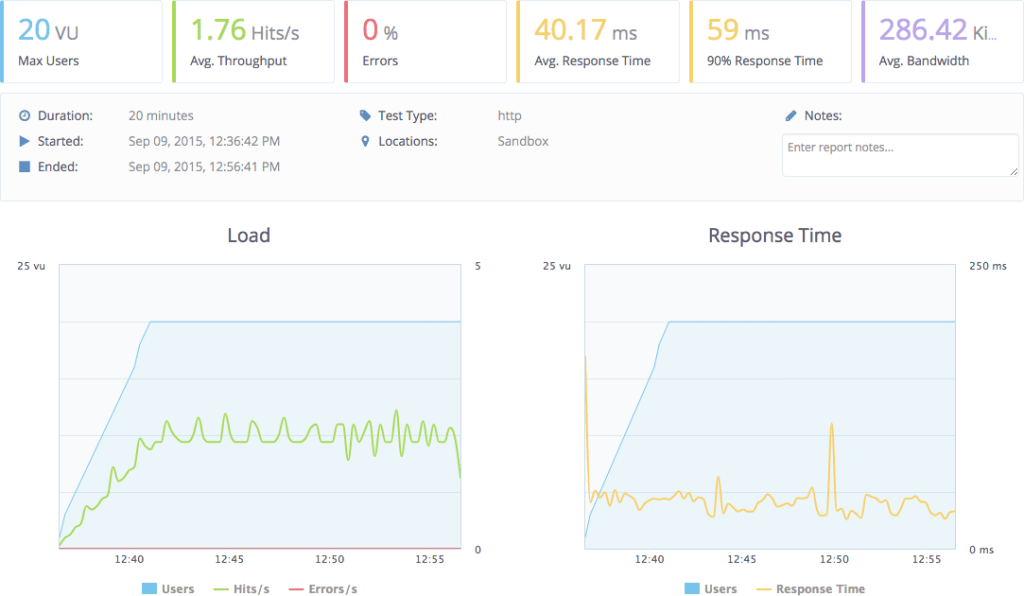
    To perform the load and the measurement of the response I’m going to use the free version of BlazeMeter, an web application to trigger load testing which I’m falling in love with. The UI is great. I’m going to hit the home and the about page with their default configuration which includes up to 20 virtual users:

    In all the tests I’m going to make a few requests to the application manually after any restart to make sure the application is not being tested in cold. Ok… go!

    That is terrible! Under load it behaves so much worst! 17.1s response time. Now that we have a way to measure how horrendous our application is behaving, we need to pin-point which bit is causing this. The elephant in the room is of course server-side JavaScript execution.

    Disabling the server side JavaScript engine causes load times to go down:

    but what we really care about is the load testing:

    40ms vs 17000ms, that’s a big difference! The scripting engine is definitely the problem, so, what now?

    Optimizing time

    Now it’s time to find optimizations. Poking around Nashorn it seems the issue is that it has a very slow start. We already know that browsers spend a lot of time parsing and compiling JavaScript and the way we are using Nashorn, we are parsing and compiling all our JavaScript in every request. Clearly we should re-use this compiled JavaScript.

    Re-using Nashorn is not straightforward because it’s not thread safe while our server is multi-threaded. JavaScript just assumes that there’s one and only thread and when developing Nashorn they decided to respect that and not make any other assumptions, which leads to a non-thread-safe implementation. We need to re-use Nashorn engines, but never at the same time by two or more threads.

    Nashorn does provides a way to have binding sets, that is, the state of a program, separate from the Nashorn script engine, so that you could use the same engine with various different states. Unfortunately this is very poorly documented. Fortunately, ClojureScript is immutable, so we don’t have much to worry about breaking state.

    After a lot of experimentation and poking, I came up with an acceptable solution using a pool. My choice was to use Dirigiste through Aleph‘s Flow. To do that, we extract the creation of a JavaScript engine into its own function:

    (defn create-js-engine []
      (doto (.getEngineByName (ScriptEngineManager.) "nashorn")
        (.eval "var global = this")
        (.eval (-> "public/js/server-side.js"
                   io/resource
                   io/reader))))

    Then we define the pool. In Dirigiste, each object in the pool is associated to a key, so that effectively it’s a pool of pools. We don’t need this functionality, so we’ll have a single constant key:

    (def js-engine-key "js-engine")

    and without further ado, the pool:

    (def js-engine-pool
      (flow/instrumented-pool
        {:generate   (fn [_] (create-js-engine))
         :controller (Pools/utilizationController 0.9 10000 10000)}))

    flow is aleph.flow and Pools is io.aleph.dirigiste.Pools. In this pool you can have different controllers which create new objects in different ways. The utilization controller will attempt to have the pool at 0.9, the first arg, so that if we are using 9 objects, there should be 10 in the pool. The other two args is the maximum per key and the total maximum and they are set two numbers that are essentially infinite.

    The reason for such a big pool is that you should never run out of JavaScript engines. If your server is getting too many requests for the amount of RAM, CPU or whatever limit you find, it should be throttled by some other means, not by an arbitrary pool inside it. Normally you’ll throttle it by limiting the amount of worker threads you have or something like that.

    The function render-page was promoted to be top level and now takes care of taking a JavaScript engine from the pool and returning it when done:

    (defn render-page [path]
      (let [js-engine @(flow/acquire js-engine-pool js-engine-key)]
        (try (.invokeMethod
               ^Invocable js-engine
               (.eval js-engine "projectx.core")
               "render_page"
               (object-array [path]))
             (finally (flow/release js-engine-pool js-engine-key js-engine)))))

    The function to render the app now doesn’t create any engines, it just uses the previous method:

    (defn render-app [path]
      (html
        [:html
         [:head
          [:meta {:charset "utf-8"}]
          [:meta {:name    "viewport"
                  :content "width=device-width, initial-scale=1"}]
          (include-css (if (env :dev) "css/site.css" "css/site.min.css"))]
         [:body
          [:div#app [:div (render-page path)]]
          (include-js "js/app.js")]]))

    Let’s load test this new solution:

    That is a big difference. It’s almost as fast as no server side scripting! You can find this change in GitHub: https://github.com/carouselapps/isomorphic-clojurescript-projectx/… as well as the full final project: https://github.com/carouselapps/isomorphic-clojurescript-projectx/tree/nashorn

    Future

    There are a few problems or potential problems with this solution that I haven’t addressed yet. One of those is that at the moment I’m not doing anything to have Nashorn generate the same cookies or session as we would have in the real browser.

    This pool works well when it’s under constant use, but for many web apps that do not see than level of usage, the pool will kill all script engines which means every request will have to create a fresh one. Solving this might require creating a brand new controller, a mix between Dirigiste’s Pools.utilizationController  and Pools.fixedController.

    A big thanks to DomKM for his Omelette app, that was a source of inspiration.

    Another approach worth considering is to implement the rendering system in portable Clojure (cljc), the common language between Clojure and ClojureScript and have it run natively on the server, without the need of a JavaScript engine. I’m very skeptical of this working in the long run as it means none of your rendering function can ever use any JavaScript or if they do, you need to implement Clojure(non-Script) equivalents.

    This approach is being explored by David Tanzer and he wrote a blog post about it: Server-Side and Client-Side Rendering Using the Same Code With Re-Frame. David’s approach is to use Hiccup to do the rendering on the server side, where React and Reagent are not available. I personally prefer to steer clear of template engines that are not safe by default, like Hiccup at the time of  this writing, as they make XSS inevitable. The only reason why I’m using it in projectx is because that’s what the template provided and I wanted to do the minimum amount of changes possible.

    Another optimization I briefly explored is not doing the server side rendering for browsers that don’t need it, that is, actual browser being used by people, like Chrome, Firefox, Safari, even IE (>10). The problem is that many bots do identify themselves as those types of browsers and Google gets very unhappy when its bots see a different page than the browsers, so it’s dangerous to perform this optimization except, maybe, for pages that you can only see after you log in.

    In conclusion I’m happy enough with this solution to start moving forward and using it, although I’m sure it’ll require much tweaking an improvement. Something I’m considering is turning it into a library, but this library would make quite a bit of assumptions about your application, how things are rendered, compiled, etc. What’s your opinion, would you like to see this code expressed as a library or are you happy to just copy and paste?

    Update

    There’s now a part 3 for this post.

    Photo by Jared Tarbell

  • I don’t think I have found the ultimate solution for this problem yet but I have reached a level in which I’m comfortable sharing what I have because I believe it’ll be useful for other people tackling the same problem.

    The reason why I doubt this is the ultimate solution is because it has not been battle tested enough for my taste. I haven’t used it in big applications and I haven’t used in production, maintaining it for months or years.

    The problem

    We are building SPAs, that is, single page applications. Think Google Maps or GMail. When you request the page, you get a relatively small HTML and a huge JavaScript app. This browser app then renders the page and from now on reacts to your interactions, requesting more data from the server whenever needed but never reloading the whole web page.

    The reason to develop an application like this is that the user experience ends up being much better. The app feels faster, snappier, more alive. Reloading the whole page, parsing CSS, JavaScript and HTML is slow, but rendering a snippet of HTML is fast. Furthermore, once you have a full app on the client you can start taking advantage of it, performing, for example, validation, storing data than you won’t request again, etc. which saves talking to the server, making the user experience much better.

    The problem, though, is that in the initial request you are not sending any content and many web consumers won’t run JavaScript to render your application. I’m talking about search engine bots, snippet generation bots (like the one Facebook, LinkedIn and Twitter use). Even though it seems Google’s bot is executing some JavaScript, it might not be wise to depend on it.

    Snippet and image generated by Facebook

    The solution is to run the client side of the application on the server up to the point of waiting for user interaction, generating the HTML that matches that page, and shipping that to the browser. This also help with the fresh page experience as the user will quickly get some content instead of having to wait for a lot of JavaScript to be parsed, compiled and executed (take a look at GMail and how long it takes to load and show you content).

    GMail loading…

    JavaScript, on the server

    Running the client JavaScript on the server is often referred to as isomorphic JavaScript, meaning, same form, that is, same code, running on both server and client. There are several server-side (no windows, headless) JavaScript implementations to chose from:

    When choosing my approach I was looking for a simple solution, one with the least moving parts to make it easier to deploy and more stable over time. Nashorn was an immediate winner as it ships with Java 8 and it’s well integrated, hiding away secondary processes and inter-process communication (if it’s happening at all, I’m not sure, and this is good).

    Nashorn came with two big issues though:

    • It’s slow to create new Nashorn instances (this might be true for all JS implementations).
    • The documentation is not great.

    I think I have overcame both of this issues, so, without further ado, let’s jump in. You can create a new script engine like this:

    (.getEngineByName (ScriptEngineManager.) "nashorn")

    ScriptEngineManager has many methods to get a script engine, some use the mime type, or the extension, and with those, you may or may not get Nashorn. I prefer to explicitly request Nashorn as it should be available on all Java 8 installations and I don’t believe we can transparently switch JavaScript implementations as they might be too different.

    Once you have a script engine, evaluating code is very easy:

    (.eval js-engine "var hello = 'world'")

    The method eval can also take files, streams, etc. Invoking a JavaScript method is a bit more involved:

    (.invokeMethod ^Invocable js-engine
                   js-object
                   "method_name"
                   (object-array [arg1 arg2 arg3])

    That will invoke the method method_name in the JavaScript object js-object which you can obtain this way:

    (.eval js-engine "object_name")
    

    There’s a lot more to Nashorn but that’s all we are going to use for implementing server-side JavaScript/ClojureScript.

    The application

    We’ll start from a reagent application created by:

    lein new reagent projectx

    which you can start by running:

    lein figwheel

    You can find all the code for this little application in GitHub: https://github.com/carouselapps/isomorphic-clojurescript-projectx. When you visit the app, you’ll briefly see this:

    That page, which you can find in handler.clj, is the actual HTML sent to the browser, before the ClojureScript/JavaScript kicks in:

    (def home-page
      (html
       [:html
        [:head
         [:meta {:charset "utf-8"}]
         [:meta {:name "viewport"
                 :content "width=device-width, initial-scale=1"}]
         (include-css (if (env :dev) "css/site.css" "css/site.min.css"))]
        [:body
         [:div#app
          [:h3 "ClojureScript has not been compiled!"]
          [:p "please run "
           [:b "lein figwheel"]
           " in order to start the compiler"]]
         (include-js "js/app.js")]]))

    Or in actual HTML:

    <html>
    <head>
        <meta charset="utf-8"/>
        <meta content="width=device-width, initial-scale=1" name="viewport"/>
        <link href="css/site.css" rel="stylesheet" type="text/css"/>
    </head>
    <body>
    <div id="app">
        <h3>ClojureScript has not been compiled!</h3>
        <p>please run <b>lein figwheel</b> in order to start the compiler</p>
    </div>
    <script src="js/app.js" type="text/javascript"></script>
    </body>
    </html>

    In production, you’ll normally want to show a message about the application being loaded. Here we are going to try to replace it with the actual rendered application.

    After seeing that page briefly, ClojureScript gets compiled to JavaScript, served to the browser, executed and it renders the homepage, which looks like this:

    This template conveniently ships with two pre-built pages, the home page and the about page. Click in the link to go to the about page and you’ll see its content but no request was sent to the server. All content was shipped before and the rendering happens client side:

    If we request that URL, we’ll se the same loading message and then the about page is going to be shown, but there’s a problem. The server doesn’t know that the about page was being requested because the fragment, the bit after the # in the URL, is not sent to the server.

    Proper URLs

    The reason why a fragment is used that way is because we don’t want to send a request to the server when we click a link and that’s what browsers do when you go from /blah#bleh to /blah#blih. Thankfully HTML 5 comes to the rescue with its history API. You can learn more about it in Dive into HTML5: Manipulating History for Fun & Profit. If you are wondering whether it’s safe to use this feature already, all current browsers support it (except Opera Mini) and IE since version 10:

    To move forward with server side rendering of SPAs you need to switch to HTML5 History, which is implemented in ClojureScript by a library called Pushy. While you are at it, I also recommend to switch to an bidirectional routing library like bidi or silk. To make the long story short, you can look at the diff to implement bidi and Pushy in projectx.

    Now that the we are using sane URLs, we need to process them on the server side. In the file handler.clj we’ll find the main HTML template, the routes and the app:

    (def home-page
      (html
       [:html
        [:head
         [:meta {:charset "utf-8"}]
         [:meta {:name "viewport"
                 :content "width=device-width, initial-scale=1"}]
         (include-css (if (env :dev) "css/site.css" "css/site.min.css"))]
        [:body
         [:div#app
          [:h3 "ClojureScript has not been compiled!"]
          [:p "please run "
           [:b "lein figwheel"]
           " in order to start the compiler"]]
         (include-js "js/app.js")]]))
    
    (defroutes routes
      (GET "/" [] home-page)
      (resources "/")
      (not-found "Not Found"))
    
    (def app
      (let [handler (wrap-defaults #'routes site-defaults)]
        (if (env :dev) (-> handler wrap-exceptions wrap-reload) handler)))

    home-page will stop being a constant as it’ll be a function on the path and while we are at it, let’s rename it to something more appropriate, like render-app:

    (defn render-app [path]
      (html
        [:html
         [:head
          [:meta {:charset "utf-8"}]
          [:meta {:name    "viewport"
                  :content "width=device-width, initial-scale=1"}]
          (include-css (if (env :dev) "css/site.css" "css/site.min.css"))]
         [:body
          [:div#app
           [:h3 "ClojureScript has not been compiled!"]
           [:p "please run "
            [:b "lein figwheel"]
            " in order to start the compiler"]]
          (include-js "js/app.js")]]))

    The reason why it’s taking the path and not the full URL is that the ClojureScript part of this app works with paths instead of URLs and we’ll need them to be consistent. This is due to how Pushy and likely HTML5 History behave.

    The routes will now pass the path to render-app:

    (defroutes routes
      (GET "*" request (render-app (path request)))
      (resources "/")
      (not-found "Not Found"))

    The function that turns the request into a path is similar to ring.util.request/request-url:

    (defn- path [request]
      (str (:uri request)
           (if-let [query (:query-string request)]
             (str "?" query))))

    When this change is done, you should see no effect in the running application at all. If you want to confirm things are working properly, you could add this to the render-app  function:

    [:p path]

    and you’ll see the path the server sees before the ClojureScript kicks in. You can see the diff for this step in GitHub: https://github.com/carouselapps/isomorphic-clojurescript-projectx/….

    The JavaScript engine

    Now things get interesting. The render-app method needs to run some JavaScript, so it’ll create the script engine. First, we need to import it (and also require clojure.java.io , which we’ll be using soon):

    (ns projectx.handler
      (:require ; ...
               [clojure.java.io :as io])
      (:import [javax.script ScriptEngineManager]))

    After creating the engine, we need to define the variable global because Nashorn doesn’t specify it and reagent needs it. Once that’s done, we are ready to load the JavaScript code:

    (defn render-app [path]
      (let [js-engine (doto (.getEngineByName (ScriptEngineManager.) "nashorn")
                        (.eval "var global = this")
                        (.eval (-> "public/js/app.js"
                                   io/resource
                                   io/reader)))]
        ; ...

    It doesn’t yet render anything, but let’s give it a try, let’s see it load the code or… well… fail:

    javax.script.ScriptException: ReferenceError: "document" is not defined in <eval> at line number 2

    What’s happening here is that app.js is referring document and Nashorn implements JavaScript, but it’s not a browser, it doesn’t have the global, window or document global objects. Let’s look at the offending file:

    var CLOSURE_UNCOMPILED_DEFINES = null;
    if(typeof goog == "undefined") document.write('<a href="http://js/out/goog/base.js">http://js/out/goog/base.js</a>');
    document.write('<a href="http://js/out/cljs_deps.js">http://js/out/cljs_deps.js</a>');
    document.write('if (typeof goog != "undefined") { goog.require("projectx.dev"); } else { console.warn("ClojureScript could not load :main, did you forget to specify :asset-path?"); };');
    

    This is a generated JavaScript file that is loaded by our small HTML file. It in turns causes the rest of the JavaScript files to be loaded but the mechanism it uses works in a browser, not in Nashorn. This is where things get hard.

    From the project definition, this is how app.js  is built:

    :cljsbuild {:builds {:app {:source-paths ["src/cljs" "src/cljc"]
                               :compiler {:output-to     "resources/public/js/app.js"
                                          :output-dir    "resources/public/js/out"
                                          :asset-path   "js/out"
                                          :optimizations :none
                                          :pretty-print  true}}}}

    It’s built with no optimizations. One of the optimizations, called whitespace, puts all the JavaScript in a single file, so there’s no document trick to load them, but sadly, it will not work in Figwheel.

    The solution I came up with, a hack, is to have two builds. One called app which is what I consider the JavaScript app itself and the other one called server-side, which is the one prepared to run on the server:

    :cljsbuild {:builds {:app {:source-paths ["src/cljs" "src/cljc"]
                               :compiler     {:output-to     "resources/public/js/app.js"
                                              :output-dir    "resources/public/js/app"
                                              :asset-path    "js/app"
                                              :optimizations :none
                                              :pretty-print  true}}
                         :server-side {:source-paths ["src/cljs" "src/cljc"]
                                       :compiler     {:output-to     "resources/public/js/server-side.js"
                                                      :output-dir    "resources/public/js/server-side"
                                                      :optimizations :whitespace}}}}

    For sanity’s sake, I changed the output of app to go to the directory called app, instead of out. Running Figwheel will auto-compile app, but not server-side; for that, you also need to run lein cljsbuild auto. Now the application loads with no errors.

    We also need to properly configure server-side for the dev and uberjar profiles:

    :cljsbuild {:builds {:app         {:source-paths ["src/cljs" "src/cljc"]
                                       :compiler     {:output-to  "resources/public/js/app.js"
                                                      :output-dir "resources/public/js/app"
                                                      :asset-path "js/app"}}
                         :server-side {:source-paths ["src/cljs" "src/cljc"]
                                       :compiler     {:output-to     "resources/public/js/server-side.js"
                                                      :output-dir    "resources/public/js/server-side"
                                                      :optimizations :whitespace}}}}
    
    :profiles {:dev     {;...
                         :cljsbuild    {:builds {:app         {:source-paths ["env/dev/cljs"]
                                                               :compiler     {:optimizations :none
                                                                              :source-map    true
                                                                              :pretty-print  true
                                                                              :main          "projectx.dev"}}
                                                 :server-side {:compiler {:optimizations :whitespace
                                                                          :source-map    "resources/public/js/server-side.js.map"
                                                                          :pretty-print  true}}}}}
    
               :uberjar {;...
                         :cljsbuild   {:jar    true
                                       :builds {:app         {:source-paths ["env/prod/cljs"]
                                                              :compiler     {:optimizations :advanced
                                                                             :pretty-print  false}}
                                                :server-side {:compiler     {:optimizations :advanced
                                                                             :pretty-print  false}}}}}}

    You might have notice that we are not including env/dev/cljs  and env/dev/cljs  for server-side. That is because those files call projectx.core/init!, which triggers the whole application to start working, which depends on global objects, like window, which are not present in Nashorn.

    With this, even the uberjar loads properly and creates JavaScript engines, but so far, we are not doing any server side rendering. That’s the next step. You can see the full diff for this change in GitHub: https://github.com/carouselapps/isomorphic-clojurescript-projectx/….

    To be continued…

    Part 2 has now been published.

    Photo by Jared Tarbell

  • jar-copier is a Leiningen plug in to copy jars from your dependencies to your source tree. It’s a very small simple utility that proved to be necessary to have a sane setup with Java agents (New Relic for example).

    It’s very simple to use. Put [jar-copier “0.1.0”]  into the :plugins  vector on your project.clj. To run this plug in, execute:

    $ lein jar-copier

    If you want the task to run automatically, which is recommended, add:

    :prep-tasks ["javac" "compile" "jar-copier"]

    and it’ll be invoked every time you build your uberjar.

    You need to configure the plug-in in your project.clj like this:

    :jar-copier {:java-agents true
                 :destination "resources/jars"}
    

    :java-agents instruct this plug in to automatically copy any jars that are specified as Java agents. :destination  specifies where to copy them to.

    For example, from proclodo-spa-server-rendering:

    (defproject proclodo-spa-server-rendering "0.1.0-SNAPSHOT"
      :dependencies [[org.clojure/clojure "1.7.0"]]
      :plugins [[jar-copier "0.1.0"]]
      :prep-tasks ["javac" "compile" "jar-copier"]
      :java-agents [[com.newrelic.agent.java/newrelic-agent "3.20.0"]]
      :jar-copier {:java-agents true
                   :destination "resources/jars"})
    

    Photo by Maik Meid

  • I’m reading the book Refactoring and one of the refactorings it shows is called “Consolidate Duplicate Conditional Fragments” and it shows an example in Java:

    if (isSpecialDeal()) {
      total = price * 0.95;
      send();
    } else {
      total = price * 0.98;
      send();
    }

    is refactored into

    if (isSpecialDeal()) {
      total = price * 0.95;
    } else {
      total = price * 0.98;
    }
    send();

    If you do it in Python it’s actually quite similar:

    if isSpecialDeal():
      total = price * 0.95
      send()
    else:
      total = price * 0.98
      send()

    is refactored into

    if isSpecialDeal():
      total = price * 0.95
    else:
      total = price * 0.98
    send()

    But in Ruby it’s different. In Ruby, like in Lisp, everything is an expression, everything has a value (maybe there are exceptions, I haven’t found them). Let’s look at it in Ruby:

    if isSpecialDeal()
      total = price * 0.95
      send()
    else
      total = price * 0.98
      send()
    end

    is refactored into

    total = if isSpecialDeal()
      price * 0.95
    else
      price * 0.98
    end
    send()

    Or if you want it indented in another way:

    total = if isSpecialDeal()
                  price * 0.95
                else
                  price * 0.98
                end
    send()

    We can push it one step further:

    total = price * if isSpecialDeal()
                              0.95
                            else
                              0.98
                            end
    send()

    Of these three languages, only Ruby can manage to have inside each branch of the if only what changes depending on the condition and nothing else. In this simple case you could use the ternary operator, :?, but if the case wasn’t simple, Ruby would be at an advantage.

    I’m reading Refactoring: Ruby Edition next.

  • This can unleash so much hate mail, but here it goes, my inbox is ready!

    Are dynamic languages just a temporary workaround? I’m not sure! I’m switching between the two types of languages all the time: Java, Python, C#, JavaScript. I’ll try to make the long story short.

    Statically typed languages, like Java and C#, are nice because when you do

    blah.bleh()

    you know that blah’s class has a bleh method, at compile time. But better than that, when you typed “blah.” you get a list of methods, and you already know whether there’s a bleh method or not, and if you typed bleh and it doesn’t exist, the IDE lets you know, no need to wait for the compiler. Also you can do very deterministic refactoring, renaming all “bleh” for “bluh” for example.

    Statically typed languages are not nice because they are very verbose and require a lot of boilerplate (if you’ve used Haskell, just bear with me for now please), so you end up with things like:

    List[Car] cars = new List[Cars]();
    foreach (Car car in cars) {
        car.Crash();
    }

    How many “cars” do you read there? And that’s a nice example. There are worse. So come dynamically typed languages and you can write:

    cars = []
    for car in cars:
        car.crash()

    You have less cars, and less (no) lists. That means you are more productive. You start chunking out code faster without having to stop and think “What type of object will this or that method return?”. But crash() can crash your application instead of just the car because you can’t know if it exists until run-time. That might be OK or not, testing and whatnot.

    Then comes C# 3.0 where you can do:

    var cars = new List[Car]();
    foreach (var car in cars) {
        car.crash();
    }

    And you can see that syntactically it got closer to Python, which is what gives you the productivity. Don’t know the type? type “var”. But semantically, it’s still statically typed, like the previous statically typed example. You know that car is going to be of some class that has a crash method. You can actually know car’s class at compile time, no need to run it.

    That’s called type inference. You don’t have to specify the type where the compiler is capable of inferring it for you. C# type inference system is still very limited (but better than Java’s). Let’s see an example in another language

    cars = []
    map crash cars

    That means, create a list called cars, call the function crash on each car. Would you say that that is a statically typed language? or a dynamic one? I’d say it is dynamic, but it is static. Very static. It’s Haskell. Haskell’s compiler will infer all the types for you. It’s amazing, you’ll write code as robust as with C#, but as terse as Python’s (Monads will then kill your productivity, but that’s another story).

    In Python 3 you can define types for arguments. They are mostly useless, but it’s an interesting direction. I think the best it can do is that when a program crashes it’ll tell you: “function blah expected an int, but got a float, not sure if that was the problem, but you might want to look into that”.

    Now, my question is, are dynamically typed languages just a temporary workaround? As our compilers get better, our computers faster, will statically typed languages keep giving us as many or more reassurances about our code and utilities while at the same time they become as simple and terse as dynamically typed languages? Or will dynamically typed languages start to gain types and over time be more static without the programmers that use them ever noticing?

    My question is, will we in the future, 50 or 100 years, look back and said “Dynamically typed languages where a temporary workaround to statically languages being painful to use when human beings and their toy computers were so primitive?” in the same way we can say today that “non-lexical scope was a limitation we had and have due to the limitations of computer hardware 30 years ago”.

    Reviewed by Daniel Magliola. Thank you!

  • NetBeans could make the Ruby on Rails experience great for the vast majority of developers who are using Windows, where installing Ruby, Rails, PHP, MySQL, Python, etc is always a pain and the end result is ugly. But it falls short in some important ways which turned my experience with it into a nightmare.

    The reason I say “for developers using Windows” is because I believe that for everybody else, the experience is great already. Or as good as it can be and NetBeans can be an excellent IDE, but not improve the installation and managing experience.

    This is my story, my rant.

    I downloaded the latest NetBeans and installed it. When creating my first Ruby project, I encountered the first problem. Ruby chocked on my username, which was “J. Pablo Fernández”. You could say it was my fault. Windows 7 asked for my name and I typed it. I wasn’t aware it was asking for my username. Even then I would have typed the same, because Windows 7 doesn’t distinguish between usernames and names, and in the 21st century, computers should be able to deal with any character anywhere.

    I know it’s not NetBeans’ fault, it’s Ruby’s. But! Can you imagine a Software Engineer telling Steve Jobs “oh, copying files in a Mac behaves weirdly because it uses rsync and that’s its behavior, you see, it makes sense because…”? Of course Steve would have interrupted: “You’ve failed me for the last time”. The next developer would have patched rsync, trying to get the patch upstream, or creating an alternate rsync or stop using rsync.

    I’ve spent many hours creating another user, migrating to it, which in Windows is like 100 times harder than it should.

    Hours later, as soon as I created a project I got a message saying that I should upgrade gem, Ruby’s package manager, because the current version was incompatible with the current Rails version. By then I had already played with NetBeans’ gem interface telling it to upgrade everything, it should have upgraded gem as well, not just the gems. Every single developer out there running NetBeans must be encountering this error, and indeed there are quite a few threads about it on forums.

    Trying to upgrade gem with NetBeans was impossible. I think what they did to install and upgrade gems in NetBeans is excellent, but failing to upgrade gem itself was a huge drawback. This one was NetBeans’ fault. Neverfear, let’s do it from the command line.

    When doing it from the command line I encountered another error:

    \NetBeans was unexpected at this time.

    Looking around it seems it’s because of the spaces in “Program Files (x86)”. That means that the command line environment for Ruby that NetBeans installs is broken for everybody. I repeat: everybody. The answer: install it somewhere else.

    Well, I have two things to say about it: first, fix the freaking thing, Ruby, gem, whatever. Paths can have spaces and all kind of weirdness. It’s a big world full of people speaking languages that can’t be represented with ASCII and people that believe computers should do our bidding, instead of the other way around. “If I want spaces you better give me spaces, useless lump of metal and silicon”.

    Second, if you know one of your dependencies is broken, try to avoid triggering the broken behavior or at least warn the user about it. “We see you picked C:\Program Files (x86)\ to install NetBeans, which is pretty standard, but you know, Ruby is broken and can’t work in there, not even JRuby, so if you plan to use those at all, please consider installing it somewhere else.”

    I uninstalled NetBeans, or tried to. The uninstaller didn’t work. I deleted it and tried to install it on C:\ProgramFilesx86, which failed because some other directory created by NetBeans somewhere else existed from the previous installation, which halted the installation. I started a dance of run installer, remove dir, run installer, remove dir, run installer… until it worked.

    Once I finished I found out that NetBeans installed in C:\ProgramFilesx86\Netbeans 6.7.1. Yes, that’s a space. Oh my…

    As a bonus, NetBeans can’t automatically find Sun’s JDK in its default directory. I had to point to it by hand. Sun was, as usually, absolutely disrespectful of the platform conventions and installed its crap in C:\Sun. I would have picked another place but I thought “I’m sure some stupid program will want to pick that shit from there”. Silly me.

    12 hours have passed and I still haven’t been able to write a single line of source code. I contemplated installing Ruby by hand, but it’s so ugly that I decided I’m not going to use Windows for this. I’m going to work on another platform where installing Ruby is trivial and where I would probably never touch NetBeans because I have other editors.

    I know there’s a lot not really related to NetBeans here, for example, the fact that working with Python, or Ruby or MySQL in Windows is a pain; but it’s a great opportunity for NetBeans. There are developers wanting to use those languages and environments and if NetBeans makes it easy for them, they will pick NetBeans not because of its editor, but because of everything else (which is what I was hoping to get out of NetBeans).

    Aside from doing some usability tests, the people working on NetBeans should learn from the people working on Ubuntu (not the people working on Evolution) and instead of asking me for debugging traces when I report a simple obvious bug and then tell me it’s not their fault, they should submit those bugs upstream, to Ruby, gem, or whatever. Whenever someone like me submits that bug to NetBeans they should mark it as duplicate of an existing open bug that points to the upstream bug. I would have followed that link and told the Ruby developers “wake up!”. As it is, I didn’t. It’s too much work for me.

    Reviewed by Daniel Magliola. Thank you!