Blog

  • One on One Meetings (a free chapter from How to Hire and Manage Remote Teams)

    One on One Meetings (a free chapter from How to Hire and Manage Remote Teams)

    Category:

    Publish date:

    This blog post is a sample chapter from my book:
    How to Hire and Manage Remote Teams

    The term one-on-one evolved to refer to a specific type of meeting and does not mean any general meeting that has two people on it. One-on-ones are the regular meetings between a manager and each of their reportees. One-on-ones are always important but in a distributed team they become critical – mainly because you are not going to be able to run into your reportees on the hallways and have a quick meaningful conversation opportunistically.

    A one-on-one has several goals and I recommend the relevant chapters on The Hard Thing About Hard Things (Ben horowitz) and High Output Management (Andrew Grove) in order to understand more about how to conduct them and their importance.

    The main and most critical role of the one-on-one is to identify problems, or potential problems, as early as possible. By the time one of your employees tells you they have another job offer, more often than not, it’s way too late to do anything about it. The issues leading to their moving posts will have started long before, perhaps months, and the opportunity to address them will have been when it first arose. If you’re not aware, and not providing the opportunity for your worker to make you aware, a problem can fester beyond the point of salvation. The one-on-one aims to reduce this possibility.

    A one-on-one is the time when an employee can bring up small issues:

    • I’m not happy with our project.
    • Work is boring.
    • I feel my ideas are ignored.
    • This person is being rude to me.
    • The way we work just sucks.

    And from that information it is your job to start fixing it. 

    However, it is unlikely your employee will feel empowered to say any of this unless they already trust you. For this reason, one-on-ones should not be reserved for only dealing with critical issues, or when you suspect there could be a problem. Routinely meeting is an exercise in building the rapport that will be required for the worker to bring up any real problem.

    For those uneventful one-on-ones, it is important that you keep a balance between listening and sharing. If you don’t share anything at all, you’ll end up coming across as an interrogator. It is through sharing that you show them that you are listening and empathizing with what they are saying.

    The opposite tends to be a bigger problem. If you as the manager go into long monologues during the one on ones most of your employees will respectfully listen and hate every minute of it. Many of us tend to have a bias that means that if we feel we spoke for 50% of the time, we actually spoke 70% of the time, so you might need to rein it in.

    Since you are doing this remotely, you could get a stopwatch and during a couple one-on-ones measure how much you talk or how much they talk. Don’t worry about getting too precise (for example, when switching back and forth quickly during clarifying questions). This is just a rough approximation. Your performance during those one-on-ones will be distracted, so this isn’t something to do regularly, but it can be a useful self-test to show yourself your baseline.

    To achieve a good balance, here’s a recipe you can follow:

    1. Start with the pleasantries: How are you? Fine, you? Fine. This is neither sincere nor useless. It’s a protocol to start communicating, it establishes cadence, tone of voice. Don’t ignore it, but also don’t take it at face value.
    2. Ask one or two questions to let the worker become comfortable talking. “How was this week?” or “That was a good release, wasn’t it?”
    3. Re-ask them how they are doing: “Now, really, how are you doing? All good in your life?”. Now is when you need to start practicing silence.
    4. Ask them if they have any questions for you. Continue practicing silence.
    5. Ask them what was the best or worst part of the week. Again… silence.

    When I say practice silence, what I mean is that you ask the question and then shut up. Different people take different amounts of time to start talking. Especially if they need to bring up a difficult subject, which can require mustering some courage. Give them time and space. This will feel uncomfortable, but it’s a skill you need to master. There are some stereotypes that introverts are more comfortable with silence than extroverts, but I’m not sure how true it is. If you are a manager, you are probably more comfortable talking than the worker (if they are developers for example), so you might need to put up with more discomfort.

    The initial “How are you?” question is part of the protocol of starting a conversation. There are some studies that show that it establishes speed cadence, tone of voice and other aspects of communication. What it’s not is a sincere question of how someone is doing. Don’t expect people to answer it truthfully; if they do, great! But most people need to be asked twice. But… avoid asking twice in a row. When we are asked the same question twice in quick succession, it engenders the feeling of being accused, as though we are lying or are being unreliable – so most of us will dig in our heels and avoid changing our answer. Most of us need to warm up to a conversation before we can answer truthfully. So ask some other benign questions, and then circle back round to it. 

    If at any point during that recipe your worker takes off on a tangent that is useful, as in it’s providing you with the information you need about their wellbeing, drop the recipe and follow their lead. The recipe is there for the cases where a worker is being more passive, which is likely to be true when you are just starting to work together.

    I recommend taking copious notes during the ones-on-ones and following up on things that were happening. These notes should be strictly private.

    I tend to run one-on-ones in two different schedules:

    • Weekly but optional.
    • Every other week but mandatory.

    Every other week but mandatory is the default way I use to schedule one-on-ones. Weekly but optional is a scheme that I use under many special circumstances:

    • The employee and I don’t know each other well.
    • The employee is new to the team.
    • I am new to the team.
    • There’s an ongoing issue or conflict.
    • They are a junior employee needing more guidance.

    The optionality has limitations: we can skip one, if they are being productive and have no pending issues to discuss in the one-on-one. Once it’s skipped one week, the next week it becomes mandatory.

    Normally I book one-on-ones to last 25 minutes with five minutes for me to finalize my notes. If someone reaches the end of the one-on-one and there are pending issues to resolve, book another meeting straight away to continue working on it (this rarely happens).

    It’s very easy for one on ones to become status reports. It’s something easy for the worker to say, and it’s something easy for the manager to consume, but the one on ones are not about performance or what got done. To drive that point: imagine the situation in which the line manager and the project manager are different people, the line manager does the one-on-one but the project manager cares about the status reports of what has been done. 

    Instead, I suggest you just say something along the lines of: “This is not about a progress report, but was there anything you enjoyed or that annoyed you this week?”

    That last part of the question allows the worker to do a retrospective and instead of talking about having achieved tasks A, B and C, they can talk about how whilst doing C they had a conflict with another worker; or how they loved doing B and wished they were doing more of that. Those are important signals for you.

    The one-on-ones cannot be extremely transactional. It takes time for someone to be comfortable to tell you about a problem they have. This is normal: people literally go to the doctor, where their confidentiality is protected by law, and still procrastinate on sharing something because it’s uncomfortable. So don’t expect that a worker will just show up and tell you there’s a problem because you have an “open door” policy. You need more than that. You really need to prove yourself approachable proactively, and that happens through repeated positive small interactions.

    If, like me, you have a terrible memory, write down the names of their spouses, children, pets, birthdays, what’s going on with their lives and ask them about it the next time (“how was your holiday to Mallorca?” or “How was [daughter’s name] school play?”). These are notes that I consider extremely private; not to be shared with employers or other managers. I don’t even write them on a medium they could gain access to (normally I use paper). For me, it’s the same as with any other friend: I have a calendar with their birthdays, because it’s important that I don’t miss them.

    In Summary: one-on-ones are often neglected or perceived as only necessary when something is already wrong. In fact they are a vital means of establishing rapport with your team and keeping on top of what’s going on with your employers. This is really the only way you’re going to be able to identify minor issues before they become big problems, and has knock-on effects on employee retention, team morale, and productivity.

    This blog post is a sample chapter from my book:
    How to Hire and Manage Remote Teams

  • Using Font Awesome 6 in a Rails 7 project that uses importmaps

    Using Font Awesome 6 in a Rails 7 project that uses importmaps

    Category:

    Publish date:

    I just figured out how to use Font Awesome 6 in a Rails 7 project that uses importmaps. I’m not entirely sure why this works and why some of the workarounds are needed, but my googling yielded no results when I was searching so hopefully here I’ll be saving the next person some time.

    If you search Rubygems for gems with the name “font awesome” you’ll find quite a few but I didn’t like any of them. They all use the font version of the icons, instead of the SVG, or they are very outdated, or they expect you to use SCSS, which I’m not using at the moment. But ultimately, the team at Font Awesome maintains the NPM packages and we should use those directly, not re-wrap packages that will always be out of date.

    For me, using NPM packages directly was higher priority than using importmaps. That’s how strongly I feel about it. I would have installed Webpacker to use Font Awesome’s main package.

    I managed to make this work, but if I’m frank, I’m not 100% sure why the workarounds are needed, so if you have any insights about it or how to improve this, please drop a comment.

    Font Awesome’s documentation says you should install the fontawesome-free package:

    npm install --save @fortawesome/fontawesome-free

    Instead we are going to pin that package, but also some of the dependencies we need later:

    ./bin/importmap pin @fortawesome/fontawesome-free \
                        @fortawesome/fontawesome-svg-core \
                        @fortawesome/free-brands-svg-icons \
                        @fortawesome/free-regular-svg-icons \
                        @fortawesome/free-solid-svg-icons

    This adds the following lines to your importmap.rb:

    pin "@fortawesome/fontawesome-free", to: "https://ga.jspm.io/npm:@fortawesome/fontawesome-free@6.0.0/js/fontawesome.js"
    pin "@fortawesome/fontawesome-svg-core", to: "https://ga.jspm.io/npm:@fortawesome/fontawesome-svg-core@1.3.0/index.es.js"
    pin "@fortawesome/free-brands-svg-icons", to: "https://ga.jspm.io/npm:@fortawesome/free-brands-svg-icons@6.0.0/index.es.js"
    pin "@fortawesome/free-regular-svg-icons", to: "https://ga.jspm.io/npm:@fortawesome/free-regular-svg-icons@6.0.0/index.es.js"
    pin "@fortawesome/free-solid-svg-icons", to: "https://ga.jspm.io/npm:@fortawesome/free-solid-svg-icons@6.0.0/index.es.js"

    Then Font Awesome’s documentation says you should add these lines to your code:

    <script defer src="/your-path-to-fontawesome/js/brands.js"></script>
    <script defer src="/your-path-to-fontawesome/js/solid.js"></script>
    <script defer src="/your-path-to-fontawesome/js/fontawesome.js"></script>

    Which might make you think this is a good idea:

    <script defer src="https://ga.jspm.io/npm:@fortawesome/fontawesome-free@6.0.0/js/brands.js"></script>
    <script defer src="https://ga.jspm.io/npm:@fortawesome/fontawesome-free@6.0.0/js/solid.js"></script>
    <script defer src="https://ga.jspm.io/npm:@fortawesome/fontawesome-free@6.0.0/js/fontawesome.js"></script>

    But it doesn’t work. It fails with this error:

    Here I’m a bit confused. How come it fails with that error? Any ideas?

    What did work was editing app/javascript/application.js and adding::

    import {far} from "@fortawesome/free-regular-svg-icons"
    import {fas} from "@fortawesome/free-solid-svg-icons"
    import {fab} from "@fortawesome/free-brands-svg-icons"
    import {library} from "@fortawesome/fontawesome-svg-core"
    import "@fortawesome/fontawesome-free"
    library.add(far, fas, fab)

    I can’t help but feel that there’s a function or method in fontawesome-free that I could call that would do all the setup automatically with less imports and less library building, but I couldn’t find it yet.

  • I have a problem: 3 or 5 stars?

    I have a problem: 3 or 5 stars?

    Category:

    Publish date:

    I’m an avid reader and I review every single book I read. I force myself to write at least two paragraphs. This is useful to me because sometimes I forget I have read something; seeing and reading back my own reviews answers the ‘did I already read that’ question but also refreshes my memory on what I thought of it. I do this in Goodreads, where I’m asked to provide a star quality rating of the book, and that’s where the problem starts.

    Normally, I rate them for myself and my rating is this:

    • 5: Amazing book, humanity is better off because this book exists and everyone should read it.
    • 4: Great book, will recommend it to most people.
    • 3: Good book, I enjoyed reading it.
    • 2: Bad book, I didn’t enjoy reading it.
    • 1: Terrible book, this is actively harmful for humanity and should not have been written.

    This naturally means most of my books get 3 stars, some 4 and 2 and even less 5 and 1. It’s a bell curve! Which should surprise no one. Actually, I think there are way more books in the 1-star category out there for consumption, it’s just very rare I accidentally read one. 

    But this is not how most people use star ratings. And it is also not how we are encouraged to use them either. Take Uber: in the event you did not give five stars, it specifically requests you to answer what was wrong with the trip. If the trip was perfectly adequate, it is expected that this be rated five stars. The upshot of this is that there is no way to reflect service that went above and beyond, or was otherwise better than ‘fine.’

    So most people give 5 stars unless there’s something wrong, in which case they start removing stars. 1 thing wrong? 4 stars. 2 things wrong? 3 stars. I think this is a bad way of rating things because, as mentioned above, it means you have no way of differentiating good, great and amazing: they all get the same 5 stars. For a service like Uber this is not such a problem, but for artistic works and for books it doesn’t fit. 

    I used to just do the rating for myself so I didn’t care I was using a different system to the rest. But when publishing on Goodreads and interacting with other people it became rather controversial: I have received both praise and criticism for this. Some people caught on and they know that when I give 4 and 5 stars, it’s a rarity and worth taking a look. Some people asked me why a book that I enjoyed, and recommended to them, is getting only 3 stars.

    What’s really bothering me with my discrepant system is that an author gets a (small) penalty for me being interested in them. Granted, this is tiny and unlikely to be noticed in the grand scheme of readers, but it still bothers me. Their average will go down, which negatively affects public perception, even though it really shouldn’t be perceived that way (to my mind). It also bothers me that an author might see 3 or 4 stars and be hurt and then confused by my positive review.

    Should I give up and remap my review system to what everyone else is doing? I dislike losing a way to signal “This book is amazing” By all means send your suggestions.

  • A odd numbering system I invented when I was a kid

    A odd numbering system I invented when I was a kid

    Category:

    Publish date:

    When I was a kid, my dad and I had a (friendly) argument. I said that digital displays were better and I wanted them everywhere, for example, as the speedometer of a car. My dad said that dials were better and he made his point:

    Dials are faster to read and remember and if the needle is oscillating, you can still read it and now what the average is.

    — My Dad

    He was right. If your speed was rapidly oscillating between 98km/h and 102km/h on a dial, it was trivial to read, on a digital display, it would be a blur that looks like 199km/h. You could solve it by dampening oscillations, but that creates other problems (lags) and it’s a boring solution.

    My dad was right, so I decided to solve the problem. I spent years thinking about and came up with a solution when I was 13 or so. A numbering system where only one digit changes at a time. Let me demonstrate. 0 through 9 is the same: 1, 2, 3, 4, 5, 6, 7, 8, 9. But the next number can’t be 10, because that’s changing two digits at the same time, so it’s 19… now what? Now you go down until you hit 10 and then you can go to 20, because between 10 and 20 there’s only one digit difference. Here’s from 1 to 30, highlighting the ones that are different:

    Normal PSDC
    0 0
    1 1
    2 2
    3 3
    4 4
    5 5
    6 6
    7 7
    8 8
    9 9
    10 19
    11 18
    12 17
    13 16
    14 15
    15 14
    16 13
    17 12
    18 11
    19 10
    20 20
    21 21
    22 22
    23 23
    24 24
    25 25
    26 26
    27 27
    28 28
    29 29
    30 39
    31 38
    32 37
    33 36
    34 35
    35 34
    36 33
    37 32
    38 31
    39 30

    The way it works is that when a digit is odd in the original normal decimal number, the next digit is PSDC is inverted. This is the Python code to convert numbers to PSDC representation:

    def convert_to_psdc(number):
      digits = [int(n) for n in list(str(number))]
      new_digits = []
      for i, digit in enumerate(digits):
        if i == 0 or digits[i - 1] % 2 == 0:
          new_digits.append(digit)
        else:
          new_digits.append(9 - digit)
      return int("".join([str(d) for d in new_digits]))

    Here are a few interesting PSDC numbers:

    Normal PSDC
    0 0
    1 1
    9 9
    10 19
    11 18
    18 11
    19 10
    20 20
    21 21
    99 90
    100 190
    101 191
    189 119
    190 109
    191 108
    999 900
    1000 1900
    1001 1901
    1900 1090
    1901 1091
    9999 9000
    10000 19000
    10001 19001
    99999 90000
    100000 190000
    100001 190001
    999999 900000
    1000000 1900000
    1000001 1900001
    9999999 9000000
    10000000 19000000
    10000001 19000001

    Problem solved! Not really, this is useless… but for some reason 13 year old me started to be obsessed with this and I still think about it frequently.

    If you want to see all the PSDC numbers up to 10k, I published a table on this site.

  • When raising prices is easier than lowering them

    When raising prices is easier than lowering them

    Category:

    Publish date:

    When you are building a B2B SaaS product it’s very hard to know what the appropriate price for your product is. Even if you magically found the correct one, it might not be the correct one next month when you made the product better and you are providing new values. That’s why you need to be constant experimenting with prices on your app.

    When I started my career I was afraid of raising prices, of having to justify why they went up (I wasn’t even aware of grandfathering). When I started to learn that most entrepreneurs set their prices too low, my partner and I decided to set the price too high and then lower it if it was necessary. Without realizing we painted ourselves to a corner.

    We didn’t want to just lower prices, we wanted to experiment with prices (switching from per-user to 3 plans, things like that). The problem was that anything we would come would cost a different amount for each customer. For some customers it would go up, and that wasn’t a problem, because we would grandfather them in. But for some customers it would plummet.

    There were two options for those customers:

    • Lower their prices according to the new plans and lose the revenue.
    • Don’t lower their prices and risk them being very angry about overpaying.

    Because we were a bootstrapped startup living month to month, every time we discussed this we would get stuck in a cycle of what-ifs one or the other situation. Eventually one day we made a rule of forbidding talking about pricing (trying to get some work done, because we would spend days and days discussing pricing).

    Eventually I found myself wishing that instead of starting with a high price and lowering it for experimentation, that we started with a low price and raising it for experimentation. We would have experimented much more. There’s another obvious solution which is not depend on the sweet revenue of those high prices. But even though it’s simple, I don’t think it’s easy… like sitting in front a pizza and not having a slide. Yeah… right!

    Next time I want to increment prices over time and even then try to give myself room for experimentation.

  • Buying tools

    Buying tools

    Category:

    Publish date:

    I have a few maxims when it comes to buying tools. One I heard from Adam Savage and I think he heard it from someone else. When buying a tool you haven’t used before:

    1. When buying a tool you haven’t used before, buy the cheapest possible working version. Not the toy one, but the next level up.
    2. Once you wear it down, break it, outgrow it, buy the most expensive one you can afford.

    The idea here is that the cheapest one will be enough to get you started and learning about the tool, maybe it’s the wrong tool, or maybe the path splits in two or maybe you end up just not using it that much. By the time you are done with the cheap one, you will have gain knowledge that lets you chose a better one.

    When you buy a better one, it’s cheaper to buy a for-life tool, than keeping buying it every now and then. At that point the extra quality might also be appreciated, specially around precision and accuracy.


    I recently had to choose which family of battery based tools to buy into. Generally when buying a tool, brand-loyalty is a liability, not an asset. Buy whichever tool matches you the best for your need for that tool, whether it’s quality or price. But when it comes to battery there’s an advantage in brand-loyalty because you can interchange batteries between your tools. It would be awesome if there was a standard of battery connectors but that will never happen.

    I’m a hobbyist and I do some home repair and DIY, so my demanding on tools is not that high. I do love quality but I found something that I love more than quality: variety. I’d rather have an OK drill and an OK stapler than a great drill. This actually happened recently and we bought the stapler and now we find so many uses for it. Having a large repertoire of tools helps find new paths, new projects, new ideas. When it comes to battery tools, I’d say, buy the cheapest ones that are good enough for you.

    Big caveat: if it’s for a job that has a fixed set of tools, then adding variety beyond the tools you need is worthless, so there you should ramp up quality instead.

    This was my decision with battery tools: the default is Ryobi, they are cheap but not too cheap and they have a great range of tools. If we outgrew a tool, for example, not enough power, or not enough resiliency, then we upgrade it to Makita and have two battery families, but no more than two. The decision on Makita is not final, I would probably reevaluate it when the time comes… so far Ryobi is performing really well.

  • I’m very proud of what I achieved at Wifinity

    I’m very proud of what I achieved at Wifinity

    Category:

    Publish date:

    Disclaimer: I’m blatantly tooting my own horn here because I’m proud of what I achieved, and very proud of what my team achieved. This is a personal story and a shout out to some awesome people.

    Today Jordan Bundy, someone I hired when I was at Wifinity sent all of us this message (pic included):

    Happy 1 year anniversary of getting the band together

    Jordan Bundy
    Part of the Wifinity team having dinner on our first get together.

    Today is the one year anniversary of the Wifinity software engineering team meeting face to face for the first time. I built this team completely distributed from the start and once I had the phase 1 complete, after months of being team mates but never having met, we had our first get together. Everyone was flown to London, where Wifinity is based, and we spent a week working, doing design/architecture, talking to all heads of departments, getting to know each other, and having geeky fun.

    Might have been the best business trip I’ve been on.

    Jordan Bundy

    What geeky fun? We all went to Bletchley Park to learn about code breaking during WWII and the birth of computers (where else?):

    On the day we all met, everybody was joking and talking as though we were old friends, like we knew each other already. I was ready to play host, to be the ice breaker, to work hard to make people comfortable… I ended up having to work hard to keep up instead. 

    At Wifinity I was in charge of all the technical aspects of a big Intellectual Property acquisition that had many moving parts that needed to come together in a 6 month program. We collectively wrote many hundreds of thousands of words of documentation that ended up being indexed, searched, tidied up and so on.

    The hardest part was probably migrating all of the servers from one company to another with minimal disruption to the wifi users. My goal was to have 100 or less complains and would have given us all a pat on the back for less than 10. In the end we got 0. Well… actually in the middle of the server transition we got 1 complaint, but turned out it was for a competitor service. That was pretty funny. A lot of credit for this migration goes to Chris Nash and Sam Whannel. If you need an SRE/DevOps/SysAdmin/SysOp type of person, you can’t go wrong with them.

    On the software development side the team did a marvelous job at taking over a very old code base with lots of technical debt, a lot of problems.

    Goran Jovic focused on security and he found some nerve wracking issues that we scrambled to fix. I remember internal conversations at Wifinity discussing pentesting; I think having Goran on the team was better than most pentesting.

    While we patched those security fixes, Rémi Sultan built an entirely new reusable authentication system that matched the needs of the company so that an entire class of bugs would be unlikely to ever happen again. He didn’t do it because it was on the roadmap but because he felt strongly about having a robust product, and he was correct.

    On the frontend side of things I had the pleasure of working with Grzegorz “Greg” Pabian. He’s an expert at many things. He was our resident Git wizard, teaching everybody the black arts of advance git and helping us when we got stuck with a broken branch. He could also have big-architecture thinking on the frontend so when he started re-writing and modernizing code, what he produced was a thing of beauty.

    Jordan Bundy also started on the frontend but it became clear to me that he’s a talented generalist. He didn’t stay on the frontend, he ventured into the backend and beyond, working with stakeholders. When I was leaving Wifinity, I recommended him to take over as manager of the team.

    And on the QA side of things I worked with Twayne Street. He’s good and fast at testing software. He would find so many rare bugs and his reports were so detailed and helpful. He started writing an automated testing system for Wifinity that looked pretty good. I really wish I would have seen it come to fruition.

    I’m very proud of what all of us achieved together at Wifinity and I miss working with this team a lot. I’d happily work with them again, and I know they would me; until then I’ve gained some very good friends. And I’m taking suggestions for our next nerdy venue. 


  • Good bye LastPass

    Good bye LastPass

    Category:

    Publish date:

    I’ve been using LastPass for 7 years or more and I have converted various business and people to use LastPass but that ended today. I’m a security minded person so I’m not abandoning passwords managers, just LastPass.

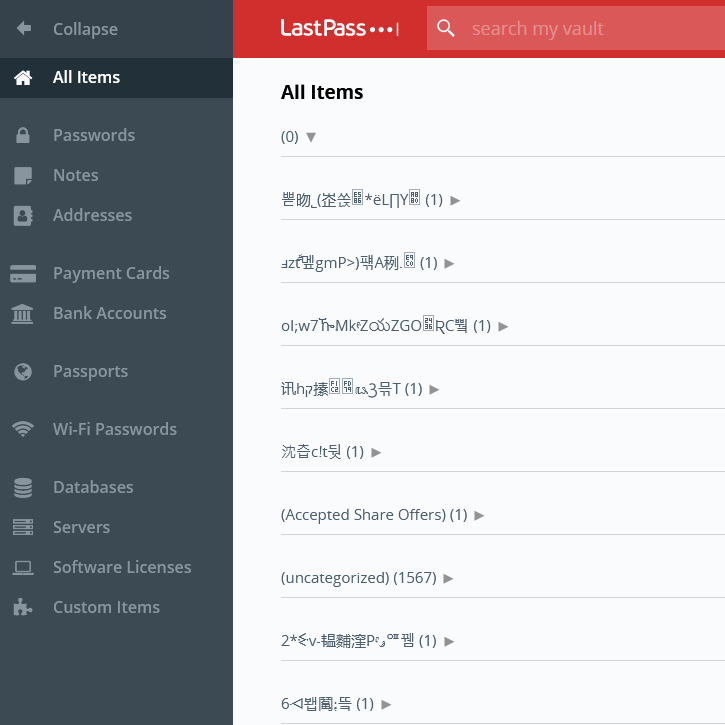
    A few days ago I woke up and my LastPass vault looked like this:

    That looks bad… I contacted support which took about a day to tell me “Oh, yeah, your Vault is corrupted, don’t worry about it, we logged you out and fixed it. Just log back in.”

    Pfiuuuu! I thought. That was a nerve wracking unproductive day, but at least LastPass support eventually showed up and fixed it…. NOPE!!!! It was still corrupt. I sent about 30 more emails to LastPass over a period of 4 days after that and I got no response.

    I did manage to revert my vault back to the last master password I used, which thankfully wasn’t changed so long ago so I didn’t lose that many passwords and also thankfully I still remember that master password. But this is completely unacceptable behavior from LastPass to a paying user, so that’s it, I’m done with LastPass.

    Any recommendations on password managers?

  • How I started documenting at a new company

    How I started documenting at a new company

    Category:

    ,

    Publish date:

    I once got a job at a company that was acquiring a massive piece of intellectual property from another and it was my task to build a team to maintain and transition the knowledge as well as running assets (servers, databases, etc). The company that hired me had no relevant the documentation and the IP we were buying came with very little and all potentially obsolete. Everything was a matter of asking random people one after the other piecing together the puzzle until the answer was built. Oh… and I had 6 months to get it done.

    The process of starting to write documentation was very daunting, so I created a new type of document that I named “Exploration”. An exploration is frozen in time and describes something that happened, was found, discovered, figured out, etc. For example an exploration might say: “My boss asked me to add an account, I didn’t know we had accounts. I asked Johnny and he said Sally used to do it but she left. I asked my boss who replaced Sally and I was told to talk to Sam. Sam told me how he adds accounts, the steps are 1, 2, 3, 4. He doesn’t know what step 3 does but he knows that if you don’t do it, the account doesn’t work.”

    An exploration is frozen in time and describes something that happened, was found, discovered, figured out, etc.

    I bet I’m not the first one to come up with this concept, but I haven’t seen it anywhere. Have you?

    The goal of the explorations is to quickly form a written corpus of documentation about “How do we do things here?”. This allows you to depend less on people, which is very useful during transitions or turbulent periods where people might leave.

    One of the key aspects of explorations is that they are narrative, informal, and not necessarily high quality. It’s hard to write the manual so people don’t do it. Specially if it’s a big manual of which nothing is written. The exploration is a brain dump.

    Explorations should be stored in a centralized documentation system that’s easily searchable. My preference is Confluence (maybe using the blogging feature), the cool kids are using Notion these days. Stay away from Google Docs, because it promotes private copies and there’s no way of having a single tree or directory of documentation. Being able to easily search all explorations is very important and they should be searchable with the rest of the documentation.

    Explorations sometimes evolve into proper documentation, procedures that are maintained and live. When that happens, I often have a See Also section in the document that points to the explorations that influenced it and at the top of the explorations I add links to the document. It’s important to note that explorations are tier 2 documentation and it’s important that everybody knows it so that they are not taken as truth when read and are written liberally.

    The frequency at which explorations are created changes depending on what’s going on at the company, but generally people should be writing them any time they faced something puzzling. The way I do it is very simple: I constantly debrief with my team about what they did and after they told me the story of what happened, what they did, the workarounds and we have a good laugh, I almost always say: “Please, write an exploration about it”. It takes some effort to get started, but I think often people realize not having to remember things and just making brain dumps has a lot of value. Eventually they would just write explorations without me asking.

    Don’t expect explorations to have an immediate effect. It takes time to build a corpus of data that is worth searching for answers. It might take you a year to get there.

  • A manager should multiply, not add

    A manager should multiply, not add

    Category:

    Publish date:

    If you are managing a team of people that are transporting rocks from A to B and you spend one hour picking ups rock from A and dropping them on B, you added one hour of work. If you spend that one hour procuring wheeled carts so that people don’t have to carry rocks on their backs, you increased their performance by 25% (and happiness). One task makes you an adder, one makes you a multiplier.

    And this is very semantically correct. If your team has 0 people, increasing 25% of 0 is still 0. Your effort was wasted.

    If you are a multiplier, the more people you manage, the more impact you have. That’s why often the compensation of a person at the top of a huge organization is so big (not to say that current CEO compensation is correct, that’s another story).

    I find this is a good heuristic to know if I’m working on the right thing as a manager. Am I adding or am I multiplying? Sometimes I have to add, but if all I do is add, am I a manager?

    The output of a manager is the output of the organizational units under his or her supervision or influence.

    Andy Grove, High Output Management

    Something to keep in mind is that multiplying is hard. Well, it’s hard to find the opportunities when you can multiply. You need to sit down, look at the team carrying the stones, think about a better way, go find some carts, get a quote, evaluate it, run an experiment, see the increase in performance, discover not everyone knows what to do with it, write the manual and the training program, stop everyone from carrying stones (temporarily dropping productivity) so they can learn to use the wheeled carts.

    If as a manager you are so busy with interruption work that constantly lands on your lap, busy doing adding work, you will not have the time and mental space to think and find opportunities to multiply. This is why I don’t like the always-busy CEO or always-busy manager. When do they do their thinking?

    If you want to learn more about this I highly recommend Andy Grove’s High Output Management.