I’m sure this is not my idea, so I’m not claiming it to be. I’ve been wanting to do a sort of continuous AI eval in production for a while, but the situation never presented a work. It was a mixture of having the data to do the eval off line, and wanting to avoid the risks of doing it in prod. But now I’m going to do it for a side project.
I don’t want to reveal what my side project is yet, so I’ll keep it vague. I’m very excited about this part, so I wanted to share it early. And I’m hoping that the Internet will tell me if, as it usually does, if this is a bad idea.
I have a task that will be done by an AI and I can measure how successful it was done but only 2 to 7 days after the task was completed and seeing it out there, in the world. I will gather some successful examples to use as part of the prompt, but I don’t have a good way to measure the AIs output other than my personal vibes which is not good enough.
My plan is to use OpenRouter and use most models in parallel, each doing a portion of the tasks (there are a lot of instances of these tasks). So if I go with 10 models, each model would be doing 10% of the tasks.
After a while I’m going to calculate the score of each model and then assign the proportion of tasks according to that score. So the better scoring models will take most of the tasks. I’m going to let the system operate like that for a period of time and recalculate scores.
After I see it become stable, I’m going to make it continuous, so that day by day (hour by hour?), the models are selected according to their performance.
Why not just select the winning model? This task I’m performing benefits from diversity, so if there are two or more models maxing it out, I want to distribute the tasks.
But also, I want to add, maybe even automatically, new models as they are released. I don’t want to have to come back to re-do an eval. The continuous eval should keep me on top of new releases. This will mean a fixed percentage for models with no wins.
What about prompts? I will also do the same with prompts. Having a diversity of prompts is also useful, but having high performing prompts is the priority. This will allow me to throw prompts on the arena and see them perform. My ideal would be all prompts in all models. I think here I will have to watch out for the amount of combinations making it take too long to get statistically significant data about each combination’s score.
What about cost? Good question! I’m still not sure if cost affects the score, as a sort of multiplier, or whether there’s a cut-off cost and if a model exceeds it, it just gets disqualified. At the moment, since I’m in the can-AI-even-do-this phase, I’m going to ignore cost.
When I was 16 years old or so, one day, my computer didn’t boot. I got a blue screen with some white text-mode error. Something was broken with the file system. This was after being utterly disappointed by Windows 95 and before I became a Linux person, so I was running Windows NT 4.0. I was the only person I knew running that operating system, and thus the only person I knew with an NTFS partition.
What to do now? That was my only computer, thus I couldn’t get online, smartphones wouldn’t be invented for another decade, I had nobody to ask for help and no tools to run checks on an NTFS partition. That filesystem was quite new back then. I could just blank the hard drive and reinstall Windows NT and all the software. But what about my data? my data!!!
At 16 years old I learned the lesson that the data is the most valuable and important thing inside my computer. Everything is replaceable. I’m sure if I could see that data now I would life, but for 16-year-old-me, that was my life. I started making backups and since that day I had a personal backup strategy that’s more robust than 90% of the companies I talk to. I have yet to lose a file and I hope to keep it that way. My ex-wife recently recovered from a complete computer failure because she’s following the backup strategy I set up for her.
One of the things I wonder is, should I have to do a total restore of my data, how do I verify it? I have more than 2 million files. Big chunks could be missing and it might take me years to notice. Because I have so much data to backup, keeping my 3 backups all up to date is hard, so it’s possible that I may have to reconstruct my information piecing things together from the 3 of them. Technically my backup software should be able to do it. But… I’m skeptical.
This is why every night I have an automatic script that generates a list of all of my files in a text file. That text file gets backed up and unless that files gets permanently and historically lost, I can use it to verify a backup restore. I think my friend Daniel Magliola gave me this idea.
Since I use Windows (shocker, I know, but try building a Mac workstation with 6 screens and play video games and report back to me), I wrote the script in PowerShell, but since I couldn’t find anything like Linux’s find, the script invokes wsl. Here it is, normally I put it in c:\Users\pupeno\.bin\filelist.ps1:
echo "Creating list of all files in C:"

wsl find /mnt/c/Users/pupeno -type b,c,p,f,l,s > C:\Users\pupeno\.all-files.new.txt

move -Force C:\Users\pupeno\.all-files.new.txt C:\Users\pupeno\.all-files.txt

echo "Creating lists of all files in D:"

wsl find /mnt/d -type b,c,p,f,l,s > D:\.all-files.new.txt

move -Force D:\.all-files.new.txt D:\.all-files.txt

echo "Creating lists of all files in E:"

wsl find /mnt/e -type b,c,p,f,l,s > E:\.all-files.new.txt

move -Force E:\.all-files.new.txt E:\.all-files.txt
And this is how it’s configured in the Task Scheduler to run every night. First run Task Scheduler:
One of my projects, Unbreach, has a database of more than 600 breaches. These come from haveibeenpwned and they are composed of some metadata, a one-paragraph description, and an image. I wanted to improve these with more content, links to articles, tweets, videos, and some content of my own.
I decided that a good way to do it would be to move them from the app, which resides at app.unbrea.ch, to the marketing website, which is at unbrea.ch, essentially creating them as blog posts. That way after the blog post is automatically created (when haveibeenpwned ads the breach), I can go in and manually edit it in all the WordPress glory. I thought this was going to take me a few hours, not days.
Hopefully, with this blog post, it’ll only take you hours. I’ll be using Ruby but it should be trivial to translate it to Python, JavaScript, or any other programming language. Writing the code wasn’t the hard part, understanding the WordPress.com world was.
WordPress has two different APIs that should be able to accomplish this task, one is the XML-RPC API and the other is the REST API. The XML-RCP API depends on a file called xmlrpc.php and it’s strongly recommended you leave this deactivated because it had a lot of security issues. It’s also old, cumbersome, and possibly on the way out. I didn’t want to use it and I don’t think you should either.
From what I can gather the REST API is what the admin tool uses, so using it sounds like a safe bet. If you are going to be creating blog posts from an unattended background process, as I do, you’ll find your first obstacle when you read about authentication because it just assumes there’s a browser sending cookies.
Fear not! There are plug-ins that implement other authentication methods and one of those is the Application Passwords plug-in. Which is now discontinued because it’s been merged into WordPress itself in version 5.6. This sounds promising until you realize the feature seems to be missing in WordPress.com.
If you search how to create an Application Password on WordPress.com you’ll land in the wrong place. WordPress.com users have an Application Password that’s hidden behind the Two-Step Authentication in Security. This is what it looks like:
If you are here you are in the wrong place
What’s going on here? Well, WordPress.com has its own API, which is a REST API, and if you talk to support and WordPress.com they’ll point you to that. I wasn’t a fan of that solution because although I want to use WordPress.com, I don’t want to be tied to it. I want to be able to move to WP Engine or something like that whenever I want.
That API, similar to the REST API, assumes there’s a human interacting through a third-party application, so it’s not great for unattended processes. Authentication works using OAuth2 which for a background job that just needs an API key I find very annoying. It’s doable but annoying. Well… it’s doable until you enable 2FA and then it’s not doable anymore, and that’s why that specific Application Password exists.
WordPress.com support also told me that the WordPress REST API is enabled only if you are on a business plan or above.
So… where’s the Application Password for the REST API then? I don’t know if there’s a link to it anywhere, but you get to it by going to https://example.com/wp-admin/profile.php where example.com is the URL of your blog. That is, add /wp-admin/profile.php to it. On WordPress.com’s defense, it was their support that finally pointed me to it. When you go there you’ll see an old-style profile page:
The correct place to set up an application password to use the WordPress REST API
The previous Application Password was tied to the user, this one is tied to the user and the site, so if you have more than one site you’ll need to create one per site.
And that was the hard part. Once I got that application password things just worked. It’s a straightforward and mostly well-documented API. I’ll share my messy code here anyway (sorry, didn’t have time to clean it up).
In Ruby I’m using a library called Faraday to talk to APIs. The first thing is creating the Farady object that has the metadata that will be used in all the requests:
The first thing I need is the id of the category in which these posts will end up. This is very important because they appear on a separate page about breaches and not on the blog and that’s achieved with categories:
Now, if the category doesn’t exist, I want to create it:
if category.nil?
  response = conn.post("/wp-json/wp/v2/categories") do |req|
    req.body = {name: "Breach"}
  end
  if response.status != 201
    raise "Unexpected response #{response.status}: #{response.body}"
  end
  category = response.body
end
Then I needed to do the same with tags. In my case, the tags were in a field called data_classes and the code for getting the id of the tag and creating it if it doesn’t exist is very similar:
tags = data_classes.map do |data_class|
  response = conn.get("/wp-json/wp/v2/tags", {search: data_class, _fields: %w[id name]})
  if response.status != 200
    raise "Unexpected response #{response.status}: #{response.body}"
  end
  tag = response.body.find { |tag| tag["name"] == data_class }
  if tag.nil?
    response = conn.post("/wp-json/wp/v2/tags") do |req|
      req.body = {name: data_class}
    end
    if response.status != 201
      raise "Unexpected response #{response.status}: #{response.body}"
    end
    tag = response.body
  end
  tag
end
And finally, we can create the post. I create the content as an HTML snippet which causes WordPress to interpret it as classic content, not as blocks. But that’s fine because it renders well and the first time I edit one of those posts converting them to blocks is two clicks and works perfectly for this simple content.
At this point, I wasn’t done. I wanted these posts to have the image associated with the breach (the logo of the company breached). The first step was downloading it which was a trivial one-liner:
In that code, logo_path is actually a full URL of the file.
To create media items in WordPress, I needed to encode the post as multi-part, so I ended up creating a separate Faraday object for that:
multipart_conn = Faraday.new(url: ENV["WORDPRESS_URL"],
  headers: {"Authorization" => "Basic #{auth_token}"}) do |conn|
  conn.request :multipart
  conn.response :json
end
It should have been possible to use a single Faraday object for all requests, but when you specify multipart, you need to take care of encoding the JSON requests yourself and adding them as one of the parts. This is where I got lazy and just moved on with my work.
The code for creating the image in WordPress is this:
extension = File.extname(logo_path)
file_name = "#{name.underscore.tr("_", "-")}#{extension}"
content_type = if extension == ".png"
  "image/png"
else
  raise "Unexpected extension #{extension}"
end
media = multipart_conn.post("/wp-json/wp/v2/media", {
  date_gmt: (breach_date.to_time(:utc) + 12.hours).iso8601.to_s,
  status: "publish",
  title: title,
  comment_status: "closed",
  ping_status: "closed",
  alt_text: "Logo for #{title}",
  caption: "Logo for #{title}",
  description: "Logo for #{title}",
  post: post["id"],
  file: Faraday::Multipart::FilePart.new(StringIO.new(logo_request.body), content_type, file_name)
})
In reality, 100% of the images are PNG so I was ok with such a simplistic approach. When creating the FilePart I wrapped logo_request.body in a StringIO because it already contained the binary data of the image. If you have a local file you can just pass the path to FilePart.new and it just works.
And now that I had the image, I could set it as the featured image for the post I created earlier:
response = conn.post("/wp-json/wp/v2/posts/#{post["id"]}", {
  featured_media: media.body["id"]
})
if response.status != 200
  raise "Unexpected response #{response.status}: #{response.body}"
end
The reason why I didn’t create the image before creating the post was so that I could pass the post id to the image and thus the image would be connected to the post. I’m not sure how useful that is.
And that’s all.
I wonder if this code should be put in a gem and made reusable. WordPress points to the wp-api-client gem as the Ruby solution, which is read-only and abandoned. There’s also wordpress_v2_api, but I wasn’t a fan of the API (it’s almost like using HTTP directly), it hasn’t been touched in 6 years and I don’t believe it supports writing. I’m half tempted to fork wp-api-client, but does anybody else care, or is it just me? Please leave a comment if this is something you want to use.
I’ve hired about 20 developers in my career so far (and I’m looking forward to hire more). When job applications arrive I separate them in three piles: Yes, No, and Maybe. It’s better to do Yes and No piles, but it’s a luxury that I haven’t had (if curious, drop a comment and I’ll write another blog post about it).
In the No-pile I put all those people that are obviously not a match, people that explicitly tell me they never wrote code before, people outside the time zone target, applications with grammar so bad I can’t understand them, etc.
[…] the most important bit: I find some evidence that they have written code before.
In the Yes-pile I put all those that show promise. Their application looks good, their profile match and this is the most important bit: I find some evidence that they have written code before.
The rest of the applicants go to the Maybe-pile. They are not discarded, but I’m going to focus on the ones in the Yes-pile first because I believe I’ll find more successful candidates there than in the Maybe-pile. This doesn’t mean that someone brilliant isn’t in the Maybe-pile. It only means that I couldn’t find any evidence about their potential brilliance.
Landing on the Maybe-pile is almost as bad as landing on the No-pile
Here’s the kicker: I never get to the Maybe-pile. I always find all the candidates I want from the Yes-pile. Landing on the Maybe-pile is almost as bad as landing on the No-pile.
There are many ways in which you can make yourself go from the Maybe to the Yes pile. These are the best ways: blogging about code you write, writing tutorials, contributing to open source software. Having done all of that will not only put you in the Yes-pile, it’ll probably put you at the front.
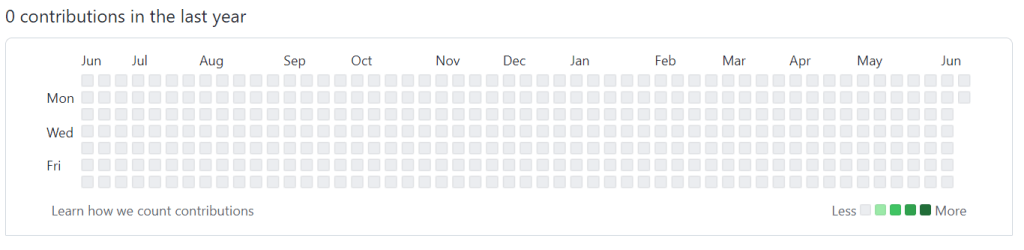
But those are things that require a lot of time an effort. There’s another thing that may only require a couple of minutes. If you’ve been using your GitHub account for work or for university, that account has a lot of activity. You may not be able to show code from work and you may not want to show code from university, but you may show the activity. Go to your Public Profile settings and tick “Include private contributions on my profile”:
This, if you have any private activity, will turn your public GitHub profile from something that looks like a ghost town:
into something like looks more lively:
The latter looks like a developer that wrote some code. It will not send you to the top of the Yes-pile, but if the rest of your application looks good, it might be enough to send you to the Yes-pile and it’s a change that requires only a few seconds.
Now, if you are in the know, you might object that this is completely fakable, and you are right. Yet, I don’t see people faking it. I see lots of empty profiles looking sad and empty, so it’s still a useful signal.
I’m not trying to find a perfect way to evaluate candidates, I’m trying to find a heuristic to help me find which ones to evaluate first
Even if some people fake it, I might still continue using the signal. It’s not like you don’t have to pass all the interviews after this anyway. Remember that I’m not trying to find a perfect way to evaluate candidates, I’m trying to find a heuristic to help me find which ones to evaluate first because it’s impossible to evaluate everyone.
Now, if you decide to fake it, you have two paths. The first one is to just fake, essentially lying about it. That’s a deception. The second is to troll. You can spell out your name or draw something in that part of GitHub. I won’t know if you have real activity or not, your profile won’t look as empty, but at least I know you know enough about coding to pull off that.
You could argue that because some people wrote the code to make that happen and uploaded to GitHub, all you have to do is find it and run it, and it doesn’t prove that you are above script kiddie. And then again, most applications I have don’t even have script kiddie level of a display of ability, so you may still be coming ahead.
The term one-on-one evolved to refer to a specific type of meeting and does not mean any general meeting that has two people on it. One-on-ones are the regular meetings between a manager and each of their reportees. One-on-ones are always important but in a distributed team they become critical – mainly because you are not going to be able to run into your reportees on the hallways and have a quick meaningful conversation opportunistically.
A one-on-one has several goals and I recommend the relevant chapters on The Hard Thing About Hard Things (Ben horowitz) and High Output Management (Andrew Grove) in order to understand more about how to conduct them and their importance.
The main and most critical role of the one-on-one is to identify problems, or potential problems, as early as possible. By the time one of your employees tells you they have another job offer, more often than not, it’s way too late to do anything about it. The issues leading to their moving posts will have started long before, perhaps months, and the opportunity to address them will have been when it first arose. If you’re not aware, and not providing the opportunity for your worker to make you aware, a problem can fester beyond the point of salvation. The one-on-one aims to reduce this possibility.
A one-on-one is the time when an employee can bring up small issues:
I’m not happy with our project.
Work is boring.
I feel my ideas are ignored.
This person is being rude to me.
The way we work just sucks.
And from that information it is your job to start fixing it.
However, it is unlikely your employee will feel empowered to say any of this unless they already trust you. For this reason, one-on-ones should not be reserved for only dealing with critical issues, or when you suspect there could be a problem. Routinely meeting is an exercise in building the rapport that will be required for the worker to bring up any real problem.
For those uneventful one-on-ones, it is important that you keep a balance between listening and sharing. If you don’t share anything at all, you’ll end up coming across as an interrogator. It is through sharing that you show them that you are listening and empathizing with what they are saying.
The opposite tends to be a bigger problem. If you as the manager go into long monologues during the one on ones most of your employees will respectfully listen and hate every minute of it. Many of us tend to have a bias that means that if we feel we spoke for 50% of the time, we actually spoke 70% of the time, so you might need to rein it in.
Since you are doing this remotely, you could get a stopwatch and during a couple one-on-ones measure how much you talk or how much they talk. Don’t worry about getting too precise (for example, when switching back and forth quickly during clarifying questions). This is just a rough approximation. Your performance during those one-on-ones will be distracted, so this isn’t something to do regularly, but it can be a useful self-test to show yourself your baseline.
To achieve a good balance, here’s a recipe you can follow:
Start with the pleasantries: How are you? Fine, you? Fine. This is neither sincere nor useless. It’s a protocol to start communicating, it establishes cadence, tone of voice. Don’t ignore it, but also don’t take it at face value.
Ask one or two questions to let the worker become comfortable talking. “How was this week?” or “That was a good release, wasn’t it?”
Re-ask them how they are doing: “Now, really, how are you doing? All good in your life?”. Now is when you need to start practicing silence.
Ask them if they have any questions for you. Continue practicing silence.
Ask them what was the best or worst part of the week. Again… silence.
When I say practice silence, what I mean is that you ask the question and then shut up. Different people take different amounts of time to start talking. Especially if they need to bring up a difficult subject, which can require mustering some courage. Give them time and space. This will feel uncomfortable, but it’s a skill you need to master. There are some stereotypes that introverts are more comfortable with silence than extroverts, but I’m not sure how true it is. If you are a manager, you are probably more comfortable talking than the worker (if they are developers for example), so you might need to put up with more discomfort.
The initial “How are you?” question is part of the protocol of starting a conversation. There are some studies that show that it establishes speed cadence, tone of voice and other aspects of communication. What it’s not is a sincere question of how someone is doing. Don’t expect people to answer it truthfully; if they do, great! But most people need to be asked twice. But… avoid asking twice in a row. When we are asked the same question twice in quick succession, it engenders the feeling of being accused, as though we are lying or are being unreliable – so most of us will dig in our heels and avoid changing our answer. Most of us need to warm up to a conversation before we can answer truthfully. So ask some other benign questions, and then circle back round to it.
If at any point during that recipe your worker takes off on a tangent that is useful, as in it’s providing you with the information you need about their wellbeing, drop the recipe and follow their lead. The recipe is there for the cases where a worker is being more passive, which is likely to be true when you are just starting to work together.
I recommend taking copious notes during the ones-on-ones and following up on things that were happening. These notes should be strictly private.
I tend to run one-on-ones in two different schedules:
Weekly but optional.
Every other week but mandatory.
Every other week but mandatory is the default way I use to schedule one-on-ones. Weekly but optional is a scheme that I use under many special circumstances:
The employee and I don’t know each other well.
The employee is new to the team.
I am new to the team.
There’s an ongoing issue or conflict.
They are a junior employee needing more guidance.
The optionality has limitations: we can skip one, if they are being productive and have no pending issues to discuss in the one-on-one. Once it’s skipped one week, the next week it becomes mandatory.
Normally I book one-on-ones to last 25 minutes with five minutes for me to finalize my notes. If someone reaches the end of the one-on-one and there are pending issues to resolve, book another meeting straight away to continue working on it (this rarely happens).
It’s very easy for one on ones to become status reports. It’s something easy for the worker to say, and it’s something easy for the manager to consume, but the one on ones are not about performance or what got done. To drive that point: imagine the situation in which the line manager and the project manager are different people, the line manager does the one-on-one but the project manager cares about the status reports of what has been done.
Instead, I suggest you just say something along the lines of: “This is not about a progress report, but was there anything you enjoyed or that annoyed you this week?”
That last part of the question allows the worker to do a retrospective and instead of talking about having achieved tasks A, B and C, they can talk about how whilst doing C they had a conflict with another worker; or how they loved doing B and wished they were doing more of that. Those are important signals for you.
The one-on-ones cannot be extremely transactional. It takes time for someone to be comfortable to tell you about a problem they have. This is normal: people literally go to the doctor, where their confidentiality is protected by law, and still procrastinate on sharing something because it’s uncomfortable. So don’t expect that a worker will just show up and tell you there’s a problem because you have an “open door” policy. You need more than that. You really need to prove yourself approachable proactively, and that happens through repeated positive small interactions.
If, like me, you have a terrible memory, write down the names of their spouses, children, pets, birthdays, what’s going on with their lives and ask them about it the next time (“how was your holiday to Mallorca?” or “How was [daughter’s name] school play?”). These are notes that I consider extremely private; not to be shared with employers or other managers. I don’t even write them on a medium they could gain access to (normally I use paper). For me, it’s the same as with any other friend: I have a calendar with their birthdays, because it’s important that I don’t miss them.
In Summary: one-on-ones are often neglected or perceived as only necessary when something is already wrong. In fact they are a vital means of establishing rapport with your team and keeping on top of what’s going on with your employers. This is really the only way you’re going to be able to identify minor issues before they become big problems, and has knock-on effects on employee retention, team morale, and productivity.
I just figured out how to use Font Awesome 6 in a Rails 7 project that uses importmaps. I’m not entirely sure why this works and why some of the workarounds are needed, but my googling yielded no results when I was searching so hopefully here I’ll be saving the next person some time.
For me, using NPM packages directly was higher priority than using importmaps. That’s how strongly I feel about it. I would have installed Webpacker to use Font Awesome’s main package.
I managed to make this work, but if I’m frank, I’m not 100% sure why the workarounds are needed, so if you have any insights about it or how to improve this, please drop a comment.
This adds the following lines to your importmap.rb:
pin "@fortawesome/fontawesome-free", to: "https://ga.jspm.io/npm:@fortawesome/[email protected]/js/fontawesome.js"
pin "@fortawesome/fontawesome-svg-core", to: "https://ga.jspm.io/npm:@fortawesome/[email protected]/index.es.js"
pin "@fortawesome/free-brands-svg-icons", to: "https://ga.jspm.io/npm:@fortawesome/[email protected]/index.es.js"
pin "@fortawesome/free-regular-svg-icons", to: "https://ga.jspm.io/npm:@fortawesome/[email protected]/index.es.js"
pin "@fortawesome/free-solid-svg-icons", to: "https://ga.jspm.io/npm:@fortawesome/[email protected]/index.es.js"
Then Font Awesome’s documentation says you should add these lines to your code:
Here I’m a bit confused. How come it fails with that error? Any ideas?
What did work was editing app/javascript/application.js and adding::
import {far} from "@fortawesome/free-regular-svg-icons"
import {fas} from "@fortawesome/free-solid-svg-icons"
import {fab} from "@fortawesome/free-brands-svg-icons"
import {library} from "@fortawesome/fontawesome-svg-core"
import "@fortawesome/fontawesome-free"
library.add(far, fas, fab)
I can’t help but feel that there’s a function or method in fontawesome-free that I could call that would do all the setup automatically with less imports and less library building, but I couldn’t find it yet.
When I was a kid, my dad and I had a (friendly) argument. I said that digital displays were better and I wanted them everywhere, for example, as the speedometer of a car. My dad said that dials were better and he made his point:
Dials are faster to read and remember and if the needle is oscillating, you can still read it and now what the average is.
— My Dad
He was right. If your speed was rapidly oscillating between 98km/h and 102km/h on a dial, it was trivial to read, on a digital display, it would be a blur that looks like 199km/h. You could solve it by dampening oscillations, but that creates other problems (lags) and it’s a boring solution.
My dad was right, so I decided to solve the problem. I spent years thinking about and came up with a solution when I was 13 or so. A numbering system where only one digit changes at a time. Let me demonstrate. 0 through 9 is the same: 1, 2, 3, 4, 5, 6, 7, 8, 9. But the next number can’t be 10, because that’s changing two digits at the same time, so it’s 19… now what? Now you go down until you hit 10 and then you can go to 20, because between 10 and 20 there’s only one digit difference. Here’s from 1 to 30, highlighting the ones that are different:
Normal
PSDC
0
0
1
1
2
2
3
3
4
4
5
5
6
6
7
7
8
8
9
9
10
19
11
18
12
17
13
16
14
15
15
14
16
13
17
12
18
11
19
10
20
20
21
21
22
22
23
23
24
24
25
25
26
26
27
27
28
28
29
29
30
39
31
38
32
37
33
36
34
35
35
34
36
33
37
32
38
31
39
30
The way it works is that when a digit is odd in the original normal decimal number, the next digit is PSDC is inverted. This is the Python code to convert numbers to PSDC representation:
def convert_to_psdc(number):
  digits = [int(n) for n in list(str(number))]
  new_digits = []
  for i, digit in enumerate(digits):
    if i == 0 or digits[i - 1] % 2 == 0:
      new_digits.append(digit)
    else:
      new_digits.append(9 - digit)
  return int("".join([str(d) for d in new_digits]))
Here are a few interesting PSDC numbers:
Normal
PSDC
0
0
1
1
9
9
10
19
11
18
18
11
19
10
20
20
21
21
99
90
100
190
101
191
189
119
190
109
191
108
999
900
1000
1900
1001
1901
1900
1090
1901
1091
9999
9000
10000
19000
10001
19001
99999
90000
100000
190000
100001
190001
999999
900000
1000000
1900000
1000001
1900001
9999999
9000000
10000000
19000000
10000001
19000001
Problem solved! Not really, this is useless… but for some reason 13 year old me started to be obsessed with this and I still think about it frequently.
Almost every time I tell someone what Dashman, one of my startups, was, their response is: “Oh, I really needed that back in 20somethingteen”. Yet I didn’t manage to make Dashman a commercial success.
I collected several hundreds of email addresses over years of people interested in Dashman. Yet it failed, nobody bought it.
How can a product show that much demand and have no sales?
I’m purposely not telling you what Dashman was, because it doesn’t matter.
I think the problem is that Dashman had a demand curve with a shape I didn’t predict. People would find themselves needing Dashman to solve a problem and would happy become a subscribing customer if Dashman was right in front of them… but… and this is the important part…. if Dashman wasn’t, they would find a workaround and not need it anymore. If I came a year later with Dashman they would buy because the workaround was working and switching was not worth the effort because their current pain around this issue was 0.
Dashman solved a pain that generally stayed around for a couple of weeks and then disappeared. It didn’t matter if the pain was intense or not, it went away. You know what market behaves like that? Weddings. If you have a great idea for a product for Weddings and you spend 5 years collecting people that want to use it, once you release it, how many would start using it? Maybe the last couple of months of interested people. Everyone before that is already married and your product is worthless to them.
I have heard weddings being a bad industry to work at but in all the books about building products in which they tell you to find the customer first I never read “make sure your demand doesn’t dissipate with time“.
I have a few maxims when it comes to buying tools. One I heard from Adam Savage and I think he heard it from someone else. When buying a tool you haven’t used before:
When buying a tool you haven’t used before, buy the cheapest possible working version. Not the toy one, but the next level up.
Once you wear it down, break it, outgrow it, buy the most expensive one you can afford.
The idea here is that the cheapest one will be enough to get you started and learning about the tool, maybe it’s the wrong tool, or maybe the path splits in two or maybe you end up just not using it that much. By the time you are done with the cheap one, you will have gain knowledge that lets you chose a better one.
When you buy a better one, it’s cheaper to buy a for-life tool, than keeping buying it every now and then. At that point the extra quality might also be appreciated, specially around precision and accuracy.
I recently had to choose which family of battery based tools to buy into. Generally when buying a tool, brand-loyalty is a liability, not an asset. Buy whichever tool matches you the best for your need for that tool, whether it’s quality or price. But when it comes to battery there’s an advantage in brand-loyalty because you can interchange batteries between your tools. It would be awesome if there was a standard of battery connectors but that will never happen.
I’m a hobbyist and I do some home repair and DIY, so my demanding on tools is not that high. I do love quality but I found something that I love more than quality: variety. I’d rather have an OK drill and an OK stapler than a great drill. This actually happened recently and we bought the stapler and now we find so many uses for it. Having a large repertoire of tools helps find new paths, new projects, new ideas. When it comes to battery tools, I’d say, buy the cheapest ones that are good enough for you.
Big caveat: if it’s for a job that has a fixed set of tools, then adding variety beyond the tools you need is worthless, so there you should ramp up quality instead.
This was my decision with battery tools: the default is Ryobi, they are cheap but not too cheap and they have a great range of tools. If we outgrew a tool, for example, not enough power, or not enough resiliency, then we upgrade it to Makita and have two battery families, but no more than two. The decision on Makita is not final, I would probably reevaluate it when the time comes… so far Ryobi is performing really well.
Disclaimer: I’m blatantly tooting my own horn here because I’m proud of what I achieved, and very proud of what my team achieved. This is a personal story and a shout out to some awesome people.
Today Jordan Bundy, someone I hired when I was at Wifinity sent all of us this message (pic included):
Happy 1 year anniversary of getting the band together
Jordan Bundy
Part of the Wifinity team having dinner on our first get together.
Today is the one year anniversary of the Wifinity software engineering team meeting face to face for the first time. I built this team completely distributed from the start and once I had the phase 1 complete, after months of being team mates but never having met, we had our first get together. Everyone was flown to London, where Wifinity is based, and we spent a week working, doing design/architecture, talking to all heads of departments, getting to know each other, and having geeky fun.
Might have been the best business trip I’ve been on.
Jordan Bundy
What geeky fun? We all went to Bletchley Park to learn about code breaking during WWII and the birth of computers (where else?):
On the day we all met, everybody was joking and talking as though we were old friends, like we knew each other already. I was ready to play host, to be the ice breaker, to work hard to make people comfortable… I ended up having to work hard to keep up instead.
At Wifinity I was in charge of all the technical aspects of a big Intellectual Property acquisition that had many moving parts that needed to come together in a 6 month program. We collectively wrote many hundreds of thousands of words of documentation that ended up being indexed, searched, tidied up and so on.
The hardest part was probably migrating all of the servers from one company to another with minimal disruption to the wifi users. My goal was to have 100 or less complains and would have given us all a pat on the back for less than 10. In the end we got 0. Well… actually in the middle of the server transition we got 1 complaint, but turned out it was for a competitor service. That was pretty funny. A lot of credit for this migration goes to Chris Nash and Sam Whannel. If you need an SRE/DevOps/SysAdmin/SysOp type of person, you can’t go wrong with them.
On the software development side the team did a marvelous job at taking over a very old code base with lots of technical debt, a lot of problems.
Goran Jovic focused on security and he found some nerve wracking issues that we scrambled to fix. I remember internal conversations at Wifinity discussing pentesting; I think having Goran on the team was better than most pentesting.
While we patched those security fixes, Rémi Sultan built an entirely new reusable authentication system that matched the needs of the company so that an entire class of bugs would be unlikely to ever happen again. He didn’t do it because it was on the roadmap but because he felt strongly about having a robust product, and he was correct.
On the frontend side of things I had the pleasure of working with Grzegorz “Greg” Pabian. He’s an expert at many things. He was our resident Git wizard, teaching everybody the black arts of advance git and helping us when we got stuck with a broken branch. He could also have big-architecture thinking on the frontend so when he started re-writing and modernizing code, what he produced was a thing of beauty.
Jordan Bundy also started on the frontend but it became clear to me that he’s a talented generalist. He didn’t stay on the frontend, he ventured into the backend and beyond, working with stakeholders. When I was leaving Wifinity, I recommended him to take over as manager of the team.
And on the QA side of things I worked with Twayne Street. He’s good and fast at testing software. He would find so many rare bugs and his reports were so detailed and helpful. He started writing an automated testing system for Wifinity that looked pretty good. I really wish I would have seen it come to fruition.
I’m very proud of what all of us achieved together at Wifinity and I miss working with this team a lot. I’d happily work with them again, and I know they would me; until then I’ve gained some very good friends. And I’m taking suggestions for our next nerdy venue.