In previous blog posts I mention that Bidi and Silk are essentially equivalent. I don’t believe this anymore. I now prefer Silk and I can show you why with a little example. First, let’s define some routes:
So far I would consider them equivalent. Silk gives you more information about the route but is also more noisy. I personally dislike the namespaced keywords, but that’s easily solved with:
The real difference, for me, comes when I try to parse /about?,which should be the same as /about and some lazy URL handling libraries emit the former rather than the latter. Silk first:
Oops, what happened here? A bit of digging around lead me to the issue Why are query parameters not supported anymore? Essentially, Bidi’s design is that you shouldn’t route on query arguments (which I would agree in principle) and thus it relays on others to separate the two, something I don’t like at all. In a ClojureScript application it would requiring some pre-parsing of the URL, while Silk does it for you.
Silk also seems to support, if not routing, at least reporting port, host, user, scheme and even fragment. This can come in handy at some point. If you want to learn more about using Silk and Pushy, take a look at the blog post No-hashes bidirectional routing in re-frame with Silk and Pushy.
In part 1 I covered the basic problem that SPA (single page applications) face and how pre-rendering can help. I showed how to integrate Nashorn into a Clojure app. In this second part, we’ll get to actually do the rendering as well as improving performance. Without further ado, part 2 of isomorphic ClojureScript.
Rendering the application
Now to the fun stuff! It would be nice if we had a full browser running on the server where we could throw our HTML and JS and tell it go! but unfortunately I’m not aware of such thing. What we’ll do instead is call a JavaScript function that will do the rendering and we’ll inject that into our response HTML.
The function to convert a path into HTML will be called render-page and it’ll be in core.cljs:
We need to mark this function as exportable because JavaScript optimizations can be very aggressive even removing dead code and since this code is called dynamically from Clojure, it’ll look like it’s unused and it’ll be removed.
render-page is similar to mount-root but instead of causing the result to be displayed to the user, it just returns it. The former takes the path as an argument while the latter reads it from the local state which is in turn set by Pushy by reading the current URL.
To invoke that function, we’ll go back to handler.clj, just after we define js-engine we’ll define a function called render-page:
and instead of sending a message about the application is loading, we just call it:
[:div#app [:div (render-page path)]]
That extra div is not necessary, it’s there only because projectx.core/current-page adds it and without it you’ll get a funny error in the browser:
Aside from that little trip into the internals of React, which is interesting, we now have a snappy, pre-rendered application… that is… if you can wait 3 seconds or so for it to load:
That is not good, not good at all. We have a serious performance problem here, we need to get serious about fixing it.
Performance
The first step to fix any performance problems is making sure you have one, as premature optimization is the root of all evil. I think we are at this point with this little project. The second step is measuring the problem: we need a good repeatable way of measuring the problem that allows us to actually locate it and and verify it was fixed.
To measure the performance behaviour of this app I’m going to use one of Heroku’s bigger instances, the Performance-L, which is a dedicated machine with 14GB of RAM. The reason is that I don’t want out of memory or my virtual CPU affected by other instances to muddy my measurements. That unacceptable 3 seconds load time was measured in that type of server.
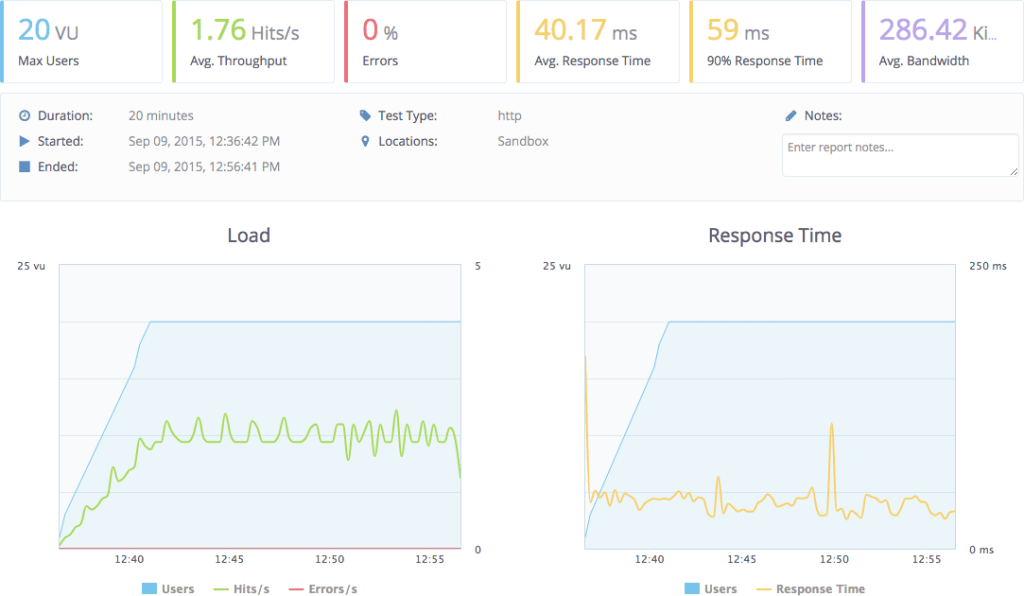
To perform the load and the measurement of the response I’m going to use the free version of BlazeMeter, an web application to trigger load testing which I’m falling in love with. The UI is great. I’m going to hit the home and the about page with their default configuration which includes up to 20 virtual users:
In all the tests I’m going to make a few requests to the application manually after any restart to make sure the application is not being tested in cold. Ok… go!
That is terrible! Under load it behaves so much worst! 17.1s response time. Now that we have a way to measure how horrendous our application is behaving, we need to pin-point which bit is causing this. The elephant in the room is of course server-side JavaScript execution.
but what we really care about is the load testing:
40ms vs 17000ms, that’s a big difference! The scripting engine is definitely the problem, so, what now?
Optimizing time
Now it’s time to find optimizations. Poking around Nashorn it seems the issue is that it has a very slow start. We already know that browsers spend a lot of time parsing and compiling JavaScript and the way we are using Nashorn, we are parsing and compiling all our JavaScript in every request. Clearly we should re-use this compiled JavaScript.
Re-using Nashorn is not straightforward because it’s not thread safe while our server is multi-threaded. JavaScript just assumes that there’s one and only thread and when developing Nashorn they decided to respect that and not make any other assumptions, which leads to a non-thread-safe implementation. We need to re-use Nashorn engines, but never at the same time by two or more threads.
Nashorn does provides a way to have binding sets, that is, the state of a program, separate from the Nashorn script engine, so that you could use the same engine with various different states. Unfortunately this is very poorly documented. Fortunately, ClojureScript is immutable, so we don’t have much to worry about breaking state.
After a lot of experimentation and poking, I came up with an acceptable solution using a pool. My choice was to use Dirigiste through Aleph‘s Flow. To do that, we extract the creation of a JavaScript engine into its own function:
Then we define the pool. In Dirigiste, each object in the pool is associated to a key, so that effectively it’s a pool of pools. We don’t need this functionality, so we’ll have a single constant key:
flow is aleph.flow and Pools is io.aleph.dirigiste.Pools. In this pool you can have different controllers which create new objects in different ways. The utilization controller will attempt to have the pool at 0.9, the first arg, so that if we are using 9 objects, there should be 10 in the pool. The other two args is the maximum per key and the total maximum and they are set two numbers that are essentially infinite.
The reason for such a big pool is that you should never run out of JavaScript engines. If your server is getting too many requests for the amount of RAM, CPU or whatever limit you find, it should be throttled by some other means, not by an arbitrary pool inside it. Normally you’ll throttle it by limiting the amount of worker threads you have or something like that.
The function render-page was promoted to be top level and now takes care of taking a JavaScript engine from the pool and returning it when done:
There are a few problems or potential problems with this solution that I haven’t addressed yet. One of those is that at the moment I’m not doing anything to have Nashorn generate the same cookies or session as we would have in the real browser.
This pool works well when it’s under constant use, but for many web apps that do not see than level of usage, the pool will kill all script engines which means every request will have to create a fresh one. Solving this might require creating a brand new controller, a mix between Dirigiste’s Pools.utilizationController and Pools.fixedController.
A big thanks to DomKM for his Omelette app, that was a source of inspiration.
Another approach worth considering is to implement the rendering system in portable Clojure (cljc), the common language between Clojure and ClojureScript and have it run natively on the server, without the need of a JavaScript engine. I’m very skeptical of this working in the long run as it means none of your rendering function can ever use any JavaScript or if they do, you need to implement Clojure(non-Script) equivalents.
This approach is being explored by David Tanzer and he wrote a blog post about it: Server-Side and Client-Side Rendering Using the Same Code With Re-Frame. David’s approach is to use Hiccup to do the rendering on the server side, where React and Reagent are not available. I personally prefer to steer clear of template engines that are not safe by default, like Hiccup at the time of this writing, as they make XSS inevitable. The only reason why I’m using it in projectx is because that’s what the template provided and I wanted to do the minimum amount of changes possible.
Another optimization I briefly explored is not doing the server side rendering for browsers that don’t need it, that is, actual browser being used by people, like Chrome, Firefox, Safari, even IE (>10). The problem is that many bots do identify themselves as those types of browsers and Google gets very unhappy when its bots see a different page than the browsers, so it’s dangerous to perform this optimization except, maybe, for pages that you can only see after you log in.
In conclusion I’m happy enough with this solution to start moving forward and using it, although I’m sure it’ll require much tweaking an improvement. Something I’m considering is turning it into a library, but this library would make quite a bit of assumptions about your application, how things are rendered, compiled, etc. What’s your opinion, would you like to see this code expressed as a library or are you happy to just copy and paste?
I don’t think I have found the ultimate solution for this problem yet but I have reached a level in which I’m comfortable sharing what I have because I believe it’ll be useful for other people tackling the same problem.
The reason why I doubt this is the ultimate solution is because it has not been battle tested enough for my taste. I haven’t used it in big applications and I haven’t used in production, maintaining it for months or years.
The problem
We are building SPAs, that is, single page applications. Think Google Maps or GMail. When you request the page, you get a relatively small HTML and a huge JavaScript app. This browser app then renders the page and from now on reacts to your interactions, requesting more data from the server whenever needed but never reloading the whole web page.
The reason to develop an application like this is that the user experience ends up being much better. The app feels faster, snappier, more alive. Reloading the whole page, parsing CSS, JavaScript and HTML is slow, but rendering a snippet of HTML is fast. Furthermore, once you have a full app on the client you can start taking advantage of it, performing, for example, validation, storing data than you won’t request again, etc. which saves talking to the server, making the user experience much better.
The problem, though, is that in the initial request you are not sending any content and many web consumers won’t run JavaScript to render your application. I’m talking about search engine bots, snippet generation bots (like the one Facebook, LinkedIn and Twitter use). Even though it seems Google’s bot is executing some JavaScript, it might not be wise to depend on it.
Snippet and image generated by Facebook
The solution is to run the client side of the application on the server up to the point of waiting for user interaction, generating the HTML that matches that page, and shipping that to the browser. This also help with the fresh page experience as the user will quickly get some content instead of having to wait for a lot of JavaScript to be parsed, compiled and executed (take a look at GMail and how long it takes to load and show you content).
GMail loading…
JavaScript, on the server
Running the client JavaScript on the server is often referred to as isomorphic JavaScript, meaning, same form, that is, same code, running on both server and client. There are several server-side (no windows, headless) JavaScript implementations to chose from:
When choosing my approach I was looking for a simple solution, one with the least moving parts to make it easier to deploy and more stable over time. Nashorn was an immediate winner as it ships with Java 8 and it’s well integrated, hiding away secondary processes and inter-process communication (if it’s happening at all, I’m not sure, and this is good).
Nashorn came with two big issues though:
It’s slow to create new Nashorn instances (this might be true for all JS implementations).
The documentation is not great.
I think I have overcame both of this issues, so, without further ado, let’s jump in. You can create a new script engine like this:
ScriptEngineManager has many methods to get a script engine, some use the mime type, or the extension, and with those, you may or may not get Nashorn. I prefer to explicitly request Nashorn as it should be available on all Java 8 installations and I don’t believe we can transparently switch JavaScript implementations as they might be too different.
Once you have a script engine, evaluating code is very easy:
(def home-page
  (html
   [:html
    [:head
     [:meta {:charset "utf-8"}]
     [:meta {:name "viewport"
             :content "width=device-width, initial-scale=1"}]
     (include-css (if (env :dev) "css/site.css" "css/site.min.css"))]
    [:body
     [:div#app
      [:h3 "ClojureScript has not been compiled!"]
      [:p "please run "
       [:b "lein figwheel"]
       " in order to start the compiler"]]
     (include-js "js/app.js")]]))
Or in actual HTML:
<html>
<head>
    <meta charset="utf-8"/>
    <meta content="width=device-width, initial-scale=1" name="viewport"/>
    <link href="css/site.css" rel="stylesheet" type="text/css"/>
</head>
<body>
<div id="app">
    <h3>ClojureScript has not been compiled!</h3>
    <p>please run <b>lein figwheel</b> in order to start the compiler</p>
</div>
<script src="js/app.js" type="text/javascript"></script>
</body>
</html>
In production, you’ll normally want to show a message about the application being loaded. Here we are going to try to replace it with the actual rendered application.
After seeing that page briefly, ClojureScript gets compiled to JavaScript, served to the browser, executed and it renders the homepage, which looks like this:
This template conveniently ships with two pre-built pages, the home page and the about page. Click in the link to go to the about page and you’ll see its content but no request was sent to the server. All content was shipped before and the rendering happens client side:
If we request that URL, we’ll se the same loading message and then the about page is going to be shown, but there’s a problem. The server doesn’t know that the about page was being requested because the fragment, the bit after the # in the URL, is not sent to the server.
(def home-page
  (html
   [:html
    [:head
     [:meta {:charset "utf-8"}]
     [:meta {:name "viewport"
             :content "width=device-width, initial-scale=1"}]
     (include-css (if (env :dev) "css/site.css" "css/site.min.css"))]
    [:body
     [:div#app
      [:h3 "ClojureScript has not been compiled!"]
      [:p "please run "
       [:b "lein figwheel"]
       " in order to start the compiler"]]
     (include-js "js/app.js")]]))

(defroutes routes
  (GET "/" [] home-page)
  (resources "/")
  (not-found "Not Found"))

(def app
  (let [handler (wrap-defaults #'routes site-defaults)]
    (if (env :dev) (-> handler wrap-exceptions wrap-reload) handler)))
home-page will stop being a constant as it’ll be a function on the path and while we are at it, let’s rename it to something more appropriate, like render-app:
(defn render-app [path]
  (html
    [:html
     [:head
      [:meta {:charset "utf-8"}]
      [:meta {:name    "viewport"
              :content "width=device-width, initial-scale=1"}]
      (include-css (if (env :dev) "css/site.css" "css/site.min.css"))]
     [:body
      [:div#app
       [:h3 "ClojureScript has not been compiled!"]
       [:p "please run "
        [:b "lein figwheel"]
        " in order to start the compiler"]]
      (include-js "js/app.js")]]))
The reason why it’s taking the path and not the full URL is that the ClojureScript part of this app works with paths instead of URLs and we’ll need them to be consistent. This is due to how Pushy and likely HTML5 History behave.
When this change is done, you should see no effect in the running application at all. If you want to confirm things are working properly, you could add this to the render-app function:
Now things get interesting. The render-app method needs to run some JavaScript, so it’ll create the script engine. First, we need to import it (and also require clojure.java.io , which we’ll be using soon):
After creating the engine, we need to define the variable global because Nashorn doesn’t specify it and reagent needs it. Once that’s done, we are ready to load the JavaScript code:
It doesn’t yet render anything, but let’s give it a try, let’s see it load the code or… well… fail:
javax.script.ScriptException: ReferenceError: "document" is not defined in <eval> at line number 2
What’s happening here is that app.js is referring document and Nashorn implements JavaScript, but it’s not a browser, it doesn’t have the global, window or document global objects. Let’s look at the offending file:
var CLOSURE_UNCOMPILED_DEFINES = null;
if(typeof goog == "undefined") document.write('<a href="http://js/out/goog/base.js">http://js/out/goog/base.js</a>');
document.write('<a href="http://js/out/cljs_deps.js">http://js/out/cljs_deps.js</a>');
document.write('if (typeof goog != "undefined") { goog.require("projectx.dev"); } else { console.warn("ClojureScript could not load :main, did you forget to specify :asset-path?"); };');
This is a generated JavaScript file that is loaded by our small HTML file. It in turns causes the rest of the JavaScript files to be loaded but the mechanism it uses works in a browser, not in Nashorn. This is where things get hard.
From the project definition, this is how app.js is built:
It’s built with no optimizations. One of the optimizations, called whitespace, puts all the JavaScript in a single file, so there’s no document trick to load them, but sadly, it will not work in Figwheel.
The solution I came up with, a hack, is to have two builds. One called app which is what I consider the JavaScript app itself and the other one called server-side, which is the one prepared to run on the server:
For sanity’s sake, I changed the output of app to go to the directory called app, instead of out. Running Figwheel will auto-compile app, but not server-side; for that, you also need to run lein cljsbuild auto. Now the application loads with no errors.
We also need to properly configure server-side for the dev and uberjar profiles:
You might have notice that we are not including env/dev/cljs and env/dev/cljs for server-side. That is because those files call projectx.core/init!, which triggers the whole application to start working, which depends on global objects, like window, which are not present in Nashorn.
This post describes how I got New Relic to run with my Clojure project. I’m using Heroku but most of what I say here should be applicable in other environments and I’ll try to point you in the right direction when it doesn’t. Please, feel free to comment with improvements or corrections.
There are already a few articles out there about this same subject but none of them gave me a complete picture, which is what I’m attempting here. I’ll cite my references at the end.
Enabling New Relic
There are two ways to enable New Relic in a Heroku app. One is through a command like this one:
heroku addons:create newrelic:wayne
The other way is through the dashboard of the app in question. It doesn’t matter which way you use, but after enabling it, your dashboard should have an entry for New Relic, like this:
Click on “New Relic APM :: Newrelic”, which will take you to your New Relic welcome screen (unless you already have projects). If you are not using Heroku, creating a New Relic account will land you at a similar-looking page:
Click on APM – that’s Application Performance Management, i.e. what most people have in mind when they say “New Relic”. That will take you to the page in which you choose which programming language or framework you are using:
Sadly, no Clojure, so just click on Java.
If you already have a New Relic project, to create a new one, search for the “Add More” link:
Once you click on Java, you’ll see the instructions to install the Java agent in a Java project:
In the rest of this post I’ll explain how to get the Java agent running in a Clojure project. But first, the configuration.
Configuration
New Relic has a licence key that your app will use to both identify and authenticate itself. If you scroll down you’ll see a button to reveal that key:
On that page click “Download the Java agent”. It’s a zip file containing some documentation, a bunch of jar files, and the one file you care about: newrelic.yml. Copy that file to the root of your Clojure project.
In that file, you’ll find the licence key specified in a line like this:
Having credentials in your source code repository is a bad idea. Your app should be able to be open source without your server and services being compromised. Even if your app is not open source, you may get developers and designers that you don’t trust working on it or you might use third party services to run tests, perform static analysis, etc, etc. that you don’t want to have the keys of your kingdom.
Remove the licence so that that line looks like this:
license_key: ''
and instead make sure you export an environment variable named NEW_RELIC_LICENSE_KEY that will be automatically picked up by New Relic to authenticate to their server:
Heroku sets this up automatically when you add the plug-in, and you can see this environment variable in your applications settings:
Another alternative would be to provision the servers with a full copy of newrelic.yml, an approach I use when deploying Rails applications with Capistrano but I’ve never used it with a Clojure or Java application.
In the config file, also search for the lines defining the name of your application:
common: &default_settings
  # ...
  app_name: My Application
  # ...

development:
  <<: *default_settings
  app_name: My Application (Development)

test:
  <<: *default_settings
  app_name: My Application (Test)

production:
  <<: *default_settings

staging:
  <<: *default_settings
  app_name: My Application (Staging)
and replace all mentions of “My Application” with the proper name of your application. Leave the extra bits between parenthesis as it is, so you can identify whether a report or alert is referring to production, staging or something else.
Java Agent
New Relic for Java runs as a Java agent. You can learn more about them in the java.lang.instrument documentation but in short, they are jars that are loaded by the JVM independently and around your own application. Leiningen has support for Java Agents by adding:
Sep 4, 2015 15:27:35 +0100 [29537 1] com.newrelic INFO: New Relic Agent: Loading configuration file "newrelic.yml"
Sep 4, 2015 15:27:35 +0100 [29537 1] com.newrelic ERROR: license_key is empty in the config. Not starting New Relic Agent.
New Relic is being loaded and it’s complaining about the lack of a key. That’s a good thing.
When you deploy to production, things won’t go as smooth. Java won’t be able to find the newrelic-agent.jar in the CLASSPATH so it’ll just silently skip the agent. There’s a command line for java that will help it locate the jar: -javaagent:newrelic-agent.jar. The problem with that is, where’s the jar? Nowhere to be seen.
The official recommendation from New Relic and other blog posts is to copy the jar file to your source tree and then reference it from there. That has two problems:
Having big blobs in source control is not very nice.
That jar is out of the loop of dependencies, so it won’t ever be upgraded unless someone remembers to explicitly do it. That’s bad.
To solve this problem I created a library called jar-copier that copies a Java agent jar into a configured directory so that you can point to it with the command line. This works in Heroku because when you deploy, the source code is checked out from git and then the uberjar is built on that same server, so jar-copier has an opportunity to run and place the jar in the correct place.
If you are shipping ready-made uberjars, you’ll have to find another way to provision your server with a copy of the agent jar in a well known location that you can point to (or that’s in the CLASSPATH ).
jar-copier is a Leiningen plug-in, so you need to add it to your list of plug-ins like this:
:plugins [; other plugins
          [com.carouselapps/jar-copier "0.2.0"]]
then, to make sure it’s run automatically, your project needs:
:prep-tasks ["javac" "compile" "jar-copier"]
and finally, you need to configure jar-copier to copy Java agents and know the destination, for example:
The next time you deploy to Heroku, in your logs, you should see:
2015-09-04T16:13:33.968914+00:00 heroku[web.1]: Starting process with command `java -javaagent:resources/jars/com.newrelic.agent.java/newrelic-agent.jar -cp target/project-x.jar clojure.main -m project-x.server`
2015-09-04T16:13:36.569062+00:00 app[web.1]: Sep 4, 2015 16:13:36 +0000 [3 1] com.newrelic INFO: New Relic Agent: Loading configuration file "newrelic.yml"
2015-09-04T16:13:36.783532+00:00 app[web.1]: Sep 4, 2015 16:13:36 +0000 [3 1] com.newrelic INFO: Agent Host: ee4b7ef8-03a0-4b76-ab17-c6850aa462ec IP: 172.16.177.186
2015-09-04T16:13:36.783663+00:00 app[web.1]: Sep 4, 2015 16:13:36 +0000 [3 1] com.newrelic INFO: New Relic Agent v3.20.0 is initializing...
2015-09-04T16:13:37.788277+00:00 app[web.1]: Sep 4, 2015 16:13:37 +0000 [3 1] com.newrelic.agent.deps.org.reflections.Reflections WARN: given scan urls are empty. set urls in the configuration
2015-09-04T16:13:37.964165+00:00 app[web.1]: Sep 4, 2015 16:13:37 +0000 [3 1] com.newrelic.agent.deps.org.reflections.Reflections INFO: Reflections collected metadata from input stream using serializer com.newrelic.agent.deps.org.reflections.serializers.JsonSerializer
2015-09-04T16:13:38.452178+00:00 app[web.1]: Sep 4, 2015 16:13:38 +0000 [3 11] com.newrelic INFO: Instrumentation com.newrelic.instrumentation.spring-aop-2 is disabled. Skipping.
2015-09-04T16:13:38.482551+00:00 app[web.1]: Sep 4, 2015 16:13:38 +0000 [3 10] com.newrelic INFO: Instrumentation com.newrelic.instrumentation.servlet-user is disabled. Skipping.
2015-09-04T16:13:38.472009+00:00 app[web.1]: Sep 4, 2015 16:13:38 +0000 [3 13] com.newrelic INFO: Instrumentation com.newrelic.instrumentation.grails-async-2.3 is disabled. Skipping.
2015-09-04T16:13:38.484518+00:00 app[web.1]: Sep 4, 2015 16:13:38 +0000 [3 10] com.newrelic INFO: Instrumentation com.newrelic.instrumentation.jcache-datastore-1.0.0 is disabled. Skipping.
2015-09-04T16:13:47.074297+00:00 app[web.1]: Sep 4, 2015 16:13:47 +0000 [3 1] com.newrelic.agent.RPMServiceManagerImpl INFO: Configured to connect to New Relic at collector.newrelic.com:443
2015-09-04T16:13:47.253668+00:00 app[web.1]: Sep 4, 2015 16:13:47 +0000 [3 1] com.newrelic INFO: Setting protocol to "https"
2015-09-04T16:13:47.253045+00:00 app[web.1]: Sep 4, 2015 16:13:47 +0000 [3 1] com.newrelic INFO: Setting audit_mode to false
2015-09-04T16:13:51.881568+00:00 app[web.1]: Sep 4, 2015 16:13:51 +0000 [3 1] com.newrelic.agent.config.ConfigServiceImpl INFO: Configuration file is /app/newrelic.yml
2015-09-04T16:13:51.944223+00:00 app[web.1]: Sep 4, 2015 16:13:51 +0000 [3 1] com.newrelic INFO: Agent class loader: sun.misc.Launcher$AppClassLoader@14dad5dc
2015-09-04T16:13:51.944000+00:00 app[web.1]: Sep 4, 2015 16:13:51 +0000 [3 1] com.newrelic INFO: New Relic Agent v3.20.0 has started
2015-09-04T16:13:51.956967+00:00 app[web.1]: Sep 4, 2015 16:13:51 +0000 [3 1] com.newrelic INFO: Premain startup complete in 16,175ms
2015-09-04T16:14:11.919171+00:00 app[web.1]: Sep 4, 2015 16:14:11 +0000 [3 27] com.newrelic INFO: Display host name is ee4b7ef8-03a0-4b76-ab17-c6850aa462ec for application project-x
2015-09-04T16:14:13.510515+00:00 app[web.1]: Sep 4, 2015 16:14:13 +0000 [3 27] com.newrelic INFO: Collector redirection to collector-175.newrelic.com:443
2015-09-04T16:14:14.082876+00:00 app[web.1]: Sep 4, 2015 16:14:14 +0000 [3 27] com.newrelic INFO: Agent 3@ee4b7ef8-03a0-4b76-ab17-c6850aa462ec/project-x connected to collector.newrelic.com:443
2015-09-04T16:14:14.082997+00:00 app[web.1]: Sep 4, 2015 16:14:14 +0000 [3 27] com.newrelic INFO: Reporting to: https://rpm.newrelic.com/accounts/1075850/applications/10426069
2015-09-04T16:14:14.082654+00:00 app[web.1]: Sep 4, 2015 16:14:14 +0000 [3 27] com.newrelic INFO: Agent run id: 45253420734418464
2015-09-04T16:14:14.101758+00:00 app[web.1]: Sep 4, 2015 16:14:14 +0000 [3 27] com.newrelic INFO: Real user monitoring is enabled with auto instrumentation for application "project-x"
2015-09-04T16:14:14.101607+00:00 app[web.1]: Sep 4, 2015 16:14:14 +0000 [3 27] com.newrelic INFO: Using RUM version 686 for application "project-x"
Reporting data
By this point, the Java agent is running and possibly reporting some data, but you are not instrumenting your code. I found a bunch of libraries that you can use to instrument your code and by far my favorite is new-reliquary because it provides Ring middleware.
At the time of this writing, the released version, 0.1.5, doesn’t support reporting data as a web transaction. New Relic will categorize the data as Non-Web, which is not what you want. Thankfully there’s already a pull request to fix this and we released it as com.carouselapps/new-reliquary 0.1.5. We are likely to request it to be deleted once it’s released properly, but until then, feel free to use our copy.
After adding it to your project, you need to add the Ring middleware. In the file where you set up your middleware add the following requires:
which doesn’t enable New Relic in development. Yours is probably quite different though. And that’s it, you should now be seeing your performance reports in New Relic. You can see a full example in proclodo-spa-server-rendering’s
Shameless plug time! At Carousel Apps we not only use New Relic, we have a constant dashboard displaying it so we never lose sight of our current performance and servers. We’ve created a product to display dashboards like this called Screensaver Ninja. It displays websites, including New Relic, as your screensaver, so you can turn all your computers into information disseminators. It’s also great for permanent screens, as it displays many web sites in rotation, keeping them fresh (useful even for self updating websites, like New Relic, because sometimes they crash) as well as keeping the computer secure by using the screensaver lock.
My References
In the process of getting New Relic to work with Clojure running on Heroku, I found the following blog posts:
jar-copier is a Leiningen plug in to copy jars from your dependencies to your source tree. It’s a very small simple utility that proved to be necessary to have a sane setup with Java agents (New Relic for example).
It’s very simple to use. Put [jar-copier “0.1.0”] into the :plugins vector on your project.clj. To run this plug in, execute:
$ lein jar-copier
If you want the task to run automatically, which is recommended, add:
:prep-tasks ["javac" "compile" "jar-copier"]
and it’ll be invoked every time you build your uberjar.
You need to configure the plug-in in your project.clj like this:
While trying to understand the behaviour of my implementation of server side JavaScript execution for pre-rendering SPAs (Single Page Applications), something I’ll write about later on, I quickly run out of memory on Heroku. What I believe was going on is that my Heroku machine was trying to handle too many requests at the same time.
The change to allow specifying how many threads Jetty will use was not hard, but I was surprised I didn’t find it documented explicitly anywhere, so, here it is. My app, created from the re-agent template, had the following -main function:
I recently replaced secretary with bidi and pushy in a re-frame project that was created fresh out of leiningen template and this is how I did it, but first, the reason.
What I like about bidi is that it’s bidirectional. It not only parses URLs into data structures but also generates URLs from data structures. This is not unique to bidi, silk also does it and feature-wise they are almost equivalent. On bidi’s website you can find this table comparing various routing libraries:
I don’t have a strong reason to chose bidi over silk, both seem like excellent choices. I also added pushy to the mix so I could have nice URLs, such as /about instead of /#/about. The reason for this is that it looks better, follows the semantics of URLs better and allows for server side rendering, to be covered in a future article. It uses HTML5 pushState which by now it’s widely supported.
Let’s get started
I’m going to use a fresh project for this article, but the information here is applicable to any similar situation. Let’s get started:
lein new re-frame projectx +routes
The first step is to get rid of secretary and include bidi and pushy by replacing
[secretary "1.2.3"]
with
[bidi "1.20.3"]
[kibu/pushy "0.3.2"]
The Routes
The routes.cljs file will be completely re-written. The namespace declaration will include bidi and pushy:
The :handler of the matched-route will be :home or :about and panel-name is constructed to be :home-panel or :about-panel so that we can dispatch setting the active panel the same way secretary used to do it. And that’s the core of it. You now have to change URLs in the view to be /about and / instead of /#/about and /#/ respectively.
Generating URLs
The whole point of using bidi was to not hard-code the URLs, for that I added this function to routes.cljs:
(def url-for (partial bidi/path-for routes))
which allowed me to replace the previous URLs with:
(routes/url-for :about)
and
(routes/url-for :home)
This works fine until you try to re-load the about page and you get a 404 Not Found error. This is because the server doesn’t know about the /about URL or any other URL the client-side might support. What you need to do is just send serve the application no matter what the URL and let the client do the dispatching (with any exceptions you might have for APIs and whatnot).
I’m actually not quite sure how you do it with a figwheel-only project, probably by setting a ring handler. With compojure I ended up creating a route like this:
(routes (ANY "*" [] (layout/render "app.html")))
Something else you might consider is passing the whole matched-route structure to the handler, so that the handler has access to path and query attributes.
And that’s it! Now you have beautiful bi-directional no-hash client-side routing.
I recently replaced secretary with silk and pushy in a re-frame project that was created fresh out of leiningen template and this is how I did it, but first, the reason.
What I like about silk is that it’s bidirectional. It not only parses URLs into data structures but also generates URLs from data structures. This is not unique to silk, bidi also does it and feature-wise they are almost equivalent. On bidi’s website you can find this table comparing various routing libraries:
I don’t have a strong reason to chose silk over bidi, both seem like excellent choices. I also added pushy to the mix so I could have nice URLs, such as /about instead of /#/about. The reason for this is that it looks better, follows the semantics of URLs better and allows for server side rendering, to be covered in a future article. It uses HTML5 pushState which by now it’s widely supported.
Let’s get started
I’m going to use a fresh project for this article, but the information here is applicable to any similar situation. Let’s get started:
lein new re-frame projectx +routes
The first step is to get rid of secretary and include silk and pushy by replacing
[secretary "1.2.3"]
with
[com.domkm/silk "0.1.1"]
[kibu/pushy "0.3.2"]
The routes
The routes.cljs file will be completely re-written. The namespace declaration will include silk and pushy:
The :name of the matched-route will be :home or :about and panel-name is constructed to be :home-panel or :about-panel so that we can dispatch setting the active panel the same way secretary used to do it.
sanitize-silk-keywords just simplifies the namespaced keywords silk produces:
And that’s the core of it. You now have to change URLs in the view to be /about and / instead of /#/about and /#/ respectively.
Generating URLs
The whole point of using silk was to not hard-code the URLs, for that I added this function to routes.cljs:
(def url-for (partial silk/depart routes))
which allowed me to replace the previous URLs with:
(routes/url-for :about)
and
(routes/url-for :home)
This works fine until you try to re-load the about page and you get a 404 Not Found error. This is because the server doesn’t know about the /about URL or any other URL the client-side might support. What you need to do is just send serve the application no matter what the URL and let the client do the dispatching (with any exceptions you might have for APIs and whatnot).
I’m actually not quite sure how you do it with a figwheel-only project, probably by setting a ring handler. With compojure I ended up creating a route like this:
(routes (ANY "*" [] (layout/render "app.html")))
Something else you might consider is passing the whole matched-route structure to the handler, so that the handler has access to path and query attributes.
And that’s it! Now you have beautiful bi-directional no-hash client-side routing.
Learning about macros in Lisps was one of my biggest whoa-moments in my programming career and since then I’ve given presentations about them to audiences ranging from 1 to 100 people. I have a little script that I follow in which I implement a custom form of the if-conditional. Unfortunately, I don’t think I’ve managed to generate many whoa-moments. I’m probably not doing macros justice. It’s not an easy task as they can be complex beasts to play with.
As we are experimenting with Clojure, I eventually needed a tool that I knew was going to be a macro, and I built a simple version of it. The tool is assert_difference. I don’t know where it first appeared, but Rails ships with one and not satisfied with that one I built one a few years ago. In the simplest case it allows you to do this:
assert_difference("User.count()", 1) do
  add_user_to_database()
end

assert_difference("User.count()", 0) do
  modify_user_on_the_database()
end

assert_difference("User.count()", -1) do
  remove_user_from_the_database()
end
The problem
Do you see what’s wrong there? Well, wrong is a strong word. What’s not as good as it could be? It’s the fact that User.count is expressed as a string and not code, when it is code. The reason for doing that is that we don’t want that code to run, we want to have it in a way that we can run it, run the body of the function (adding users, removing users, etc) and run it again comparing it with the output of the previous one.
There’s no (nice) way in Ruby or many languages to express code and not run it. Rephrasing that, there’s no (nice) way to have code as data in Ruby as in most languages. I’m not picking on Ruby, I love that language, I’m just using it because it’s the language I’m most familiar with; what I’m saying is probably true about any programming language you chose.
One of the things you’ll hear repeated over and over in the land of the Lisp, be it Common Lisp, Scheme or Clojure is that code is data. And that’s what we want here, we want to have a piece of code as data. We want this:
assert_difference(User.count(), 1) do
  add_user_to_database()
end

assert_difference(User.count(), 0) do
  modify_user_on_the_database()
end

assert_difference(User.count(), -1) do
  remove_user_from_the_database()
end
If you are not familiar with Clojure that will be very hard to read, so, let me help you:
The first line defines the macro with the name assert-difference and getting 3 or more parameters with the first one called form , the second delta and all other parameters, as a list, in body. So, in this example:
Note that the parameters to the macro didn’t get the value of calling (user-count), it got the code itself, unexecuted, represented as data that we can inspect and play with, not an unparsed string.
The body of the macro is a bit cryptic because it’s a template. The backtick at the beginning just identifies it as a template and ~ means “replace this variable with the parameter”. ~@ is a special version of ~ that we have to use because body contains a list of statements instead of a single one. That means that:
Is it starting to make sense? count# is a variable that is set to (user-count), then we execute the body, that is (add-user-to-database) and then we execute (user-count) again and compare it count# plus delta. This is the code that’s emitted by the macro, this is the code that actually gets compiled and executed.
If you are wondering about why the variable name has a hash at the end, imagine that variable was just named count instead and the macro was used like this:
That snippet defines count, but then the macro defines count again, by the time you reach (generate-users count) that count was masked by the macro-generated one. That bug can be very hard to debug. The hash at the ends makes it into a uniquely named variable, something like count__28766__auto__ , that is consistent with the other mentions of count# within that macro.
which I’m not going to package and release yet like I did with assert_difference because it’s nowhere near finished and I’m not going to keep on improving it until I see the actual patterns that I like for my tests.
You might notice that it doesn’t use assert-equal. That’s a function I made up because I believe it was familiar for non-clojurians reading this post. When using clojure.test, you actually do this:
(is (= a b))
There’s one and only one thing to remember: is . Think of is as a generic assert and that’s actually all that you need. No long list of asserts like MiniTest has: assert, assert_block, assert_empty, assert_equal, assert_in_delta, assert_in_epsilon, assert_includes, assert_instance_of, assert_kind_of, assert_match, assert_nil, assert_operator, assert_output, assert_predicate, assert_raises, assert_respond_to, assert_same, assert_send, assert_silent and, assert_throws.
In a programming language like Ruby we need all those assertions because we want to be able to say things such as “1 was expected to be equal to 2, but it isn’t” which can only be done if you do:
assert_equal(1, 2)
but not if you do
assert(1 == 2)
because in the second case, assert doesn’t have any visibility into the fact that it was an equality comparison, it would just say something like “true was expected, but got false” which is not very useful.
Do you see where this is going? is is a macro, so it has visibility into the code, it can both run the code and use the code as data and thus generate errors such as:
which if you ask me, is a lot of very beautiful detail to come out of just
(is (= 1 2))
But language X!
When talking to people about this, I often get rebuttals that this or that language can do it too and yes, other languages can do some things like this.
For example, we could argue that this is possible in Ruby if you encase the code in an anonymous function when passing it around, such as:
assert_difference(->{User.count}, 1) do
  add_user()
end
but it’s not as nice and we don’t see it very often. What we see is 20 assert methods like in MiniTest. To have an impact in the language, these techniques need to be easy, nice, first class citizens, the accepted style. Otherwise they might as well not exist.
I’m also aware of a few languages having templating systems to achieve things such as this, like Template Haskell, but they are always quite hard to use and left for the true experts. You rarely see them covered in a book for beginners of the language, like macros tend to be covered for Lisp.
There are also languages that have a string based macro system, like C and I’ve been told that Tcl does as well. The problem with this is that it’s from hard to impossible to build something that’s of medium complexity, to the point that you are recommended to stay away from it.
All of the alternative solutions I mention so far have a problem: code is not (nice) data. When a macro in Lisp gets a piece of code such as:
(+ 1 2)
that code is received as a list of three elements, containing + , 1 and 2 . If the macro instead received:
(1 2 +)
the code would be a list containing 1, 2 and +. Note that it’s not valid Lisp code, it doesn’t have to be because it’s not being compiled and executed. The output of a macro has to be valid Lisp code, the input can be whatever and thus, making a macro that changes the language from prefix notation to suffix notation, like in the last snippet of code, is one of the few first exercises you do when learning to make macros.
What makes it so easy to get code as data and work with it and then execute the data as code is the fact that Lisp’s syntax is very close to the abstract syntax tree of the language. The abstract syntax tree of Lisp programs is something Lisp programmers are familiar with intuitively while most programmers of other languages have no idea what the AST looks like for their programs. Indeed, I don’t know what it looks like for any of the Ruby code I wrote.
Most programmers don’t know what an AST actually is, but even the Lisp programmers that don’t know what an AST is have an intuition for what the ASTs of their programs are.
This is why many claim Lisp to be the most powerful programming language out there. You could start thinking of another programming language that has macros that receive code as data and that their syntax is close to the AST and if you find one of those, congratulations, you found a programming language of the Lisp family because pretty much those properties make it a member of the Lisp family.







 disseminators. It’s also great for permanent screens, as it displays many web sites in rotation, keeping them fresh (useful even for self updating websites, like New Relic, because sometimes they crash) as well as keeping the computer secure by using the screensaver lock.


