Category: Technical

Posts related to programming or other highly technical stuff that can only be of interest to computer geeks.

  • We tend to be very security conscious at Carousel Apps and one thing we often do is force all our applications to run over TLS (aka SSL), that is, when you go to http://example.com we redirect you to https://example.com. This little article will show you how to do it in a Luminus application.

    First, add Ring SSL to your project by editing project.clj , finding the list of dependencies and adding:

    [ring/ring-ssl "0.2.1"]

    That library provides various Ring middleware functions to deal with SSL. The first one you care about is wrap-ssl-redirect  that will cause an HTTP request to be redirected to the equivalent HTTPS one.

    In your middleware.clj  file, find the function wrap-base  which will look something like:

    (defn wrap-base [handler]
      (-> handler
          wrap-dev
          wrap-auth
          (wrap-idle-session-timeout
            {:timeout          (* 60 30)
             :timeout-response (redirect "/")})
          wrap-formats
          (wrap-defaults
            (-> site-defaults
                (assoc-in [:security :anti-forgery] false)
                (assoc-in [:session :store] (memory-store session/mem))))
          wrap-servlet-context
          wrap-internal-error))
    

    Depending on which options you added, you might have fewer or more middleware functions in your project. You can start simple by adding wrap-ssl-redirect  to it, like this:

    (defn wrap-base [handler]
      (-> handler
          wrap-ssl-redirect
          wrap-dev
          ...))

    Redirecting to SSL should happen as early as possible to avoid leaking any information over a non-secure channel. With that code you’ll immediately run into trouble when running your project locally, because neither your development environment nor your test one are likely to support TLS, so you’ll get redirected to HTTPS and it won’t work.

    That’s easy to solve by creating a function, let’s call it enforce-ssl , that will skip the enforcement when developing or testing:

    (defn enforce-ssl [handler]
      (if (or (env :dev) (env :test))
        handler
        (-> handler
            wrap-ssl-redirect)))

    and then in your middleware configuration:

    (defn wrap-base [handler]
      (-> handler
          enforce-ssl
          wrap-dev
          ...))

    The function wrap-ssl-redirect obviously checks whether you are already accessing the site over SSL and if that’s the case, it doesn’t redirect you; otherwise you’d have a redirect loop.

    If your application is sitting behind a proxy or a load balancer, like in the case of Heroku, Linode’s Load Balance, AWS Elastic Load Balancing, etc. the proxy will be terminating the HTTPS connection and then it’ll issue an HTTP (non-S) connection to your application because since now you are in an internal secure network, encryption is no longer required and HTTP is faster. Thus, your application after forwarding to HTTPS will still receive connections to HTTP and forward again and it’ll be stuck in an infinite forwarding loop.

    The convention for this situation is that those proxies will add the header X-Forwarded-Proto with the original protocol, either http  or https. There’s another middleware function called wrap-forwarded-scheme  that will look at X-Forwarded-Proto (or another header entry of your choosing) and set that as the actual scheme in the request so a simple check for http  or https would suffice:

    (defn enforce-ssl [handler]
      (if (or (env :dev) (env :test))
        handler
        (-> handler
            wrap-ssl-redirect
            wrap-forwarded-scheme)))

    Doing the scheme forwarding should be the first thing you do, so that wrap-ssl-redirect  can use the correct scheme.

    IMPORTANT: if your application is not behind a trusted proxy, or the proxy is using a different header, then blindly applying wrap-forwarded-scheme would be dangerous as your application could be easily deceived into believing a connection is secure which would enable a man‐in‐the‐middle attack.

    One last thing that we do is add wrap-hsts  which makes sure the browser from now on will only use HTTPS for this domain, even if the user types http (which would result in a redirect anyway). The final code looks like this:

    (defn enforce-ssl [handler]
      (if (or (env :dev) (env :test))
        handler
        (-> handler
            wrap-hsts
            wrap-ssl-redirect
            wrap-forwarded-scheme)))

    And that’s it, your application now uses TLS/SSL by default, something that you should always consider and definitely do if there’s any kind of auth at all.

  • You know when after a few months of dating someone, they do something that touches you and fall in love all over again. It just happened to me and Clojure. I was playing with Korma and I had the following namespace declaration:

    (ns carouselapps.db.core
      (:require
        [korma.core :refer :all]
        [korma.db :as db]
        [environ.core :refer [env]]
        [to-jdbc-uri.core :refer [to-jdbc-uri]]))

    which was generating this warning:

    WARNING: update already refers to: #'clojure.core/update in namespace:
                  carouselapps.db.core, being replaced by: #'korma.core/update

    What now? I thought I was going to spend the next two hours figuring out a clean way to deal with this, but nope, it took 5 minutes to figure out I could just rename korma.core/update  as I was requiring it:

    (ns carouselapps.db.core
      (:require
        [korma.core :refer :all :rename {update sql-update}]
        [korma.db :as db]
        [environ.core :refer [env]]
        [to-jdbc-uri.core :refer [to-jdbc-uri]]))

    This is the kind of real world pragmatism that you rarely see in programming languages, specially those rooted in academic practices, like being a Lisp, which Clojure is.

    I fell in love all over again. Sometimes it’s the small things you know!

  • In the past, I never managed to build a web site and feel happy with the process. Every time I finished building a web site I would have a list of things to never do again. Until now! So, I thought I’d share.

    First, by web site I mean content, like watuapp.com or screensaver.ninja, I don’t mean a web app. I’m happy with how I build web apps although I’m constantly improving and learning and trying new things. When it comes to content, you have to balance some opposing forces:

    • It should look amazing.
    • It should be flexible.

    It should look amazing because it’s going to be compared to the ones produced by expert teams of designers at tech companies and if your web site is not indistinguishable from those, your web site will be perceived as unprofessional and as a result, so will you and your product.

    I had web sites that looked very good. A graphic designed was hired to produce a pretty illustration of the web site and then a coder turned that picture into HTML and CSS. New pages were created by hand-coding them in HTML. The process of setting up the web site initially was ok, but after that, the workflow was horrendous.

    Changes to the web site would come from non-coders, like the CEO, people in marketing or sales, copywriters, and they would be given to a developer to execute. Then we would have to prioritize between improving our web site or improving our product. Almost always product wins… only when the web site got the point of being embarrassingly out-of-date or broken we would consider doing something about it. This situation is annoying and frustrating for both developers and content generators.

    The way to solve it is with a Content Management System, where things get flexible. With a CMS suddenly anyone with a browser and the right access can edit the site, add new pages, correct typos, add a FAQ, change a title, write a new blog post, etc. It’s as easy as Microsoft Word and the output is as generic, boring and bland as that of your average Word document. It might be ok for text files, but on the web, that screams unprofessional.

    The problem is a tricky one. You might think there’s a nice separation between design and content but that isn’t true. A content writer might decide to have only one column of text instead of two because there’s not enough copy. But the difference between one and two columns is a big one when it comes to design. The content might call for a picture or even worst, a drawing. The design establishes the palette and style of that drawing.

    A screenshot of Screensaver Ninja's web site
    A screenshot of Screensaver Ninja’s web site at the time of this writing.

    I just finished rebuilding the web site for Screensaver Ninja and for the first time I’m happy with the result. Not only how it looks, but the amount of work and funds require as well as the flexibility and workflow going forward.

    The CMS we are using is WordPress and we host it at wpengine, which I really recommend. Not the cheapest, but if you care about your web site and you can afford it, you should go there.

    One potential approach to having a beautiful site would be to go to 99designs and run a contest for a WordPress theme. My hesitation is around the flexibility of the result. Will the new design be completely hard-coded or will I be able to change the copy? What about changing more involved aspects like the amount of columns or images. I’m not sure and asking around did not reach any useful answers. If you have taken this approach, would you mind sharing how it works with me?

    The approach we took was to use a very flexible and advance WordPress theme called X. We chose one of their many templates for a page that we felt would match our current branding and the message we wanted to communicate. We proceeded to fill it up with our own copy following this tenets:

    • Change as little as possible.
    • Ignore all images, just leave them blank.

    Once copy was done, we hired a designer through a freelancing marketplace and ask her to produce images to fill in the blanks. We showed her our web site with the blank images as well as the original template with sample images and asked her to keep the style and palette. We provided some ideas for the images and she came up with some as well. After a couple of iterations we had all the needed images.

    And that’s it. That’s how we produced that site. Yes, it’s possible that out there there are other sites that look exactly the same, but it’s not a big issue. It’s like worrying that somewhere out there there’s someone with the same t-shirt as you. The chances of you two being seen by the same person in a short period of time is small and even if that happens, whether the t-shirts fits you or not is more important. Nobody will care about your originality of clothing if they look horrible and the same goes for your web site.

    Next time i have to build a web site for a product, I’ll do this exercise again and I recommend it to all entrepreneurs that are working in a small company and need to be efficient.

  • There’s a gem called bundler-audit that checks whether any of the gems in your project have open security advisors against them. A year or so ago there was an infamous month in which Rails itself got three of those. It was terrible and I think bundler-audit is a good idea. My only problem with it is having to remember to run it: it just won’t happen. I need to run it automatically and an easy way to do that is to run it as part of my tests.

    Unfortunately, bundler-audit doesn’t make it easy. It’s designed for the command line and that’s it, but these days it’s easier than a year ago and I recommend everybody to add them to their integration tests. Here’s how we do it at Watu:

    require "test_helper"
    require "bundler/audit/database"
    require "bundler/audit/scanner"
    
    class SecurityTest < ActionDispatch::IntegrationTest
      should "not have any vulnerable gems" do
        Bundler::Audit::Database.update!
        scanner = Bundler::Audit::Scanner.new
        scanner.scan do
          raise "There are vulnerable gems in your Gemfile. Run bundle-audit check to know more"
        end
      end
    end
    

    I don’t try to show the vulnerable gems because I found those methods to not be easily reusable and I didn’t want to copy them because they look like they might change at any moment. It’s not a big problem, if something is wrong, you should run bundle-audit check anyway.

  • Sometimes you want to raise an exception when a method fails but without losing information about an inner exception. Let me explain it with an example.

    At Watu we have a method that causes a user to be indexed in our search engine. This method is called many times in different situations. One of those situations is when indexing most or all of our users. Recently, something failed and I got this exception:

    undefined method `each' for #<String:0x10dab8fc>

    Something that should be an array is actually a string. In this case the indexing method is correct, it’s just getting broken data. I want to fix the bug in the data generation, but to locate it, I need to know which user has broken data. I added a rescue clause to my indexing method to show me that data:

    def index
      # ...
    rescue
      raise "Error when indexing user #{self}"
    end

    Now I get something like:

    Error when indexing user #<User:1234>

    which allows me know that user 1234 has something wrong in its data. The problem is that now I have no idea what the issue is. I lost the information about trying to call each on a string.

    The solution to this problem is exception wrapping (or nesting). You want the custom exception to wrap the other one so that you have both pieces of information. This, for example, exists in Java and if you search the web you’ll find ways on how to implement it in Ruby. Implementing this manually is not needed anymore since Ruby 2.1. Unfortunately, it’s a bit hidden and the tools haven’t caught up yet.

    The secret lies in a new method in the class Exception called, cause. At the time of this writing it doesn’t even have documentation:

    No documentation for the method Exception#cause
    No documentation for the method Exception#cause

    Using it is very straightforward. Just raise an exception in the rescue clause and the new exception will have the previous one as its cause. For example, in this case:

    begin
      a = 1 / 0
    rescue
      raise "Something went wrong"
    end

    you get two exceptions: the divided-by-zero wrapped inside one with the “Something went wrong” message.

    The problem arrises that nobody seems to be using the causes of exceptions yet. If you run that in IRB, this is what you get:

    RuntimeError: Something went wrong
    	from (irb):4:in `rescue in irb_binding'
    	from (irb):1
    	from /Users/pupeno/.rvm/rubies/ruby-2.1.0/bin/irb:11:in `<main>`

    But the exception’s cause is in there… hidden. If you catch the outer exception you can access its cause. For example:

    begin
      begin
        a = 1 / 0
      rescue
        raise "Something went wrong"
      end
    rescue => e
      puts e
      puts e.cause
    end
    

    would produce:

    Something went wrong
    divided by 0

    The reason why it doesn’t produce something like that by default is because whatever IRB is using to print exceptions is ignoring the exception’s cause. Now we’ll have to wait until all the tools catch up with this new feature.

    Well, we don’t actually have to wait. Aside from the fact that most of them are open source and you can fix them yourself, Ruby allows you to monkey patch so you can fix your own copy of these tools.

    In my case I needed rake to print inner exceptions, so I wrote this monkey patch (which works for rake 10.1.1):

    module Rake
      class Application
        def display_error_message(ex)
          trace "#{name} aborted!"
          display_exception(ex)
          trace "Tasks: #{ex.chain}" if has_chain?(ex)
          trace "(See full trace by running task with --trace)" unless options.backtrace
        end
    
        private
    
        def display_exception(ex, margin = "")
          trace "#{margin}#{ex.message}"
          if options.backtrace
            trace "#{margin}#{ex.backtrace.join("\n#{margin}")}"
          else
            trace "#{margin}#{Backtrace.collapse(ex.backtrace).join("\n#{margin}")}"
          end
    
          if ex.respond_to?(:cause) && !ex.cause.nil? # Ruby < 2.1.0 doesn't have *cause*
            trace "#{margin}which was caused by:"
            display_exception(ex.cause, "#{margin} ")
          end
        end
      end
    end

    This is something that I would like to see in rake itself so I created an issue request (#253). Take a look at it to follow the development of this feature and hopefully, all tools will start displaying causes in one way or another.

  • If I was in charge of GitHub, I would build a team of .NET Programmers and have them built an awesome UI for Git on Windows, bundle it with Git itself as well as other usually needed programs like an SSH client and release it for free. Well, as open source of course.

    The reason for that is that almost everybody that I know that’s using Git is also using GitHub and the number one objection I get to Git is Windows support. I myself chosen Mercurial once before just to be able to cooperate with my Windows-using friends. I think it’s time someone fixes that and I think GitHub has the most to win.

    I know Git can be installed on Windows and that it works. But you need more than that. You need on amazing user experience and Git on Windows doesn’t provide it.

    There are several reasons for that. Running Git in Windows is not as nice as Linux or Mac OS X, period. Even if the support was realyl good, the command line itself in Windows is not on par with Bash… even when you run Bash itself on Windows (which the last time I checked, you had to do to run Git).

    Most important than that is that the Windows crowd are just used to UIs, so the most amazing command line tool won’t stand a chance against the crappiest UI. Windows users just search for another tool when no UI is provided. Even myself when using Windows do that. It’s another world with another dynamic and you have to play by their rules to win their game. And I have to admit, if I had to stop using MacOSX I would miss my favorite Git UI a lot, GitX (L).

  • “J. Pablo Fernández” is not my name, my name is J. Pablo Fernández, but I see the former quite often. For example, as a donor for the L5 series:

    That happens when someone takes the UTF-8 encoded version of my name and re-interprets it as Latin-1 or ASCII. Something that sadly happens very often. Programmers of the world, I know thinking about character sets and encodings make your brain hurt and that’s why you pick UTF-8 and forget about it. But otherwise, if you are handling data, you are using a character set and an encoding. You have to know and understand that. A great place to start is Joel Spolsky’s The Absolute Minimum Every Software Developer Absolutely, Positively Must Know About Unicode and Character Sets (No Excuses!).

    Oh… the first episode of L5 was awesome, go and grab it. I can’t wait for the next one.

  • Most applications, web, desktop or mobile, handle some kind of data. When we are developing them we generally generate some sample data to play with and we forget to ever run the application without it. The problem is that the first impression people will get of our app is without data. And first impressions are important.

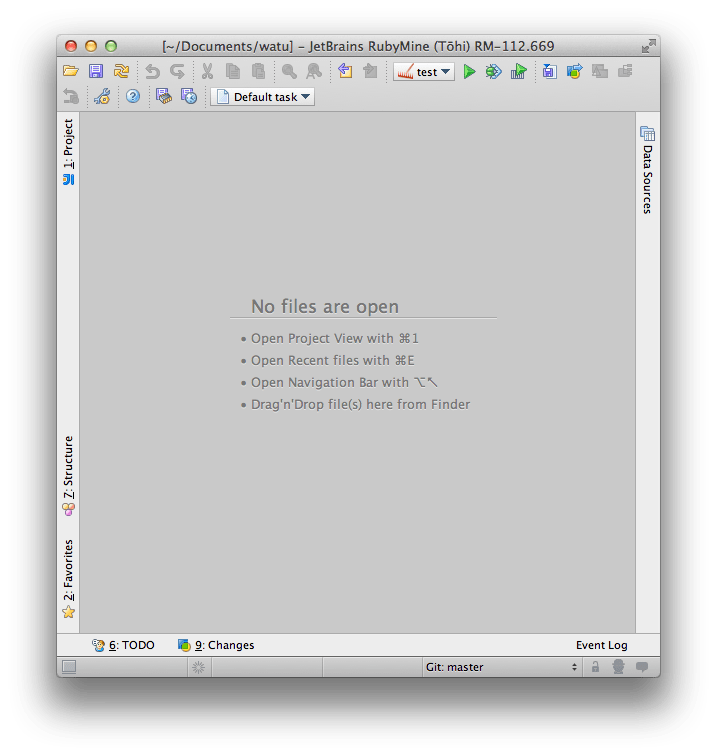
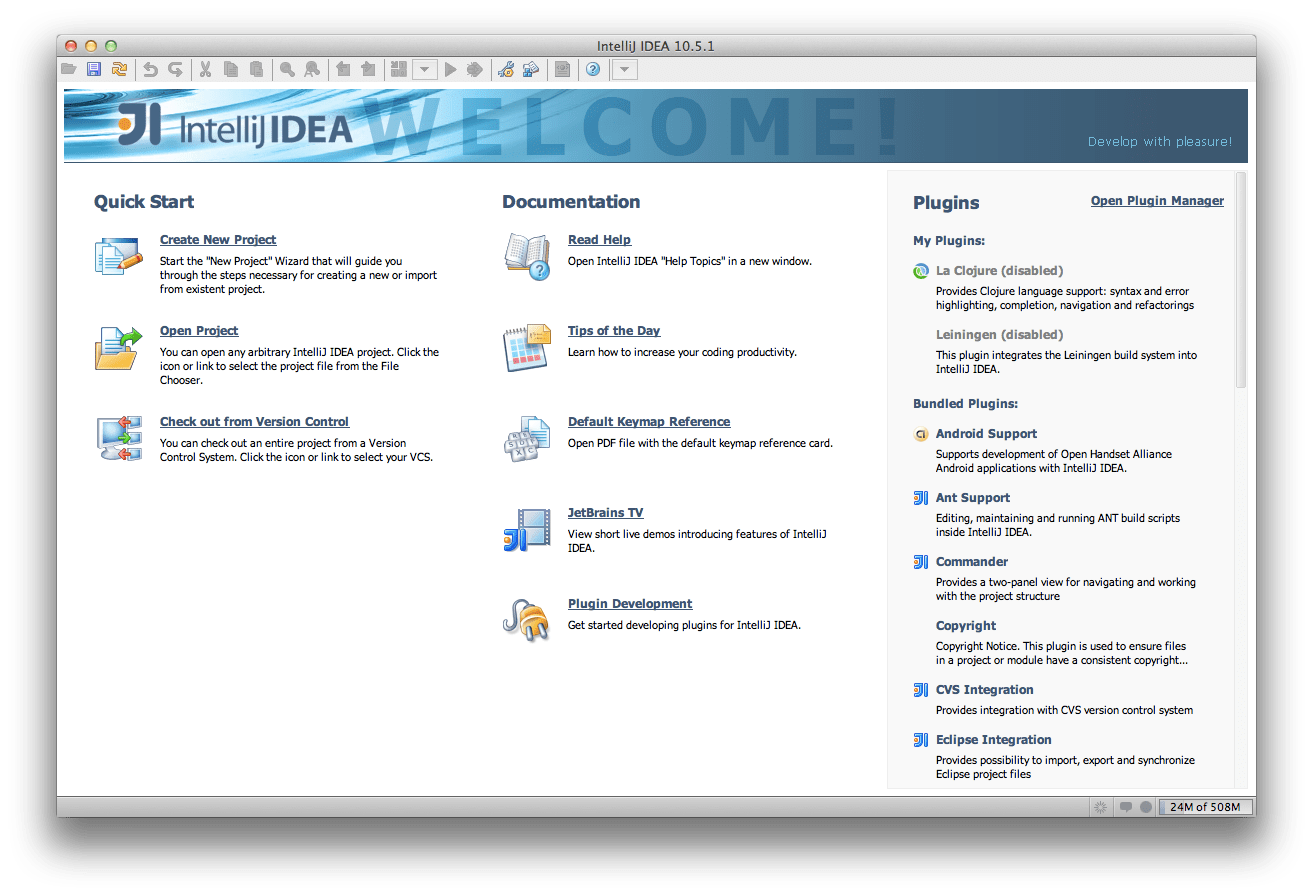
    In the application I’m building, Watu, we are resorting to just create some sample data for customers to play with. Making the application beautiful and meaningful without data is just too hard. It seems the guys at JetBrains spent some time thinking of this because RubyMine 4.0 shows this when there are no open files:

    I think that simple change it’s a good step towards making the application nicer in the no-data scenario, making people happier, as well as making people more productive in it, making the application more useful.

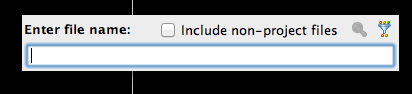
    I do wonder why they didn’t include the most useful of the shortcuts: ⌘⇧N. I think I press that more than any other. It pops up this little dialog:

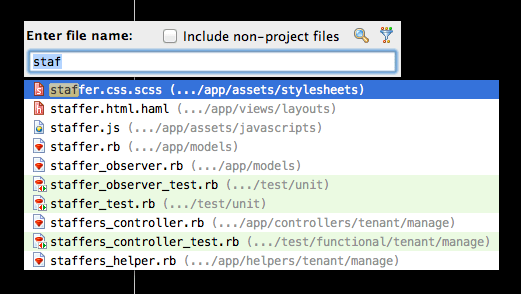
    in which you can type and it’ll search among all your files (and files inside the gems, that is, libraries, of your project if it doesn’t match anything in your project or if you enable by ticking the include non-project files):

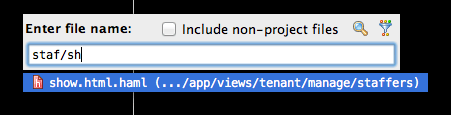
    What I really like, compared to other implementations of this feature, is that you can add more parts of the path, for example:

    Without that feature, my productivity would drop a 10%. I’m not exaggerating, that’s my estimation, as I recently have to code using TextMate instead of RubyMine.

    Before you send me the hate-mail, I know TextMate has a similar feature although I think not as advanced (not without plugins at least) but since the key shortcut was different, it was almost like it didn’t exist for me, so I experienced coding without that feature at all.

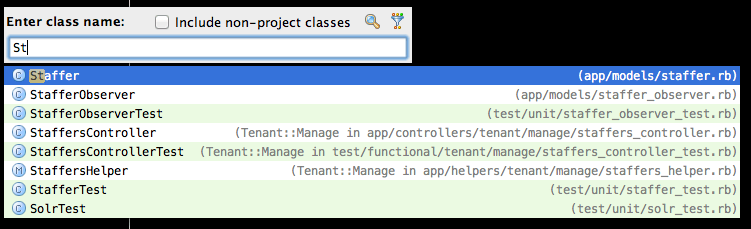
    Another potentially useful way to find code is to use ⌘N which allows you to search for a class:

    But since in a Rails projects most classes are in a file with the same name (but underscore instead of camel case) and the file dialog allows me to find views, wich the class dialog doesn’t, I never use the class dialog.

    No… I’m not affiliated with JetBrains, makers of RubyMine in any way. I just love the tool and I wish more Ruby programmers would give it a try because I think they’ll also find it useful and the more people that are using it, the more resources JetBrains is likely to put into its development which ultimately benefits me. And they are cool guys, a pleasure to deal with every time I report a bug or ask for a feature.

  • Balance by Tony Roberts

    This is the first time I see this:

    -------------------------------------
    pupeno.com
    Service: pupeno.com
    Outages: 0
    Downtime: 0 hrs, 0 mins
    Uptime: 100.00%
    -------------------------------------

    It was always above 98%, often above 99% and I was proud of that because it was my own crappy server doing it. But now I’m proud of not caring about it, letting someone else solve a problem I’m not interested in and focus on what I am interested in. 100% uptime provided by WordPress.com.