This blog post was originally published in Screensaver Ninja‘s blog.
We were recently challenged by someone who asked what was so special about adding websites into a screensaver. Perhaps, at first, this doesn’t seem like a tough task but after months of challenging work, I can confirm it is. I realized I never shared exactly why yet, so here it is. Putting a browser into your screensaver is like putting a square peg in a round hole.
Chromium on Mac
Screensaver Ninja for Mac is already out there. It’s working and it’s robust, but getting there wasn’t without its pains. Initially, we wanted the Mac and Windows versions to have the exact same rendering engine and thus, we went for Chrome’s WebKit, packaged as Chromium Embedded Framework, or CEF for short.
Chromium, the open source version of Chrome, follows the same structure as Chrome to handle page isolation: by running it in different processes. On Mac, applications are distributed as bundles which you may know as .app files. They are actually directories and you can inspect the contents by right‐clicking or control‐clicking on it and then choosing Show Package Contents. (Warning: if you change anything the app will likely not work anymore.) When you use CEF, you end up with a secondary bundle application inside your application. This is sort‐of supported, but weird and not without issues.
In Mac OS X, screensavers are dynamic libraries that are loaded by a special screensaver program. When you make a screensaver, you are not in control of the running program, you just have a few entry points to start doing your animation. The Mac OS X screensaver framework doesn’t like it at all when you have a secondary app bundle that you trigger from your library.
During this research, we found a bunch of issues, many of which were not clear‐cut as solving it for us might break it for other people. We still needed those issues solved so we wrote scripts that would pre-process CEF and solve them for us. Ultimately we ended up dropping CEF; more on that later.
Swift
We decided to use Swift for our project. It’s the new way and we prefer higher level languages whenever possible. Swift saves us a bit of pain with memory management, syntax and other things. But we inadvertently caused ourselves quite a bit of pain. The Mac screensaver framework is still an Objective-C application and since we are not building an app, but a library, we need to write and compile Swift with Objective-C binary compatibility. This is not commonly done so it took us quite a bit of bumping our head against a brick wall to figure it out. Furthermore, not being in control of the program loading our library made getting error messages tricky at best.
Apple’s WebKit
When we dropped CEF, our alternative was Apple’s WebKit, which was so much easier to integrate and have running, despite the fact that there are two of them; one that works out of the box, but it’s deprecated, called WebView, and a new one that’s not so well supported, called KWWebView. We played a lot with both and both had the same problem: cookies shared with Safari.
Apple decided that all users of a web view must share cookies with Safari. This was not acceptable for us because we want to have separate independent sessions and in the future we are even planning on having separate cookie jars per site so that you can, for example, be logged in into two different Twitter accounts at the same time. We contacted Apple about it, paying our tech support fee, and the answer was a resounding “can’t be done, we’ll add it to the list of things that we’ll consider in the future”.
Challenge accepted Mr Apple! We embarked on a quest to achieve this anyway that took us into the dark innards of the Cookie Jar, debugging it at the assembly level to understand its interface and workings:
I have to admit it, that was fun. After understanding Apple’s cookie jar’s implementation, we wrote a test suite that was exercising it all, as far as we know, including bits that we believe are abandoned. After that we wrote our own implementation that stored the cookies separately and used the same test suite to make sure our implementation was equivalent to Apple’s. This code had to be done in a mix of C and Objective-C. Then we used method swizzling to replace Apple’s with our own and ta-da! Cookie separation.
Windows events
The Windows version of Screensaver Ninja is of course not done yet, but we’ve already started working on it and we are partly there. One interesting problem that we run into is that Windows doesn’t help you at all with the workflow of a screensaver. It is of paramount importance to us that while the screensaver is running, nobody should be able to interact with those websites. We don’t want any keystrokes, mouse moves, mouse clicks, etc to reach the pages, otherwise it would be a breach of our security approach to dashboards.
Windows has a long history all the way back to Windows 1.0 that ran as a little program on top of MS DOS. Awww, good old days. Through the decades, ways to code Windows applications have changed radically and thus the way events travel through applications also did. That means that there’s a lot of different ways for an app to get keystrokes, mouse events, etc. Finding them all and plugging all those holes was not trivial and since we are talking about security this required a lot of testing.
I’m sure that as we go along, we are going to find many more issues like those in the Windows environment, and we are going to solve them and we are going to strive for elegant, stable, robust code.
We just released a new version of to-jdbc-uri, 0.4.1. A very important change in this one is that we are consolidating all our libraries into the com.carouselapps group ID, so you need to switch from including it like this:
[to-jdbc-uri "0.3.0"]
to including it like this:
[com.carouselapps/to-jdbc-uri "0.4.1"]
Aside from that, this release supports RedHat OpenShift style of URL that use the schema postgresql:// instead of postgres://. Courtesy of Pradnyesh Sawant.
I was not expecting there to be a part 3 to this series and this third part is also going to be quite different to the first two. In parts 1 and 2 I walked you through an exploration of server side pre-rendering with Nashorn. My naive example worked fine with Nashorn but it didn’t survive encountering the real world.
Nashorn is not a headless browser, it’s a plain JavaScript engine. It doesn’t implement document or window for example, which were easy to workaround, but it also doesn’t implement setTimeout, setInterval or XMLHttpRequest which are much harder to workaround.
When I started to look for alternatives I focused on NodeJS because I knew if implemented those things I was missing and V8‘s speed is attractive. Also, the fact the ClojureScript has it as a compilation target made me feel it was well supported, a first class citizen.
At this point someone might interject and exclaim: What about nodyn.io? nodyn.io is an attempt to bring all the NodeJS goodness to Nashorn and I think it’s a great idea. Sadly, on GitHub we can find this notice:
This project is no longer being actively maintained. If you have interest in taking over the project, please file an issue.
I’m not sure if the project got far before being abandoned either.
Implementing the missing bits of Nashorn in Clojure was tempting. It looks like fun and it also looks like something that might be popular amongst Java users and thus good for the Clojure echo system. I exercised some restrain and moved on.
In the process of experimenting with NodeJS my code quickly took the form of a library and without further ado, let me introduce you to Prerenderer. The ultimate solution for all your server side pre-rendering needs. I’m not going to show you how to use it here because its page go into a lot of detail already.
My big concern about prerendering is performance and stability. As I showed in part 2, a naive implementation can behave horribly while in production, sometimes taking up to 17 seconds to serve a page. Prerenderer was not developed with a sample project, like I did with Nashorn, but with a project we are working on called Ninja Tools that uses re-frame and AJAX. Before any modifications to it, this was its performance:
After enabling Prerenderer, this is how it looks like:
The average response time went up from 51ms to 362ms. This would generally be a very bad thing. The reason for this is explained in Prerenderer’s documentation:
[…] SPAs are never done. Imagine a SPA that has a timer and every second sends a request to the server, and the server replies with the current time, which then the application displays. When is it done rendering? Never. But Prerenderer needs to, at some point, decide that the page is done enough and ship it to the browser. […]
[…] Prerenderer will watch for events and once nothing happened for a period of time (300ms by default) it’ll consider the application done and if a certain amount of time went by (3s by default) even if the application is still active, it’ll stop and send it to the browser.
That’s where the jump in 300ms is coming from and it’s constant. It’s not linear and definitely not exponential. It’s a constant number that can be tuned and tweaked. There are also some potential optimizations to reduce it or remove all together.
The important thing is that all other values remained more or less the same and that the performance characteristics where quite stable. For me, this feels good enough to move on and start producing SPAs and with a bigger codebase we’ll be able to improve this library and make it better.
In previous blog posts I mention that Bidi and Silk are essentially equivalent. I don’t believe this anymore. I now prefer Silk and I can show you why with a little example. First, let’s define some routes:
So far I would consider them equivalent. Silk gives you more information about the route but is also more noisy. I personally dislike the namespaced keywords, but that’s easily solved with:
The real difference, for me, comes when I try to parse /about?,which should be the same as /about and some lazy URL handling libraries emit the former rather than the latter. Silk first:
Oops, what happened here? A bit of digging around lead me to the issue Why are query parameters not supported anymore? Essentially, Bidi’s design is that you shouldn’t route on query arguments (which I would agree in principle) and thus it relays on others to separate the two, something I don’t like at all. In a ClojureScript application it would requiring some pre-parsing of the URL, while Silk does it for you.
Silk also seems to support, if not routing, at least reporting port, host, user, scheme and even fragment. This can come in handy at some point. If you want to learn more about using Silk and Pushy, take a look at the blog post No-hashes bidirectional routing in re-frame with Silk and Pushy.
In part 1 I covered the basic problem that SPA (single page applications) face and how pre-rendering can help. I showed how to integrate Nashorn into a Clojure app. In this second part, we’ll get to actually do the rendering as well as improving performance. Without further ado, part 2 of isomorphic ClojureScript.
Rendering the application
Now to the fun stuff! It would be nice if we had a full browser running on the server where we could throw our HTML and JS and tell it go! but unfortunately I’m not aware of such thing. What we’ll do instead is call a JavaScript function that will do the rendering and we’ll inject that into our response HTML.
The function to convert a path into HTML will be called render-page and it’ll be in core.cljs:
We need to mark this function as exportable because JavaScript optimizations can be very aggressive even removing dead code and since this code is called dynamically from Clojure, it’ll look like it’s unused and it’ll be removed.
render-page is similar to mount-root but instead of causing the result to be displayed to the user, it just returns it. The former takes the path as an argument while the latter reads it from the local state which is in turn set by Pushy by reading the current URL.
To invoke that function, we’ll go back to handler.clj, just after we define js-engine we’ll define a function called render-page:
and instead of sending a message about the application is loading, we just call it:
[:div#app [:div (render-page path)]]
That extra div is not necessary, it’s there only because projectx.core/current-page adds it and without it you’ll get a funny error in the browser:
Aside from that little trip into the internals of React, which is interesting, we now have a snappy, pre-rendered application… that is… if you can wait 3 seconds or so for it to load:
That is not good, not good at all. We have a serious performance problem here, we need to get serious about fixing it.
Performance
The first step to fix any performance problems is making sure you have one, as premature optimization is the root of all evil. I think we are at this point with this little project. The second step is measuring the problem: we need a good repeatable way of measuring the problem that allows us to actually locate it and and verify it was fixed.
To measure the performance behaviour of this app I’m going to use one of Heroku’s bigger instances, the Performance-L, which is a dedicated machine with 14GB of RAM. The reason is that I don’t want out of memory or my virtual CPU affected by other instances to muddy my measurements. That unacceptable 3 seconds load time was measured in that type of server.
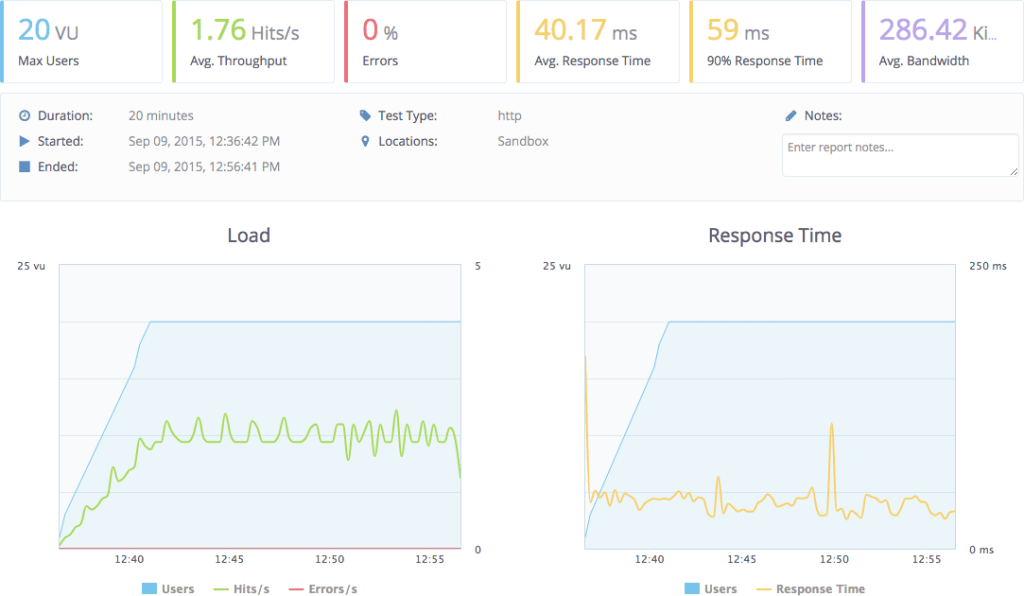
To perform the load and the measurement of the response I’m going to use the free version of BlazeMeter, an web application to trigger load testing which I’m falling in love with. The UI is great. I’m going to hit the home and the about page with their default configuration which includes up to 20 virtual users:
In all the tests I’m going to make a few requests to the application manually after any restart to make sure the application is not being tested in cold. Ok… go!
That is terrible! Under load it behaves so much worst! 17.1s response time. Now that we have a way to measure how horrendous our application is behaving, we need to pin-point which bit is causing this. The elephant in the room is of course server-side JavaScript execution.
but what we really care about is the load testing:
40ms vs 17000ms, that’s a big difference! The scripting engine is definitely the problem, so, what now?
Optimizing time
Now it’s time to find optimizations. Poking around Nashorn it seems the issue is that it has a very slow start. We already know that browsers spend a lot of time parsing and compiling JavaScript and the way we are using Nashorn, we are parsing and compiling all our JavaScript in every request. Clearly we should re-use this compiled JavaScript.
Re-using Nashorn is not straightforward because it’s not thread safe while our server is multi-threaded. JavaScript just assumes that there’s one and only thread and when developing Nashorn they decided to respect that and not make any other assumptions, which leads to a non-thread-safe implementation. We need to re-use Nashorn engines, but never at the same time by two or more threads.
Nashorn does provides a way to have binding sets, that is, the state of a program, separate from the Nashorn script engine, so that you could use the same engine with various different states. Unfortunately this is very poorly documented. Fortunately, ClojureScript is immutable, so we don’t have much to worry about breaking state.
After a lot of experimentation and poking, I came up with an acceptable solution using a pool. My choice was to use Dirigiste through Aleph‘s Flow. To do that, we extract the creation of a JavaScript engine into its own function:
Then we define the pool. In Dirigiste, each object in the pool is associated to a key, so that effectively it’s a pool of pools. We don’t need this functionality, so we’ll have a single constant key:
flow is aleph.flow and Pools is io.aleph.dirigiste.Pools. In this pool you can have different controllers which create new objects in different ways. The utilization controller will attempt to have the pool at 0.9, the first arg, so that if we are using 9 objects, there should be 10 in the pool. The other two args is the maximum per key and the total maximum and they are set two numbers that are essentially infinite.
The reason for such a big pool is that you should never run out of JavaScript engines. If your server is getting too many requests for the amount of RAM, CPU or whatever limit you find, it should be throttled by some other means, not by an arbitrary pool inside it. Normally you’ll throttle it by limiting the amount of worker threads you have or something like that.
The function render-page was promoted to be top level and now takes care of taking a JavaScript engine from the pool and returning it when done:
There are a few problems or potential problems with this solution that I haven’t addressed yet. One of those is that at the moment I’m not doing anything to have Nashorn generate the same cookies or session as we would have in the real browser.
This pool works well when it’s under constant use, but for many web apps that do not see than level of usage, the pool will kill all script engines which means every request will have to create a fresh one. Solving this might require creating a brand new controller, a mix between Dirigiste’s Pools.utilizationController and Pools.fixedController.
A big thanks to DomKM for his Omelette app, that was a source of inspiration.
Another approach worth considering is to implement the rendering system in portable Clojure (cljc), the common language between Clojure and ClojureScript and have it run natively on the server, without the need of a JavaScript engine. I’m very skeptical of this working in the long run as it means none of your rendering function can ever use any JavaScript or if they do, you need to implement Clojure(non-Script) equivalents.
This approach is being explored by David Tanzer and he wrote a blog post about it: Server-Side and Client-Side Rendering Using the Same Code With Re-Frame. David’s approach is to use Hiccup to do the rendering on the server side, where React and Reagent are not available. I personally prefer to steer clear of template engines that are not safe by default, like Hiccup at the time of this writing, as they make XSS inevitable. The only reason why I’m using it in projectx is because that’s what the template provided and I wanted to do the minimum amount of changes possible.
Another optimization I briefly explored is not doing the server side rendering for browsers that don’t need it, that is, actual browser being used by people, like Chrome, Firefox, Safari, even IE (>10). The problem is that many bots do identify themselves as those types of browsers and Google gets very unhappy when its bots see a different page than the browsers, so it’s dangerous to perform this optimization except, maybe, for pages that you can only see after you log in.
In conclusion I’m happy enough with this solution to start moving forward and using it, although I’m sure it’ll require much tweaking an improvement. Something I’m considering is turning it into a library, but this library would make quite a bit of assumptions about your application, how things are rendered, compiled, etc. What’s your opinion, would you like to see this code expressed as a library or are you happy to just copy and paste?
I don’t think I have found the ultimate solution for this problem yet but I have reached a level in which I’m comfortable sharing what I have because I believe it’ll be useful for other people tackling the same problem.
The reason why I doubt this is the ultimate solution is because it has not been battle tested enough for my taste. I haven’t used it in big applications and I haven’t used in production, maintaining it for months or years.
The problem
We are building SPAs, that is, single page applications. Think Google Maps or GMail. When you request the page, you get a relatively small HTML and a huge JavaScript app. This browser app then renders the page and from now on reacts to your interactions, requesting more data from the server whenever needed but never reloading the whole web page.
The reason to develop an application like this is that the user experience ends up being much better. The app feels faster, snappier, more alive. Reloading the whole page, parsing CSS, JavaScript and HTML is slow, but rendering a snippet of HTML is fast. Furthermore, once you have a full app on the client you can start taking advantage of it, performing, for example, validation, storing data than you won’t request again, etc. which saves talking to the server, making the user experience much better.
The problem, though, is that in the initial request you are not sending any content and many web consumers won’t run JavaScript to render your application. I’m talking about search engine bots, snippet generation bots (like the one Facebook, LinkedIn and Twitter use). Even though it seems Google’s bot is executing some JavaScript, it might not be wise to depend on it.
Snippet and image generated by Facebook
The solution is to run the client side of the application on the server up to the point of waiting for user interaction, generating the HTML that matches that page, and shipping that to the browser. This also help with the fresh page experience as the user will quickly get some content instead of having to wait for a lot of JavaScript to be parsed, compiled and executed (take a look at GMail and how long it takes to load and show you content).
GMail loading…
JavaScript, on the server
Running the client JavaScript on the server is often referred to as isomorphic JavaScript, meaning, same form, that is, same code, running on both server and client. There are several server-side (no windows, headless) JavaScript implementations to chose from:
When choosing my approach I was looking for a simple solution, one with the least moving parts to make it easier to deploy and more stable over time. Nashorn was an immediate winner as it ships with Java 8 and it’s well integrated, hiding away secondary processes and inter-process communication (if it’s happening at all, I’m not sure, and this is good).
Nashorn came with two big issues though:
It’s slow to create new Nashorn instances (this might be true for all JS implementations).
The documentation is not great.
I think I have overcame both of this issues, so, without further ado, let’s jump in. You can create a new script engine like this:
ScriptEngineManager has many methods to get a script engine, some use the mime type, or the extension, and with those, you may or may not get Nashorn. I prefer to explicitly request Nashorn as it should be available on all Java 8 installations and I don’t believe we can transparently switch JavaScript implementations as they might be too different.
Once you have a script engine, evaluating code is very easy:
(def home-page
  (html
   [:html
    [:head
     [:meta {:charset "utf-8"}]
     [:meta {:name "viewport"
             :content "width=device-width, initial-scale=1"}]
     (include-css (if (env :dev) "css/site.css" "css/site.min.css"))]
    [:body
     [:div#app
      [:h3 "ClojureScript has not been compiled!"]
      [:p "please run "
       [:b "lein figwheel"]
       " in order to start the compiler"]]
     (include-js "js/app.js")]]))
Or in actual HTML:
<html>
<head>
    <meta charset="utf-8"/>
    <meta content="width=device-width, initial-scale=1" name="viewport"/>
    <link href="css/site.css" rel="stylesheet" type="text/css"/>
</head>
<body>
<div id="app">
    <h3>ClojureScript has not been compiled!</h3>
    <p>please run <b>lein figwheel</b> in order to start the compiler</p>
</div>
<script src="js/app.js" type="text/javascript"></script>
</body>
</html>
In production, you’ll normally want to show a message about the application being loaded. Here we are going to try to replace it with the actual rendered application.
After seeing that page briefly, ClojureScript gets compiled to JavaScript, served to the browser, executed and it renders the homepage, which looks like this:
This template conveniently ships with two pre-built pages, the home page and the about page. Click in the link to go to the about page and you’ll see its content but no request was sent to the server. All content was shipped before and the rendering happens client side:
If we request that URL, we’ll se the same loading message and then the about page is going to be shown, but there’s a problem. The server doesn’t know that the about page was being requested because the fragment, the bit after the # in the URL, is not sent to the server.
(def home-page
  (html
   [:html
    [:head
     [:meta {:charset "utf-8"}]
     [:meta {:name "viewport"
             :content "width=device-width, initial-scale=1"}]
     (include-css (if (env :dev) "css/site.css" "css/site.min.css"))]
    [:body
     [:div#app
      [:h3 "ClojureScript has not been compiled!"]
      [:p "please run "
       [:b "lein figwheel"]
       " in order to start the compiler"]]
     (include-js "js/app.js")]]))

(defroutes routes
  (GET "/" [] home-page)
  (resources "/")
  (not-found "Not Found"))

(def app
  (let [handler (wrap-defaults #'routes site-defaults)]
    (if (env :dev) (-> handler wrap-exceptions wrap-reload) handler)))
home-page will stop being a constant as it’ll be a function on the path and while we are at it, let’s rename it to something more appropriate, like render-app:
(defn render-app [path]
  (html
    [:html
     [:head
      [:meta {:charset "utf-8"}]
      [:meta {:name    "viewport"
              :content "width=device-width, initial-scale=1"}]
      (include-css (if (env :dev) "css/site.css" "css/site.min.css"))]
     [:body
      [:div#app
       [:h3 "ClojureScript has not been compiled!"]
       [:p "please run "
        [:b "lein figwheel"]
        " in order to start the compiler"]]
      (include-js "js/app.js")]]))
The reason why it’s taking the path and not the full URL is that the ClojureScript part of this app works with paths instead of URLs and we’ll need them to be consistent. This is due to how Pushy and likely HTML5 History behave.
When this change is done, you should see no effect in the running application at all. If you want to confirm things are working properly, you could add this to the render-app function:
Now things get interesting. The render-app method needs to run some JavaScript, so it’ll create the script engine. First, we need to import it (and also require clojure.java.io , which we’ll be using soon):
After creating the engine, we need to define the variable global because Nashorn doesn’t specify it and reagent needs it. Once that’s done, we are ready to load the JavaScript code:
It doesn’t yet render anything, but let’s give it a try, let’s see it load the code or… well… fail:
javax.script.ScriptException: ReferenceError: "document" is not defined in <eval> at line number 2
What’s happening here is that app.js is referring document and Nashorn implements JavaScript, but it’s not a browser, it doesn’t have the global, window or document global objects. Let’s look at the offending file:
var CLOSURE_UNCOMPILED_DEFINES = null;
if(typeof goog == "undefined") document.write('<a href="http://js/out/goog/base.js">http://js/out/goog/base.js</a>');
document.write('<a href="http://js/out/cljs_deps.js">http://js/out/cljs_deps.js</a>');
document.write('if (typeof goog != "undefined") { goog.require("projectx.dev"); } else { console.warn("ClojureScript could not load :main, did you forget to specify :asset-path?"); };');
This is a generated JavaScript file that is loaded by our small HTML file. It in turns causes the rest of the JavaScript files to be loaded but the mechanism it uses works in a browser, not in Nashorn. This is where things get hard.
From the project definition, this is how app.js is built:
It’s built with no optimizations. One of the optimizations, called whitespace, puts all the JavaScript in a single file, so there’s no document trick to load them, but sadly, it will not work in Figwheel.
The solution I came up with, a hack, is to have two builds. One called app which is what I consider the JavaScript app itself and the other one called server-side, which is the one prepared to run on the server:
For sanity’s sake, I changed the output of app to go to the directory called app, instead of out. Running Figwheel will auto-compile app, but not server-side; for that, you also need to run lein cljsbuild auto. Now the application loads with no errors.
We also need to properly configure server-side for the dev and uberjar profiles:
You might have notice that we are not including env/dev/cljs and env/dev/cljs for server-side. That is because those files call projectx.core/init!, which triggers the whole application to start working, which depends on global objects, like window, which are not present in Nashorn.
jar-copier is a Leiningen plug in to copy jars from your dependencies to your source tree. It’s a very small simple utility that proved to be necessary to have a sane setup with Java agents (New Relic for example).
It’s very simple to use. Put [jar-copier “0.1.0”] into the :plugins vector on your project.clj. To run this plug in, execute:
$ lein jar-copier
If you want the task to run automatically, which is recommended, add:
:prep-tasks ["javac" "compile" "jar-copier"]
and it’ll be invoked every time you build your uberjar.
You need to configure the plug-in in your project.clj like this:
While trying to understand the behaviour of my implementation of server side JavaScript execution for pre-rendering SPAs (Single Page Applications), something I’ll write about later on, I quickly run out of memory on Heroku. What I believe was going on is that my Heroku machine was trying to handle too many requests at the same time.
The change to allow specifying how many threads Jetty will use was not hard, but I was surprised I didn’t find it documented explicitly anywhere, so, here it is. My app, created from the re-agent template, had the following -main function:
I recently replaced secretary with bidi and pushy in a re-frame project that was created fresh out of leiningen template and this is how I did it, but first, the reason.
What I like about bidi is that it’s bidirectional. It not only parses URLs into data structures but also generates URLs from data structures. This is not unique to bidi, silk also does it and feature-wise they are almost equivalent. On bidi’s website you can find this table comparing various routing libraries:
I don’t have a strong reason to chose bidi over silk, both seem like excellent choices. I also added pushy to the mix so I could have nice URLs, such as /about instead of /#/about. The reason for this is that it looks better, follows the semantics of URLs better and allows for server side rendering, to be covered in a future article. It uses HTML5 pushState which by now it’s widely supported.
Let’s get started
I’m going to use a fresh project for this article, but the information here is applicable to any similar situation. Let’s get started:
lein new re-frame projectx +routes
The first step is to get rid of secretary and include bidi and pushy by replacing
[secretary "1.2.3"]
with
[bidi "1.20.3"]
[kibu/pushy "0.3.2"]
The Routes
The routes.cljs file will be completely re-written. The namespace declaration will include bidi and pushy:
The :handler of the matched-route will be :home or :about and panel-name is constructed to be :home-panel or :about-panel so that we can dispatch setting the active panel the same way secretary used to do it. And that’s the core of it. You now have to change URLs in the view to be /about and / instead of /#/about and /#/ respectively.
Generating URLs
The whole point of using bidi was to not hard-code the URLs, for that I added this function to routes.cljs:
(def url-for (partial bidi/path-for routes))
which allowed me to replace the previous URLs with:
(routes/url-for :about)
and
(routes/url-for :home)
This works fine until you try to re-load the about page and you get a 404 Not Found error. This is because the server doesn’t know about the /about URL or any other URL the client-side might support. What you need to do is just send serve the application no matter what the URL and let the client do the dispatching (with any exceptions you might have for APIs and whatnot).
I’m actually not quite sure how you do it with a figwheel-only project, probably by setting a ring handler. With compojure I ended up creating a route like this:
(routes (ANY "*" [] (layout/render "app.html")))
Something else you might consider is passing the whole matched-route structure to the handler, so that the handler has access to path and query attributes.
And that’s it! Now you have beautiful bi-directional no-hash client-side routing.

 Chromium, the open source version of Chrome, follows the same structure as Chrome to handle page isolation: by running it in different processes. On Mac, applications are distributed as bundles which you may know as .app files. They are actually directories and you can inspect the contents by right‐clicking or control‐clicking on it and then choosing Show Package Contents. (Warning: if you change anything the app will likely not work anymore.) When you use CEF, you end up with a secondary bundle application inside your application. This is sort‐of supported, but weird and not without issues.