• Most applications, web, desktop or mobile, handle some kind of data. When we are developing them we generally generate some sample data to play with and we forget to ever run the application without it. The problem is that the first impression people will get of our app is without data. And first impressions are important.

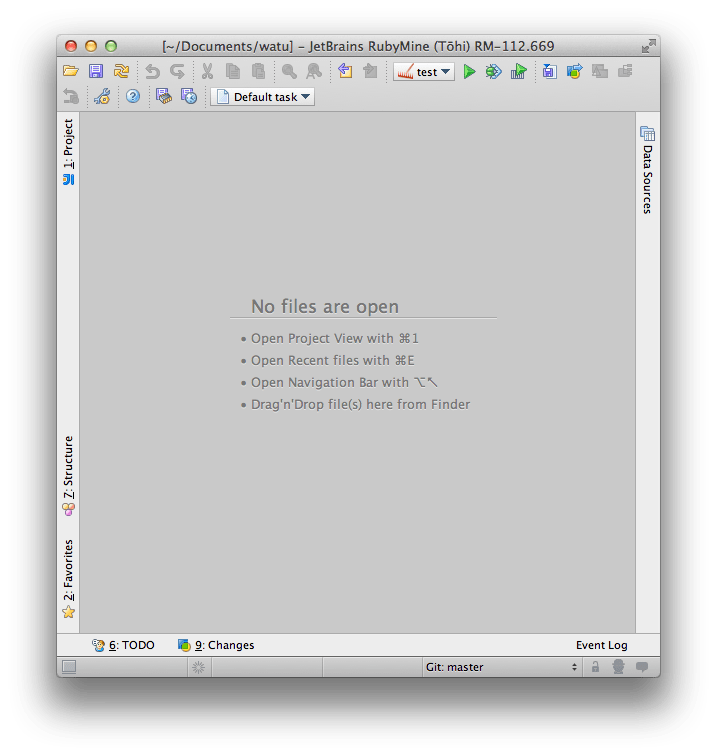
    In the application I’m building, Watu, we are resorting to just create some sample data for customers to play with. Making the application beautiful and meaningful without data is just too hard. It seems the guys at JetBrains spent some time thinking of this because RubyMine 4.0 shows this when there are no open files:

    I think that simple change it’s a good step towards making the application nicer in the no-data scenario, making people happier, as well as making people more productive in it, making the application more useful.

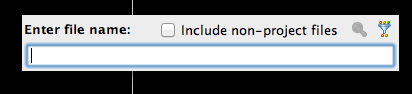
    I do wonder why they didn’t include the most useful of the shortcuts: ⌘⇧N. I think I press that more than any other. It pops up this little dialog:

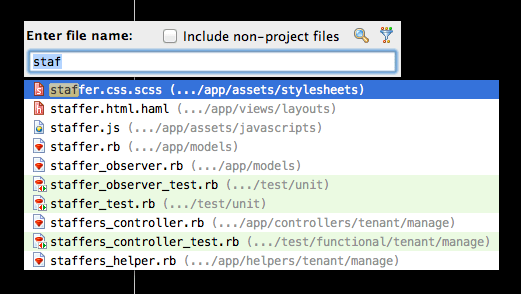
    in which you can type and it’ll search among all your files (and files inside the gems, that is, libraries, of your project if it doesn’t match anything in your project or if you enable by ticking the include non-project files):

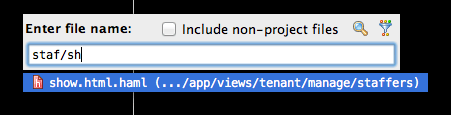
    What I really like, compared to other implementations of this feature, is that you can add more parts of the path, for example:

    Without that feature, my productivity would drop a 10%. I’m not exaggerating, that’s my estimation, as I recently have to code using TextMate instead of RubyMine.

    Before you send me the hate-mail, I know TextMate has a similar feature although I think not as advanced (not without plugins at least) but since the key shortcut was different, it was almost like it didn’t exist for me, so I experienced coding without that feature at all.

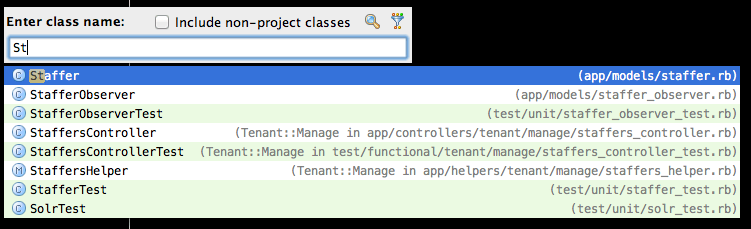
    Another potentially useful way to find code is to use ⌘N which allows you to search for a class:

    But since in a Rails projects most classes are in a file with the same name (but underscore instead of camel case) and the file dialog allows me to find views, wich the class dialog doesn’t, I never use the class dialog.

    No… I’m not affiliated with JetBrains, makers of RubyMine in any way. I just love the tool and I wish more Ruby programmers would give it a try because I think they’ll also find it useful and the more people that are using it, the more resources JetBrains is likely to put into its development which ultimately benefits me. And they are cool guys, a pleasure to deal with every time I report a bug or ask for a feature.

  • Recently I needed the table of correlatives in pure ASCII form and I couldn’t find it online, so I built it (it took more time that I’m willing to admit):

    ┌───────────────┬──────────┬────────────┬────────────┬───────────┬──────────┐
    │               │ Question │ Indication │ Indefinite │ Universal │ Negative │
    │               │ ki–      │ ti–        │ i–         │ ĉi–       │ neni–    │
    ├───────────────┼──────────┼────────────┼────────────┼───────────┼──────────┤
    │ Thing -o      │ kio      │ tio        │ io         │ ĉio       │ nenio    │
    ├───────────────┼──────────┼────────────┼────────────┼───────────┼──────────┤
    │ Individual -u │ kiu      │ tiu        │ iu         │ ĉiu       │ neniu    │
    ├───────────────┼──────────┼────────────┼────────────┼───────────┼──────────┤
    │ Reason –al    │ kial     │ tial       │ ial        │ ĉial      │ nenial   │
    ├───────────────┼──────────┼────────────┼────────────┼───────────┼──────────┤
    │ Time -am      │ kiam     │ tiam       │ iam        │ ĉiam      │ neniam   │
    ├───────────────┼──────────┼────────────┼────────────┼───────────┼──────────┤
    │ Place -e      │ kie      │ tie        │ ie         │ ĉie       │ nenie    │
    ├───────────────┼──────────┼────────────┼────────────┼───────────┼──────────┤
    │ Manner -el    │ kiel     │ tiel       │ iel        │ ĉiel      │ neniel   │
    ├───────────────┼──────────┼────────────┼────────────┼───────────┼──────────┤
    │ Quality –a    │ kia      │ tia        │ ia         │ ĉia       │ nenia    │
    ├───────────────┼──────────┼────────────┼────────────┼───────────┼──────────┤
    │ Amount -om    │ kom      │ tiom       │ iom        │ ĉiom      │ neniom   │
    └───────────────┴──────────┴────────────┴────────────┴───────────┴──────────┘

    I used the DOS box drawing characters and only single lines. Double lines in some common fonts were broken. And the beautiful Unicode box drawing characters were broken in several fonts.

    If you admire the table of correlatives as much as I do, maybe you want to buy some schwag with it: http://www.cafepress.com/correlatives (disclaimer, I’m selling that stuff).

    Isn’t this a great notebook to take to your Esperanto lessons:

    Not allowed during exams
  • The Palace of Westminster at night seen from the south bank of the River Thames.
    London by Jim Trodel

    I’m making a lot of changes in my life. I’m moving to London… tomorrow. I’m really excited about it. I wanted to live in London for a while already. In that topic, do you know anyone that wants to share a flat in the London Bridge area?

    Also, I’m changing jobs. In London I’m joining a startup called Watu. Well, I’m part of the founding team and I’ll be the CTO, which for now, it’s just an overly fancy way to say the coder, but I like it. We are solving the problem of managing employees from publishing the open positions at a company to interviewing, to paying salaries, to assigning and managing shifts. The whole deal. I’m really excited about it and I’m looking forward to it.

  • Balance by Tony Roberts

    This is the first time I see this:

    -------------------------------------
    pupeno.com
    Service: pupeno.com
    Outages: 0
    Downtime: 0 hrs, 0 mins
    Uptime: 100.00%
    -------------------------------------

    It was always above 98%, often above 99% and I was proud of that because it was my own crappy server doing it. But now I’m proud of not caring about it, letting someone else solve a problem I’m not interested in and focus on what I am interested in. 100% uptime provided by WordPress.com.

  • Canon camera by Kazuhiko Teramoto

    I been using iPhoto for a few years right now and I like it a lot. Before using iPhoto I was manually marking who was in each picture and where it was taken, so when I saw iPhoto could do it almost automatically I bought a mac. Yes, iPhoto was a big part of buying a mac.

    Some time afterwards, I got a DSLR, starting shooting in raw, and as usual, shooting a lot. I rarely remove pictures. I don’t see a reason, my hard drives get bigger faster than I take pictures. My collection has around 35000 pics, at least, and lot’s of raw too. This is not what iPhoto is designed for.

    I looked around and Apple’s Aperture is the only pro photo management software that keeps all the features I need and like from iPhoto (faces and places mostly). Since the latest iPhoto is not very robust (it actually crashed on me once and I had to restore everything from backups), I decided to migrate to Aperture.

    Something that surprised me about Aperture is that it doesn’t prompt me to delete the pictures after importing. I searched on the interwebs about this and apparently, it’s a feature. When people asked how to delete pictures, people replied: “Don’t! If you delete pictures after importing, your pictures are in only one place, if something happens to them, they are lost.”

    One should be careful when getting advice on how to use an Apple product as the Apple fanboys will defend whatever Apple believes we should do even if it makes no sense and kills kittens in the process. But this actually makes sense. I had my computer crash during the import procedure and take all the pics with it. I’m glad iPhoto didn’t get to delete the pictures in the camera when that happened. Both Aperture and iPhoto are capable of ignoring duplicates when importing and I would expect any other useful picture management program to do the same.

    I decided to embrace the workflow, I bought a bigger memory card for my camera and now I don’t delete the pics from the camera until a couple of days later, when my several backups solutions managed to backup the new pictures.

    Another reason to do it this way, and delete pictures by formatting the memory card, is that it’s the only way to ensure there are no extraneous files on the card, taking space, that neither the camera nor any program need or understand.

  • I find myself needing to have the full URLs in Rails’ logs. Normally you get something like:

    [sourcecode lang=”text”]
    Started GET "/" for 127.0.0.1 at 2011-08-27 13:13:10 +0200
    [/sourcecode]

    but I needed

    [sourcecode lang=”text”]
    Started GET "http://foo.bar:3000/" for 127.0.0.1 at 2011-08-27 13:13:10 +0200
    [/sourcecode]

    because the app does different things depending on the domain and when it fails, I have to know which URL was hit. The solution I ended up with was adding this in an initializer:

    [sourcecode lang=”ruby”]
    class Rails::Rack::Logger << ActiveSupport::LogSubscriber
    protected

    def before_dispatch(env)
    request = ActionDispatch::Request.new(env)
    info "\n\nStarted #{request.request_method} \"#{request.url}\" for #{request.ip} at #{Time.now.to_default_s}"
    end
    end
    [/sourcecode]

    That’s monkey-patching Rails’ own logger. Credit for the solution goes to numbers1311407.

    My question for the people using Rails, do you think having a configurable logger in Rails would be useful or nice? If so, I could make a patch for Rails but I have made patches before that failed to gather the needed popularity and thus were ignored. I’m not wasting my time like that again.

  • Lobos is a Clojure library to create and alter tables which also supports migrations similar to what Rails can do. I like where Lobos is going but it’s a work in progress, so the information here might be out of date soon, beware!

    Let’s imagine a project called px (for Project X of course) with the usual Leiningen structure. In the src directory you you need to create a lobos directory and inside there let’s get started with config.clj which contains the credentials and other database information:

    [sourcecode lang=”clojure”]
    (ns lobos.config)

    (def db
    {:classname "org.postgresql.Driver"
    :subprotocol "postgresql"
    :subname "//localhost:5432/px"})
    [/sourcecode]

    then we create a simple migration in lobos/migrations.clj that creates the users table:

    [sourcecode lang=”clojure”]
    (ns lobos.migrations
    (:refer-clojure :exclude [alter defonce drop bigint boolean char double float time])
    (:use (lobos [migration :only [defmigration]] core schema) lobos.config))

    (defmigration create-users
    (up [] (create (table :users
    (integer :id :primary-key)
    (varchar :email 256 :unique))))
    (down [] (drop (table :users))))
    [/sourcecode]

    You run a REPL, load the migrations and run them (using the joyful Clojure example code convention):

    [sourcecode lang=”clojure”]
    (require ‘lobos.migrations)
    ;=> nil
    (lobos.core/run)
    ;=> java.lang.Exception: No such global connection currently open: :default-connection, only got [] (NO_SOURCE_FILE:0)
    [/sourcecode]

    and you get an error because you didn’t open the connection yet, so, let’s do that:

    [sourcecode lang=”clojure”]
    (require ‘lobos.connectivity)
    ;=> nil
    (lobos.connectivity/open-global lobos.config/db)
    ;=> {:default-connection {:connection #<Jdbc4Connection org.postgresql.jdbc4.Jdbc4Connection@2ab600af>, :db-spec {:classname "org.postgresql.Driver", :subprotocol "postgresql", :subname "//localhost:5432/px"}}}
    [/sourcecode]

    and now it works:

    [sourcecode lang=”clojure”]
    (lobos.core/run)
    ; create-users
    ;=> nil
    [/sourcecode]

    and you can also rollback:

    [sourcecode lang=”clojure”]
    (lobos.core/rollback)
    ; create-users
    ;=> nil
    [/sourcecode]

    You might be tempted to open the global connection in your config.clj and that might be fine for some, but I found it problematic that the second time I load the file, I get an error: “java.lang.Exception: A global connection by that name already exists (:default-connection) (NO_SOURCE_FILE:0)”.

    My solution was to write a function called open-global-when-necessary that will open a global connection only when there’s none or when the database specification changed, and will close the previous connection in that case, leaving a config.clj that looks like:

    [sourcecode lang=”clojure”]
    (ns lobos.config
    (:require lobos.connectivity))

    (defn open-global-when-necessary
    "Open a global connection only when necessary, that is, when no previous
    connection exist or when db-spec is different to the current global
    connection."
    [db-spec]
    ;; If the connection credentials has changed, close the connection.
    (when (and (@lobos.connectivity/global-connections :default-connection)
    (not= (:db-spec (@lobos.connectivity/global-connections :default-connection)) db-spec))
    (lobos.connectivity/close-global))
    ;; Open a new connection or return the existing one.
    (if (nil? (@lobos.connectivity/global-connections :default-connection))
    ((lobos.connectivity/open-global db-spec) :default-connection)
    (@lobos.connectivity/global-connections :default-connection)))

    (def db
    {:classname "org.postgresql.Driver"
    :subprotocol "postgresql"
    :subname "//localhost:5432/px"})

    (open-global-when-necessary db)
    [/sourcecode]

    That works fine locally, so let’s move to Heroku. To get started with Clojure on Heroku I recommend you read:

    1. Getting Started With Clojure on Heroku/Cedar
    2. Building a Database-Backed Clojure Web Application

    I took the code used to extract the database specification from DATABASE_URL but I modified it so I don’t depend on that environment variable existing on my local computer and I ended up with the following config.clj:

    [sourcecode lang=”clojure”]
    (ns lobos.config
    (:require [clojure.string :as str] lobos.connectivity)
    (:import (java.net URI)))

    (defn heroku-db
    "Generate the db map according to Heroku environment when available."
    []
    (when (System/getenv "DATABASE_URL")
    (let [url (URI. (System/getenv "DATABASE_URL"))
    host (.getHost url)
    port (if (pos? (.getPort url)) (.getPort url) 5432)
    path (.getPath url)]
    (merge
    {:subname (str "//" host ":" port path)}
    (when-let [user-info (.getUserInfo url)]
    {:user (first (str/split user-info #":"))
    :password (second (str/split user-info #":"))})))))

    (defn open-global-when-necessary
    "Open a global connection only when necessary, that is, when no previous
    connection exist or when db-spec is different to the current global
    connection."
    [db-spec]
    ;; If the connection credentials has changed, close the connection.
    (when (and (@lobos.connectivity/global-connections :default-connection)
    (not= (:db-spec (@lobos.connectivity/global-connections :default-connection)) db-spec))
    (lobos.connectivity/close-global))
    ;; Open a new connection or return the existing one.
    (if (nil? (@lobos.connectivity/global-connections :default-connection))
    ((lobos.connectivity/open-global db-spec) :default-connection)
    (@lobos.connectivity/global-connections :default-connection)))

    (def db
    (merge {:classname "org.postgresql.Driver"
    :subprotocol "postgresql"
    :subname "//localhost:5432/px"}
    (heroku-db)))

    (open-global-when-necessary db)
    [/sourcecode]

    After you push to Heroku, you can run heroku run lein repl, load lobos.config and run the migrations just as if they were local.

    Thanks to Daniel Magliola and Nicolas Buduroi for reading drafts of this.

  • Lisp is an old language. Very old. Today there are many Lisps and no single language is called Lisp today. Actually, there are as many Lisps as Lisp programmers. That’s because you become a Lisp programmer when you go alone in the desert and write an interpreter for your flavor of lisp with a stick on the sand.

    There are two main Lisps these days: Common Lisp and Scheme, both standards with many implementations. The various Common Lisps are more or less the same, the various Schemes are the same at the basic level but then they differ, sometimes quite significantly. They are both interesting but I personally failed to make a practical use of any of those. Both bother me in different ways, and of all the other Lisps, my favorite is Clojure. I’m not going to dig into that, it’s a personal matter and it’ll take me a long time.

    Clojure, like any other Lisp, has a REPL (Read Eval Print Loop) where we can write code and get it to run immediately. For example:

    5
    ;=> 5
    
    "Hello world"
    ;=> "Hello world"

    Normally you get a prompt, like user>, but here I’m using the joyful Clojure example code convention. You can give this REPL thing a try and run any code from this post in Try Clojure.

    We can call a function like this:

    (println "Hello World")
    ; Hello World
    ;=> nil

    It printed “Hello World” and returned nil. I know the parenthesis look misplaced but there’s a reason for that and you’ll notice it’s not that different from Javaish snippet:

    println("Hello World")

    except that Clojure uses the parenthesis in that way for all operations:

    (+ 1 2)
    ;=> 3

    In Clojure we also have vectors:

    [1 2 3 4]
    ;=> [1 2 3 4]

    symbols:

    'symbol
    ;=> symbol

    The reason for the quote is that symbols are treated as variables. Without the quote, Clojure would try to find its value. Same for lists:

    '(li st)
    ;=> (li st)

    and nested lists

    '(l (i s) t)
    ;=> (l (i s) t)

    Here’s how defining a variable and using it looks like

    (def hello-world "Hello world")
    ;=> #'user/hello-world
    
    hello-world
    ;=> "Hello world"

    I’m going very fast, skipping lots of details and maybe some things are not totally correct. Bear with me, I want to get to the good stuff.

    In Clojure you create functions like this:

    (fn [n] (* n 2))
    ;=> #<user$eval1$fn__2 user$eval1$fn__2@175bc6c8>

    That ugly long thing is how a compiled function is printed out. Don’t worry, it’s not something you see often. That’s a function, as created by the operator fn, of one argument, called n, that multiplies the argument by two and returns the result. In Clojure as in all Lisps, the value of the last expression of a function is returned.

    If you look at how a function is called:

    (println "Hello World")

    you’ll notice the pattern is, open parens, function, arguments, close parens. Or saying it in another way, a list where the first item is the operator and the rest are the arguments.

    Let’s call that function:

    ((fn [n] (* n 2)) 10)
    ;=> 20

    What I’m doing there is defining an anonymous function and applying it immediately. Let’s give that function a name:

    (def twice (fn [n] (* n 2)))
    ;=> #'user/twice

    and then we can apply it by name:

    (twice 32)
    ;=> 64

    As you can see, functions are stored in variables like any other piece of data. Since that’s something that’s done very often, there’s a shortcut:

    (defn twice [n] (* 2 n))
    ;=> #'user/twice
    
    (twice 32)
    ;=> 64

    Let’s make the function have a maximum of 100 by using an if:

    (defn twice [n] (if (> n 50) 100 (* n 2))))

    The if operator has three arguments, the predicate, the expression to evaluate when the predicate is true and the one when it’s false. Maybe like this it’s easier to read:

    (defn twice [n]
      (if (> n 50)
        100
        (* n 2)))

    Enough basic stuff, let’s move to the fun stuff.

    Let’s say you want to write Lisp backwards. The operator at the last position, like this:

    (4 5 +)

    Let’s call this language Psil (that’s Lisp backwards… I’m so smart). Obviously if you just try to run that it won’t work:

    (4 5 +)
    ;=> java.lang.ClassCastException: java.lang.Integer cannot be cast to clojure.lang.IFn (NO_SOURCE_FILE:0)

    That’s Clojure telling you that 4 is not a function (an object implementing the interface clojure.lang.IFn).

    It’s easy enough to write a function that converts from Psil to Lisp:

    (defn psil [exp]
      (reverse exp))

    The problem is that when I try to use it, like this:

    (psil (4 5 +))
    ;=> java.lang.ClassCastException: java.lang.Integer cannot be cast to clojure.lang.IFn (NO_SOURCE_FILE:0)

    I obviously get an error, because before psil is called, Clojure tries to evaluate the argument, that is, (4 5 +) and that fails. We can call it explicitly turning the argument into a list, like this:

    (psil '(4 5 +))
    ;=> (+ 5 4)

    but that didn’t evaluate it, it just reversed it. Evaluating it is not that hard though:

    (eval (psil '(4 5 +)))
    ;=> 9

    You can start to see the power of Lisp. The fact that the code is just a bunch of nested lists allows you to easily generate running programs out of pieces of data.

    If you don’t see it, just try doing it in your favorite language. Start with an array containing two numbers and a plus and end up with the result of adding them. You probably end up concatenating strings or doing other nasty stuff.

    This way of programming is so common on Lisp that it was abstracted away in a reusable thing call macros. Macros are functions that receive the unevaluated arguments and the result is then evaluated as Lisp.

    Let’s turn psil into a macro:

    (defmacro psil [exp]
      (reverse exp))

    The only difference is that I’m now calling defmacro instead of defn. This is quite remarkable:

    (psil (4 5 +))
    ;=> 9

    Note how the argument is not valid Clojure yet I didn’t get any error. That’s because it’s not evaluated until psil processes it. The psil macro is getting the argument as data. When you hear people say that in Lisp code is data, this is what they are talking about. It’s data you can manipulate to generate other programs. This is what allows you to invent your own programming language on top of Lisp and have any semantics you need.

    There’s an operator on Clojure called macroexpand which makes a macro skip the evaluation part so you can see what’s the code that’s going to be evaluated:

    (macroexpand '(psil (4 5 +)))
    ;=> (+ 5 4)

    You can think of a macro as a function that runs at compile time. The truth is, in Lisp, compile time and run time are all mixed and you are constantly switching between the two. We can make our psil macro very verbose to see what’s going on, but before, I have to show you do.

    do is a very simple operator, it takes a list of expressions and runs them one after the other but they are all grouped into one single expression that you can pass around, for example:

    (do (println "Hello") (println "world"))
    ; Hello
    ; world
    ;=> nil

    With do, we can make the macro return more than one expression and to make it verbose:

    (defmacro psil [exp]
      (println "compile time")
      `(do (println "run time")
           ~(reverse exp)))

    That new macro prints “compile time” and returns a do that prints
    “run time” and runs exp backwards. The back-tick, ` is like the quote ' except that allows you to unquote inside it by using the tilde, ~. Don’t worry if you don’t understand that yet, let’s just run it:

    (psil (4 5 +))
    ; compile time
    ; run time
    ;=>; 9

    As expected, compile time happens before runtime. If we use macroexpand things will get more clear:

    (macroexpand '(psil (4 5 +)))
    ; compile time
    ;=> (do (clojure.core/println "run time") (+ 5 4))

    You can see that the compile phase already happened and we got an expression that will print “run time” and then evaluate (+ 5 4). It also expanded println into its full form, clojure.core/println, but you can ignore that. When that code is evaluated at run time.

    The result of the macro is essentially:

    (do (println "run time")
        (+ 5 4))

    and in the macro it was written like this:

    `(do (println "run time")
         ~(reverse exp))

    The back-tick essentially created a kind of template where the tilde marked parts for evaluating ((reverse exp)) while the rest was left at is.

    There are even more surprises behind macros, but for now, it’s enough hocus pocus.

    The power of this technique may not be totally apparent yet. Following my Why I love Smalltalk post, let’s imagine that Clojure didn’t come with an if, only cond. It’s not the best example in this case, but it’s simple enough.

    cond is like a switch or case in other languages:

    (cond (= x 0) "It's zero"
          (= x 1) "It's one"
          :else "It's something else")

    Around cond we can create a function my-if straightforward enough:

    (defn my-if [predicate if-true if-false]
      (cond predicate if-true
            :else if-false))

    and at first it seems to work:

    (my-if (= 0 0) "equals" "not-equals")
    ;=> "equals"
    (my-if (= 0 1) "equals" "not-equals")
    ;=> "not-equals"

    but there’s a problem. Can you spot it? my-if is evaluating all its arguments, so if we do something like this, the result is not as expected:

    (my-if (= 0 0) (println "equals") (println "not-equals"))
    ; equals
    ; not-equals
    ;=> nil

    Converting my-if into a macro:

    (defmacro my-if [predicate if-true if-false]
      `(cond ~predicate ~if-true
             :else ~if-false))

    solves the problem:

    (my-if (= 0 0) (println "equals") (println "not-equals"))
    ; equals
    ;=> nil

    This is just a glimpse into the power of macros. One very interesting case was when object oriented programming was invented (Lisp is older than that) and Lisp programmers wanted to use it.

    C programmers had to invent new languages, C++ and Objective C, with their compilers. Lisp programmers created a bunch of macros, like defclass, defmethod, etc. All thanks to macros. Revolutions, in Lisp, tend to just be evolutions.

    Thanks to Gonzalo Fernández, Alessandro Di Maria, Vladimir Filipović for reading drafts of this.
  • image

    I just watched The Blues Brothers in an open air cinema in Interlaken, Switzerland. It was a cinema built in a square on the main street. Free with a bar.

    They lend blankets for you to put on the chair or cover yourself if you are cold. Some people came with their own cushions. I suppose they are regulars.

    On top of that all the bar staff were dressing as the Blues brothers and so people too. Others just Blues Brothers t-shirts. During the movie people would laugh really loud, cheer, shout.

    It was quite an experience.

  • At last I find someone that shares my view on passwords:

    My thinking was similar but not the same. If you make me type symbols, upercase and numbers, you slow me down and make me error prone, giving more time for other people to figure out my password. If it’s a long phrase, all lowercase, after a week of using it I’m like a machine gun typing it… trrrr… done.

    These days I’m quite fast with numbers, so my passwords do include numbers. But most of the passwords I auto-generate with a program, they are long, contain lowercase, uppercase, numbers and symbols. They are a mess.

    Using those beautiful passwords I discovered something interesting. Many websites can’t handle passwords longer than 20 characters. Some throw weird errors, some send you back to the original register screen without saying what’s wrong and the most problematic ones are the ones that simple truncate your password. Everything seems to be fine until you try to re-login. It’s terrible.